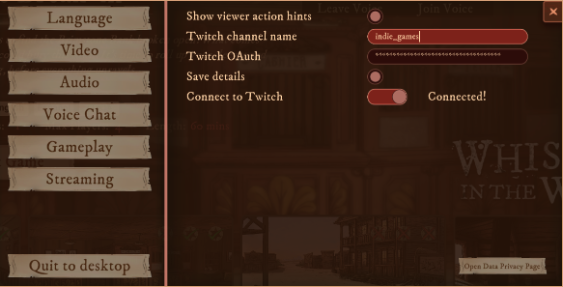
The Twitch integration enables your audience to interact with you in the game through the Twitch chat.
- Your viewers can prompt you to ask about something or someone by typing in the chat command "!ask [a character or a letter]"
- Your viewers can vote on the answers by using the chat command "!vote [a character or a letter]"
Get the OAuth code for your Twitch account
- Go to https://twitchapps.com/tmi/ in the browser where you are logged in with your Twitch account.
- Click "Connect".
- On the next page, "Authorize" the Twitch Chat OAuth Token Generator app to read your channel's chat messages.
- Then, you should see an OAuth token starting with "oauth".
- Copy this token (including "oauth:").
* To remove the permission, go to Twitch settings.
Enter the OAuth code in Whispers in the West
- Launch Whispers in the West from Steam
- On the case selection screen, click the gear icon on the top right.
- Then go to "Steaming"
- Enter the name of your Twitch channel, and the OAuth token you copied in the previous step.
- Optionally, you can save your token in the game.
- Slide the "Connect to Twitch" toggle to the right
- Once you see "Connected", start a game and your audience will be able to interact with you