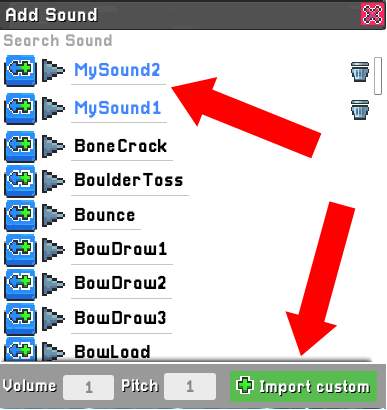
This week's update includes the ability to add custom sound effects- and we're excited to see what the community can do with them! 🎤 We will be adding voicelines for the base roster in the coming weeks, after auditions are complete for selecting our voice actors.
In addition to custom sounds, we've added a new sprite selection tool- so you can select a region of pixels, drag it, and copy it between layers. We have some addition tools coming soon to make it easier than ever to edit your sprites directly in game! ✏️
Full list of changes:
Custom sounds effects:
- You can now add custom sound effects to your characters (there's an option to "Import Custom" from the Add Sounds pane on the right side)
- Added a new action: "Play Sound From List" - allows adding up to five sounds, and it will pick one at random
New Sprite Selection tool:
- The new tool is available anywhere that you can draw sprites (animation rigs and the main animation timeline)
- With the Selection tool selected, use the mouse to select a region of sprites
- Once selected, click the region to drag it around
- Pressing delete will delete just the selected area
- Ctrl+A selects the entire canvas
- Ctrl+C copies a selected region, and Ctrl+V pastes it (so you can copy content between animations and animation rig layers)
- Importing a sprite places it in a selection automatically so that you can drag it without impacting other sprites on the frame
Changes to the Import Sprites pane:
- Added a new option to "Clear existing" - if false, the added sprite won't override the existing sprites on the frame, so you can assemble multiple sprites without needing an external editor
- Replaced the "Keep window open" button with a pushpin visual icon in the top left corner
- All settings are now saved when you close the window so that you don't need to select them again next time
Character editor - small visual changes:
- New outline button for animation rig timelines
- Added a warning before importing a sprite if no animation rig layer is selected
Bug fixes:
- Audio muted while the app is running was the background (it now continues playing)
- Deselecting hitboxes can cause a rare crash
- "Failed to download workshop characters" error is triggered on launching the game when player has 0 workshop characters
- Set Random Value can't set the max value if it's an Integer variable
- Undo in the animation rig details pane can cause sprites on unselected layers to revert incorrectly
- After undoing a bind operation in the animation rig details pane, redoing doesn't always work