·Developer post·Original post (opens in a new tab)
Update: 0.30
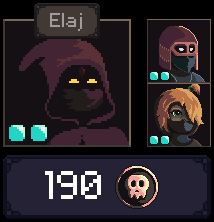
Squad UI
- Added a portrait of all squad members next to the selected character portrait (for levels with several thieves)
- Clicking on any portrait selects and centers the view on the character.
- The name of the selected character is displayed
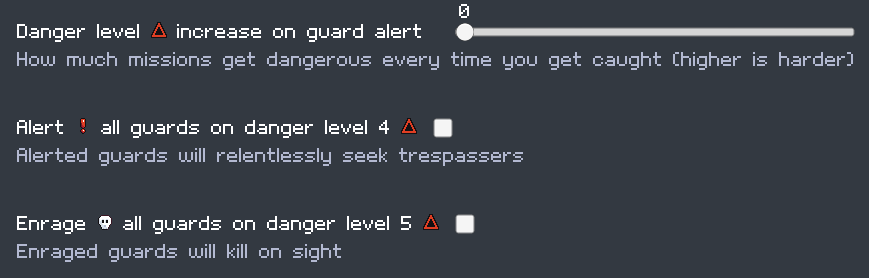
New difficulty options
- These new options allow making the game harder, especially at higher danger levels.
- The new options are automatically applied if you use one of the default difficulty settings. Check out the difficulty menu to change them.
- New option: All guards are alerted on danger level 4. On by default on veteran and expert.
- New option: All guards are enraged (kill on sight) on danger level 5. On by default on expert.
- New setting: danger level increase when caught by a guard. Default values are 0 on Novice, 1 on Veteran, and 2 on Expert.
- Enraged guards now correctly kill on sight.
- Allow "0 rewinds" as a custom difficulty setting.
Misc
- Added a "nope" hover icon for impossible actions (i.e. Trin with loot or levers) for more clarity
- More variety for tables and crates. Improved bed with sleeping guard animation and they remove their shoes before going to sleep.
- It is now possible to walk over stunned guards.
- Auto-save is less frequent and is now asynchronous to avoid slow downs when using the shop.
- Added some spacing between ability buttons and added a background to the hotkeys.
Fixes
- Repaired missing wall corners
- Keys on the keyring got their color back
- Fix "Invisibility lost!" appearing for any guard bump
- Highlighted footsteps correctly show the current position and direction of the guard
- Fix scouting progress lost when quitting a level.
- Tentative fix for tooltip going out of the screen on dual-screen setup