HexMapEditor Update — Multi-POI Stacks & Fog of War Polish
Two updates in this release. The big one: hex tiles now hold as many POIs as you want, with a tidy click-to-fan disclosure. The other: a stack of fog-of-war fixes so hiding
works the way you'd expect across every editor level.
---
Multiple POIs Per Hex
Until now, each hex held a single POI. That made sense for marking a town but fell apart anywhere you wanted a town **and** a quest marker **and** a dungeon entrance.
That's gone. A hex can now hold as many POIs as it needs to.
**How it works in the editor**
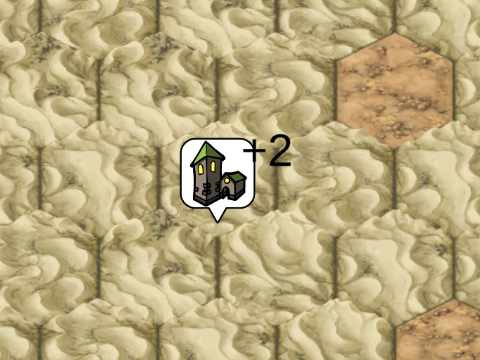
- When a hex has more than one POI, it shows a single marker with a **"+N" badge**.
- **Click the badge** to fan the stack out around the hex — each POI on its own leg with a connector line back to the origin.
- **Click any leg** to select that POI; click outside to collapse the fan.
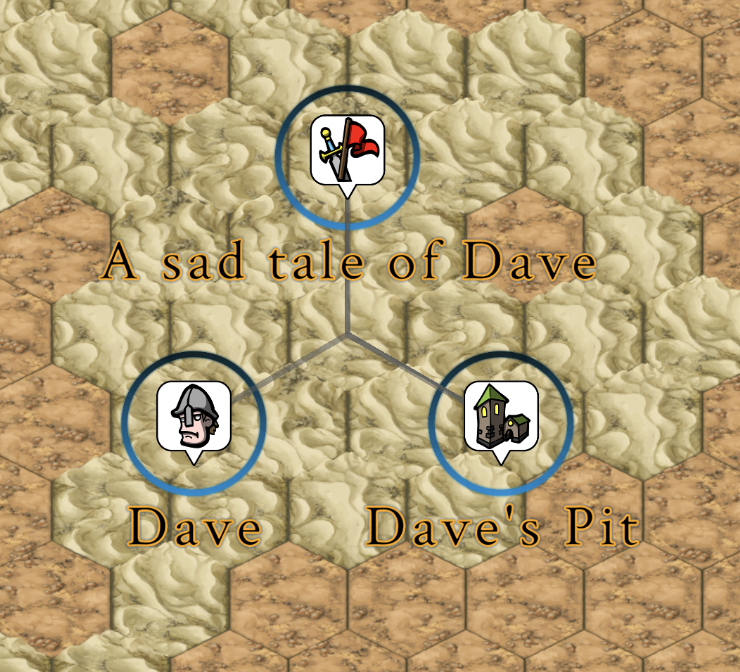
- **Drag a leg** to move just that POI. Drop it on an empty hex, or drop it onto another stack to merge.
- A new **"New POI"** button in the POI tool panel arms create-mode for one click. No more accidental creation when you meant to select — explicit arming, single-shot,
auto-disarms.
**A few quality-of-life fixes bundled in**
- Click accuracy after zooming or moving POIs is now reliable (previously, clicks could miss a freshly-moved POI until you nudged the zoom).
- POI markers no longer steal clicks from UI overlays sitting on top of them.
Specs, contracts, and design notes for the feature live under `specs/008-poi-stacking/` if you want to dig in.
---
Fog of War Across Every Level
If you've been using the hide/show tool, you may have noticed it didn't always do what you asked. Specifically:
- **Hiding a region at the Region/Continent level didn't propagate down to the detailed map.** Your hidden region looked hidden on the overview, but the detailed view still
showed everything.
- **The "Hide All" / "Show All" buttons crashed at the World level.** The World editor uses a different rendering path than the lower-level editors, and the bulk operation
wasn't aware of that.
- **Locked tiles (user-painted features at the detail level) were "punching holes" in fog at the overview.** If you'd painted a town at the detail level and then hid the
region containing it at the overview, the town would stubbornly remain visible.
All three are fixed.
**What's working now**
- Hide/show changes at any level propagate **both up and down** through the zoom levels on save.
- "Hide All" and "Show All" now work at **every** editor level — World, Continent/Region, and the detailed Board view.
- Locking still protects your painted terrain from being overwritten by pyramid changes, but **it no longer shields tiles from fog**. Hide a region, and everything inside
it is hidden — including the details you painted.
- Bulk hide/show is a single undoable action now (one Ctrl+Z reverses the whole sweep) instead of thousands of per-tile undos.
If you had worlds where fog "leaked" through to detailed tiles, loading and re-saving them after this update will reconcile the state across levels.
---
*As always: bug reports and feature requests welcome.*