·Developer post·Original post (opens in a new tab)
PRO Version 2.1.0.5
Cable Guardian Pro
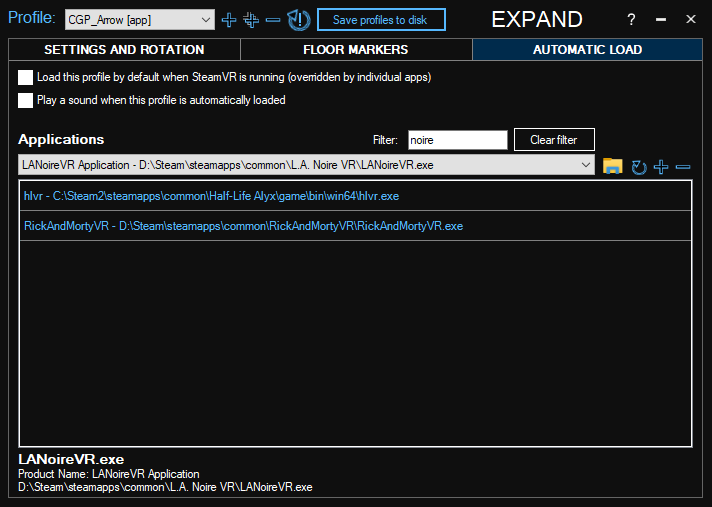
Automatic Loading of Profiles
- You can now link applications to a profile. The profile will be loaded automatically when any of those apps run.
- Select which profile to use with SteamVR (intended for Oculus users who can use Cable Guardian without SteamVR)
- Option to play a sound and/or show an image when switching profiles automatically
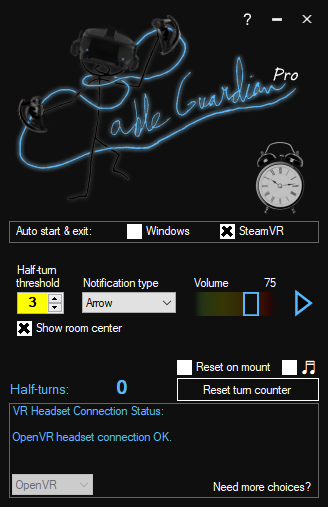
Simplified mode (earlier only in the free version)
- Less options to worry about but still offers both audio and visual notifications
- Easy toggle room center marker
- Meant for new users, but can be accessed retroactively from the top right corner of the help window
Patch Notes
- Tabbed design for easier navigation
- Active Profile name is now shown in the tray menu (in full mode)
- Increased wave loop limit from 9 to 99
- Fixed unnecessarily long pauses between wave loops
- Internal improvements to overlay handling