Save big on AI: The Somnium Files , the STEINS;GATE franchise, CRYSTAR and more during the Steam Golden Week Sale! Click here to see participating titles!
Save big on AI: The Somnium Files, the STEINS;GATE franchise, CRYSTAR and more during the Steam Golden Week Sale!
Save on AI: The Somnium Files , YU-NO: A girl who chants love at the bound of this world and other big titles during the Steam Winter Sale! Title Lineup
Save on AI: The Somnium Files, YU-NO: A girl who chants love at the bound of this world and other big titles during the Steam Winter Sale!
The Spike Chunsoft Publisher Weekend sale starts today! Get discounts on your favorite titles, including the Danganronpa , Zero Escape , and STEINS;GATE franchises. The sale runs from now through August 12, 10:00 a.m. (PDT). TITLE LINEUP
The Spike Chunsoft Publisher Weekend sale starts today! Get discounts on your favorite titles, including the Danganronpa, Zero Escape, and STEINS;GATE franchises. The sale runs from now through August 12, 10:00 a.m. (PDT).
The Steam Summer Sale 2019 sale starts today! Get discounts on your favorite titles, including the Danganronpa , Zero Escape , and STEINS;GATE franchises. The sale runs from now through July 9, 10:00 a.m. (PDT). TITLE LINEUP
The Steam Summer Sale 2019 sale starts today! Get discounts on your favorite titles, including the Danganronpa, Zero Escape, and STEINS;GATE franchises. The sale runs from now through July 9, 10:00 a.m. (PDT).
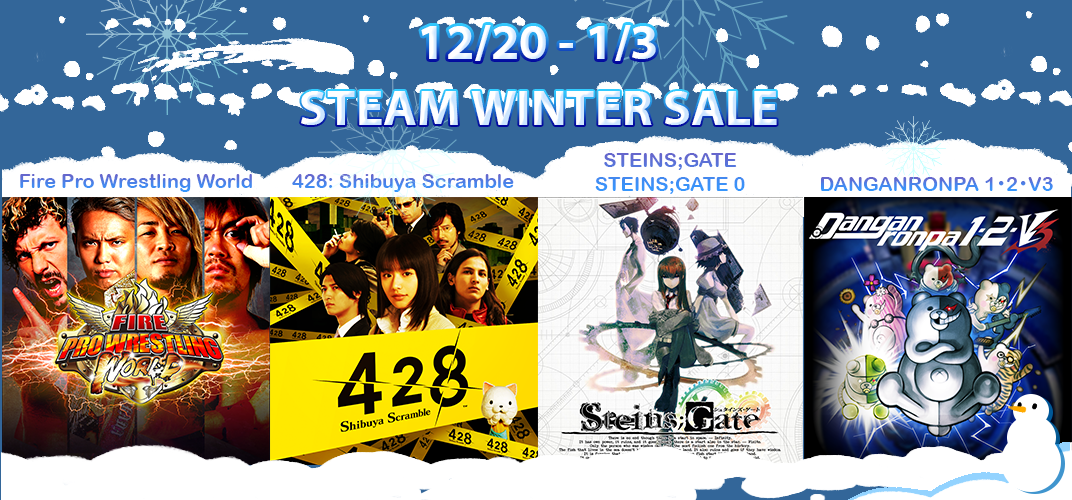
Save big on the Danganronpa series, STEINS;GATE , Fire Pro Wrestling World , 428: Shibuya Scramble , and more during the Steam Golden Week Sale! Click here to see participating titles!
Save big on the Danganronpa series, STEINS;GATE, Fire Pro Wrestling World, 428: Shibuya Scramble, and more during the Steam Golden Week Sale!
The most recent patch addresses the following issues: Fixed translation errors and re-translated portions of text for clarity. Added “Quit” option to Main Menu. Added option to make traps visibles by default. (Options > System Settings > Show Trap) Added controller prompts.
The most recent patch addresses the following issues:
Fixed translation errors and re-translated portions of text for clarity.
Added “Quit” option to Main Menu.
Added option to make traps visibles by default. (Options > System Settings > Show Trap)
Added controller prompts. (Will default to controller prompts if controller is recognized at start-up.)
Fixed issue with final achievement not unlocking: "You have completed your Greatest Adventure!". (Will automatically unlock upon starting game with latest patch.)
The most recent patch addresses the following issues: Fixed translation errors and re-translated portions of text for clarity. Added “Quit” option to Main Menu. Added option to make traps visibles by default. (Options > System Settings > Show Trap) Added controller prompts.
The most recent patch addresses the following issues:
Fixed translation errors and re-translated portions of text for clarity.
Added “Quit” option to Main Menu.
Added option to make traps visibles by default. (Options > System Settings > Show Trap)
Added controller prompts. (Will default to controller prompts if controller is recognized at start-up.)
Fixed issue with final achievement not unlocking: "You have completed your Greatest Adventure!". (Will automatically unlock upon starting game with latest patch.)
This patch addresses performance issues experienced by some players after the previous patch. Please let us know if this does not resolve the issue for you.
This patch addresses performance issues experienced by some players after the previous patch. Please let us know if this does not resolve the issue for you.
This patch addresses performance issues experienced by some players after the previous patch. Please let us know if this does not resolve the issue for you.
This patch addresses performance issues experienced by some players after the previous patch. Please let us know if this does not resolve the issue for you.
A number of reported crashes were caused because the GPU is not DirectX 11 compatible. We have made it so that the game will launch with older versions of DirectX. However, be aware that this may cause performance issues. We strongly recommend a GPU with DirectX 11 or above. NOTE
A number of reported crashes were caused because the GPU is not DirectX 11 compatible. We have made it so that the game will launch with older versions of DirectX. However, be aware that this may cause performance issues. We strongly recommend a GPU with DirectX 11 or above.
NOTES ON ONGOING ISSUES
Use/Throw
Currently the command to Use/Throw items directly from the menu does not work. We will fix this in a future patch
Game pad prompts
We will add game pad prompts in a future patch.
Localization
We are working with the localizers, AGM Playism, to fix syntax errors and improve quality of the script.
Resolution Options
To properly upscale sprites, the resolution must be doubled. Otherwise graphics and text will become blurry.
We have locked the resolution at the following options to preserve graphical fidelity:
480x270, 960x540,1920x1080.
Frame Rate Issues/Stuttering
When your character takes an action, all enemies/NPCs in the world, even those off screen, also take an action. Your character can’t move again until these animations finish, so if an enemy/NPC triggers a trap/attacks/takes an extra action, you will be “stuck” for a moment. This is why the game appears to “stutter,” especially when dashing. This is how the title was designed and also occurs in the PS4/Vita version.
Screen scroll speed and animations are based on 30FPS. Switching to 60FPS will be a difficult process that may introduce new issues. We have no plans to switch to 60FPS.
With that said, we are looking into causes and solutions of true frame rate drop/performance issues.
A number of reported crashes were caused because the GPU is not DirectX 11 compatible. We have made it so that the game will launch with older versions of DirectX. However, be aware that this may cause performance issues. We strongly recommend a GPU with DirectX 11 or above. NOTE
A number of reported crashes were caused because the GPU is not DirectX 11 compatible. We have made it so that the game will launch with older versions of DirectX. However, be aware that this may cause performance issues. We strongly recommend a GPU with DirectX 11 or above.
NOTES ON ONGOING ISSUES
Use/Throw
Currently the command to Use/Throw items directly from the menu does not work. We will fix this in a future patch
Game pad prompts
We will add game pad prompts in a future patch.
Localization
We are working with the localizers, AGM Playism, to fix syntax errors and improve quality of the script.
Resolution Options
To properly upscale sprites, the resolution must be doubled. Otherwise graphics and text will become blurry.
We have locked the resolution at the following options to preserve graphical fidelity:
480x270, 960x540,1920x1080.
Frame Rate Issues/Stuttering
When your character takes an action, all enemies/NPCs in the world, even those off screen, also take an action. Your character can’t move again until these animations finish, so if an enemy/NPC triggers a trap/attacks/takes an extra action, you will be “stuck” for a moment. This is why the game appears to “stutter,” especially when dashing. This is how the title was designed and also occurs in the PS4/Vita version.
Screen scroll speed and animations are based on 30FPS. Switching to 60FPS will be a difficult process that may introduce new issues. We have no plans to switch to 60FPS.
With that said, we are looking into causes and solutions of true frame rate drop/performance issues.
The most recent patch addresses the following issues: Fixed crash dumps so .mdmp files are generated instead of .dmp files You can now create system data even with a PC user name that has double-byte characters We are looking into the other issues you have reported. Thank you for
The most recent patch addresses the following issues:
Fixed crash dumps so .mdmp files are generated instead of .dmp files
You can now create system data even with a PC user name that has double-byte characters
We are looking into the other issues you have reported. Thank you for your patience and understanding.
The most recent patch addresses the following issues: Fixed crash dumps so .mdmp files are generated instead of .dmp files You can now create system data even with a PC user name that has double-byte characters We are looking into the other issues you have reported. Thank you for
The most recent patch addresses the following issues:
Fixed crash dumps so .mdmp files are generated instead of .dmp files
You can now create system data even with a PC user name that has double-byte characters
We are looking into the other issues you have reported. Thank you for your patience and understanding.
Mystery Chronicle: One Way Heroics is Now Available on Steam and is 10% off!* Play your way through the different maps generated with every playthrough, constantly on the move away from the calamity of light, the Shine Raid, to your left and on your final battle with the Fallen A
Mystery Chronicle: One Way Heroics is Now Available on Steam and is 10% off!*
Play your way through the different maps generated with every playthrough, constantly on the move away from the calamity of light, the Shine Raid, to your left and on your final battle with the Fallen Angel Alma. There's no turning back, once this thrilling one-way adventure begins!