*We strongly recommend players to play the game with a steering wheel or an xbox gamepad. Analog stick deadzone and mid point settings will be added in the upcoming updates
*H-pattern is not supported currently. It will be supported in the upcoming updates
*For steering wheel users, using a FFB frequency higher than 250 hz may cause severe performance issues. Proceed with caution.
*For steering wheel users, please take advantage of the “SET MIN” and “SET MAX” buttons to fit your device input into the appropriate range
*For gamepad and keyboard users, if you are not using axis, i.e. if you are going to control the steering left, steering right, throttle or brake with a on/off button, make sure to clear up the axis by pressing all the circular arrow buttons in the AXIS CALIBRATION menu
*The set up menu sucks. We know and we don’t really have an excuse for that. We will revise it in the upcoming updates. (We also know our game could be a lot better. Working hard on it.)
For Steering Wheel Users:
1. In Steam Library, right click on “Rev to Vertex”. Go to “properties…” -> “Steering Wheel”. Set “Steam input status” to disable for the Xbox Controller
2. Go to SETTINGS
3. The AXIS CALIBRATION menu will show up; if not, click the AXIS CALIBRATION button at the bottom right
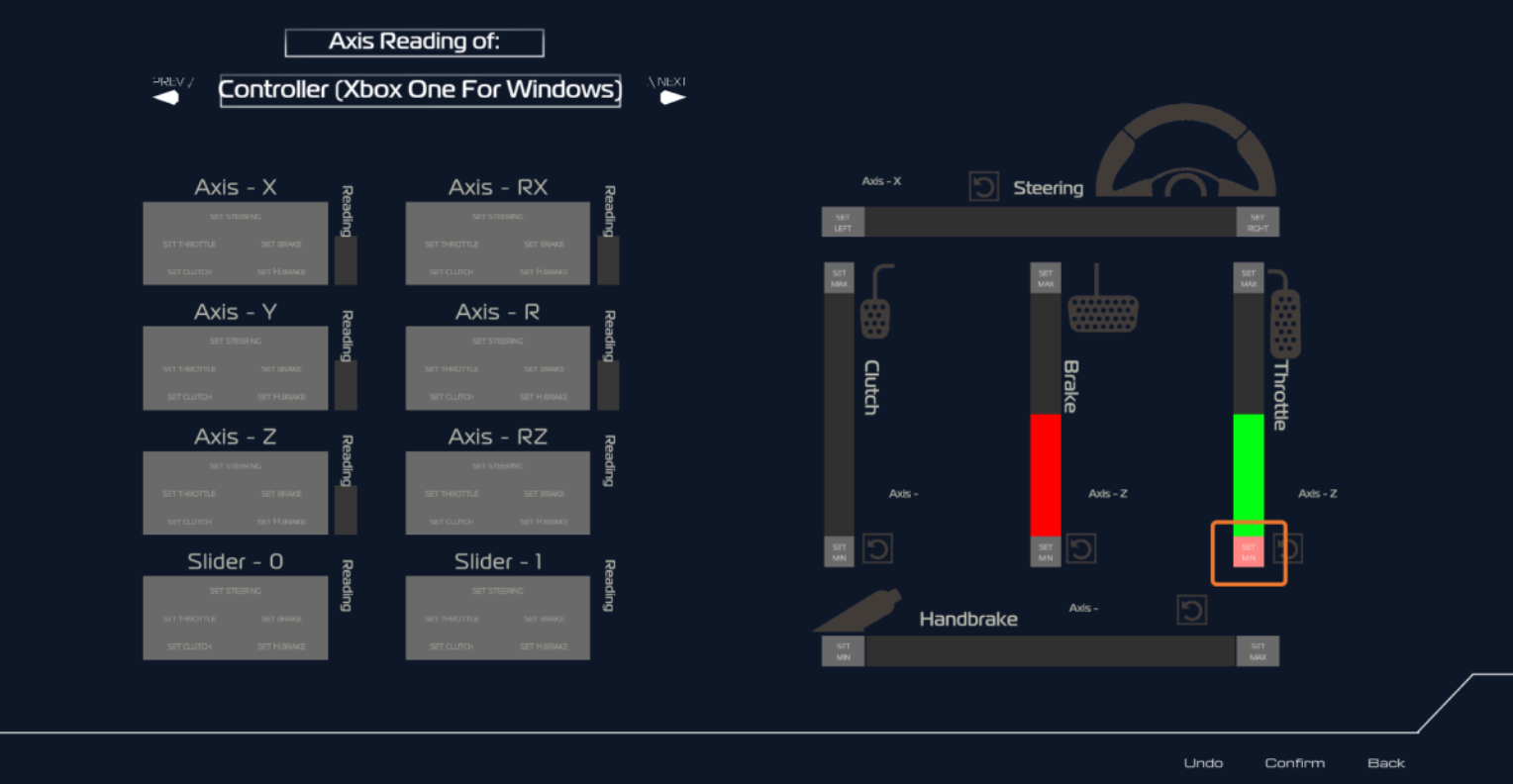
4. In the AXIS CALIBRATION menu, your input device, such as wheel base, pedals, handbrake etc., will be displayed under “AXIS READING of” in the top left. Switch to the device you want to set by clicking the left and right arrows next to the displayed input device name
5. There is a set of 2x4 grey boxes beneath the device name. Try rotating your steering wheel or pressing the pedals, one of the grey boxes should react to your device and show value change. Then you just need to set it to either “steering”, “throttle”, “brake”, “clutch” or “handbrake” by pressing one of the five buttons below the input value reading.
6. After you have bind the input device successfully, when you do steering or pressing the pedals, the colourful bars on the right side of the menu should respond. Check if the minimum input and the maximum input react correctly.
7. If the range is not correct, or is reversed, for the pedals, handbrake or clutch, fully release the device, then press the “SET MIN” button; after that, fully press on the device, then press the “SET MAX” button.
8. For the steering wheel, first rotate the wheel fully to the left, then press the “SET LEFT” button; then, rotate the wheel fully to the right, then press the “SET RIGHT” button.
For setting the gear shift button, press the “BACK” button in the bottom right of the AXIS CALIBRATION menu, then look for SHIFT UP and SHIFT DOWN in the CONTROL menu and bind the keys you prefer
9. You can also set the force feedback intensity, force feedback frequency etc. in the CONTROL menu
10. To bind keys in the CONTROL menu, press on the name of the key that is binded already, then push the button on your device you would like to bind. To escape the binding process and revert, press esc on your keyboard
For Xbox Gamepad Users:
1. In Steam Library, right click on “Rev to Vertex”. Go to “properties…” -> “Controller”. Set “Steam input status” to disable for the Xbox Controller
2. Go to SETTINGS
3. The AXIS CALIBRATION menu will show up; if not, click the AXIS CALIBRATION button at the bottom right. The AXIS CALIBRATION menu is for you to setup your analog sticks, LT and RT buttons
4. In the AXIS CALIBRATION menu, the name of your connected xbox gamepad will display under “AXIS READING of”
5. Press or move your analog sticks, LT or RT button, you should see the values on the 2 x 4 grey boxes react to your input
6. Set the appropriate input to either “steering”, “throttle”, “brake”, “clutch” or “handbrake” by pressing one of the five buttons below the input value reading.
7. If the range or the LT or RT buttons is not correct, or is reversed, simply fully release the button, press the “SET MIN” button next to the appropriate axis, then fully press on the button and press the “SET MAX” button.
8. For setting up an analog stick for steering, after you have binded the analog stick to the steering, push the analog stick fully to the left. Then, press the “SET LEFT” button next to the STEERING bar. After that push the analog button fully to the right. Then, press the “SET RIGHT” button.
9. For binding the buttons other than the analog sticks, LT and RT buttons, press the “BACK” button in the bottom right to go back to CONTROL menu, and use the CONTROL menu to bind keys.Rev
10. Press on the name of the key that is binded already, then push the button on your device you would like to bind. To escape the binding process and revert, press esc on your keyboard
For Keyboard Users:
1. Go to SETTINGS
2. The AXIS CALIBRATION menu will show up. Make sure all the axis are clear by pressing each of the circular arrow on the right
3. Press the BACK button on the bottom right to go back to the CONTROL menu
4. To bind keys, press on the name of the key that is binded already, then push the button on your device you would like to bind. To escape the binding process and revert, press esc on your keyboard