Happy Children's Day to all engineers!
Not building Dyson spheres today, just enjoying ice cream spheres. 🍦
Not building Dyson spheres today, just enjoying ice cream spheres. 🍦


Youthcat Studio · Gamirror Games
Not building Dyson spheres today, just enjoying ice cream spheres. 🍦
Not building Dyson spheres today, just enjoying ice cream spheres. 🍦

Good afternoon, engineers, Icarus, who is hard at work mining resources in distant star systems, sends his greetings and wishes you a wonderful day!
Good afternoon, engineers, Icarus, who is hard at work mining resources in distant star systems, sends his greetings and wishes you a wonderful day!

Engineers still busy among the stars and reality alike — the blazing heat of summer is almost upon us, and Dyson Sphere Program continues to move forward at full speed. Here is today’s small update: Holo beacons can activate "Dark Fog Beaconing" function (in combat mode). Once ac
Engineers still busy among the stars and reality alike — the blazing heat of summer is almost upon us, and Dyson Sphere Program continues to move forward at full speed.
Here is today’s small update:
Holo beacons can activate "Dark Fog Beaconing" function (in combat mode). Once activated, Dark Fog Hives will dispatch Relay stations to beacon's location. Note: The beacon must maintain power supply and visibility must be set to at least "Local Planetary System".
We know, of course, that many of you are looking forward to the vehicle system. However, this is a special feature that runs through the entire game experience, and to some extent, it will change the rhythm of how the game is played.
In order to present it to every Engineer in the best possible form, it still needs quite some time before it can truly take shape. We are just as eager for its arrival, and we hope it will bring you an even more impressive Dyson Sphere Program, helping this game that has grown alongside all of us reach new heights.
At the same time, we will continue to optimize and update other content, while also working with our publisher to support the creation of collaboration content and more multilingual content. Please rest assured that this will not affect the design and development of the core game itself.
Hello Engineers of Dyson Sphere Program, We’re excited to announce that Dyson Sphere Program now officially supports Japanese, German, and French! With this update, we hope to welcome even more players from around the world to explore and enjoy the universe we’ve built together.
Hello Engineers of Dyson Sphere Program,
We’re excited to announce that Dyson Sphere Program now officially supports Japanese, German, and French!
With this update, we hope to welcome even more players from around the world to explore and enjoy the universe we’ve built together.
To ensure a smooth and comfortable experience across different languages, we’ve made extensive UI adjustments—especially for German and French, where text length can be significantly longer than in English. Our goal is to maintain both readability and visual clarity for everyone.
In addition to in-game text and UI, this update also includes localized voiceovers (including the advisor and voice prompts), as well as CG content.
We’ve had the pleasure of working with talented voice actors for each language. The advisor voiceovers for each language are performed by:
Japanese: Ugaki Hidenari (宇垣 秀成)
German: Frank Schaff
French: Marc Perez
We hope these additions will further enhance immersion for players across different languages as they build and expand their interstellar factories.
We will continue working with our publisher to add more language support in the future. Thank you for your support.
[Feature]
Added localization support for Deutsch (German). This includes full coverage of all UI text, cutscene subtitles, and system broadcast voice-over.
Added localization support for Français (French). This includes full coverage of all UI text, cutscene subtitles, and system broadcast voice-over.
Added localization support for 日本語 (Japanese). This includes full coverage of all UI text, cutscene subtitles, and system broadcast voice-over.
Hello Engineers, hope everyone is having a great week. Don’t forget to take a break, step outside, and enjoy some fresh air. Now, onto the new update: You can now set memos in the Planet (Planetary System) Information Panel Added 3 new combat situational music tracks. These will
Hello Engineers, hope everyone is having a great week.
Don’t forget to take a break, step outside, and enjoy some fresh air.
Now, onto the new update:
You can now set memos in the Planet (Planetary System) Information Panel
Added 3 new combat situational music tracks. These will play depending on the actual combat situation and historical play frequency. They can also be toggled on/off in the settings.
Improved the undo/redo experience in input fields with undo functionality when continuously entering non-Latin characters.
Fixed an issue where canceling a working lab's task could cause incorrect subsequent behavior in some cases

As the festive spirit grows richer, we extend Lunar New Year wishes to all engineers.🧨 In the 2026 Year of the Horse, may production lines surge ahead like galloping steeds, and the tech tree shines like a starry river of brilliance.✨ No matter which sea of stars you wander in,
As the festive spirit grows richer, we extend Lunar New Year wishes to all engineers.🧨
In the 2026 Year of the Horse, may production lines surge ahead like galloping steeds, and the tech tree shines like a starry river of brilliance.✨
No matter which sea of stars you wander in, never forget the lights and cares of your home planet.
Thank you for five years of company. Let's ride forward to a new journey together in 2026! 🐎
Dear Engineers, we’re back with another update today! Since the release of the Anniversary Update, we have continued to make adjustments based on actual gameplay experience, including feature refinements, QoL improvements, and bug fixes. Below is the complete changelog covering u
Dear Engineers, we’re back with another update today!
Since the release of the Anniversary Update, we have continued to make adjustments based on actual gameplay experience, including feature refinements, QoL improvements, and bug fixes.
Below is the complete changelog covering updates from V0.10.34.28282 to V0.10.34.28455.
● Added a [Copy Settings Data] button to the upper-right corner of the [Settings] interface. Clicking it will copy the last successfully applied settings to the clipboard. Settings that were not successfully applied will not be copied.
● (Experimental) IP addresses have been added to [Holo Beacons] and [Traffic Monitors]. When a Holo Beacon and a Traffic Monitor share the same IP address, the Holo Beacon can receive the color signal from the Traffic Monitor and synchronize its own color accordingly.
● Added text editing shortcuts for input fields: some input fields (such as blueprint description, memo, etc.) support [Ctrl+Z] to undo and [Ctrl+Y] to redo, making text modifications more convenient.
● The text icon selection interface now includes an option to adjust whether the interface automatically closes after selecting an icon.
● Slightly adjusted the physical collider of the [Fractionator] to make it easier for mecha to pass through densely placed fractionators.
● A [Default Color] button has been added to the color selection interface for facilities like Holo Beacon. Furthermore, when the interface is opened, the currently selected color will now be highlighted.
● If there is no Matrix Lab currently being researched, a confirmation prompt will now be displayed when canceling manual research.
● Fixed a bug where the [Holo Beacon] indicator line would not appear when offline if no icon was set.
● Fixed an issue where certain icons would not display correctly in icon picker.
● Fixed a bug where [Assemblers] might encounter issues when directly outputting fuel to [Power Facilities] via sorters.
● Fixed an issue in older version saves with the [Sorter Cargo Stacking] technology, where Sorters Mk. III experienced reduced transport capacity when outputting cargo to conveyor belts.
● Fixed a bug where the Dark Fog drop filter did not display information when pointing at items.
● Fixed a bug that could cause errors in planetary shield information when opening the [Combat Interface].
● Fixed a bug where using the Instant Dismantle function in [Sandbox Mode] to dismantle a lab could cause errors.
● Fixed a bug where clicking on other save files in the save/load interface and then continuing the game could lead to abnormal research consumption data for labs.
● Fixed a bug where some save files from versions prior to 0.6 could not be loaded.
● Fixed a bug where, when hiding all space navigation, beacon icons that should still be displayed in certain space navigation elements would appear incorrectly and in the wrong position.
● Fixed a bug in the [Marks] of the control panel where the icon mapping in the memo could not be interacted with via the mouse.
Hello again, Engineers! We hope you enjoyed yesterday's update preview! Without further ado, we're serving them up right now! In case any of you were so deep in the thick of contruction that you missed yesterday's report, you can catch up quickly here: View game page Below are th
Hello again, Engineers!
We hope you enjoyed yesterday's update preview! Without further ado, we're serving them up right now!
In case any of you were so deep in the thick of contruction that you missed yesterday's report, you can catch up quickly here:
Below are the full patch notes for today's update:
Added new building [Holo Beacon] along with related technologies and recipes. The Holo Beacon can serve as a map marker to indicate the location of the player’s factories.
The [Holo Beacon] includes an integrated [Memo] module, allowing players to input text for factory planning and information recording.
Added a [Memo] tab to the planetary information panel in the [Star Map]. When a planet has factories, players can input text in the [Memo] to plan production schedules for that planet’s factories.
Completely revamped the text component to support more features and redesigned the layout of various UI interfaces.
Players can now insert in-game icons into input fields such as planet/star system names, logistics station names, blueprint descriptions, etc.
Key bindings in text now automatically update when changed in the settings.
Icons within the in-game [Goals] and icon mappings from player input (such as blueprint descriptions, etc.) now support [Ctrl + Left Mouse Click] to directly jump to the corresponding [Replicator] or [Tech Tree].
Blueprints now include new attributes [Author] and [Version Number]. Creators can also create and edit custom attributes to manage blueprints more conveniently.
On a planet, within a star system, or in outer space, pressing the [N] key will automatically reset the camera to its default orientation.
Optimized game logic to improve cache hit rates and enhance multithreading parallel efficiency, reducing bottlenecks caused by memory bandwidth. Update frame cost reduced by approximately 5% to 30% (the exact improvement varies across different hardware, with generally greater gains on CPU with more threads).
Optimized the logic for dynamic multithreading allocation, significantly reducing dynamic allocation costs when the number of threads exceeds 32.
Improved data access for factory facilities such as assemblers and labs, as well as sorters, and reduced computational overhead in the power system.
Optimized performance overhead for constructed Dyson Spheres.
Optimized performance overhead for Milky Way, improved its final frame rate.
[Desolus] now has a chance to spawn [Stalagmite Crystal Vein]. After loading an old save file, Stalagmite Crystal Vein may also spawn in Desolus where no factories have been built.
Input sorters of power generation facilities will now only pick up the fuel required by that facility.
Adjusted the position of the UI hint for obtaining soil pile in the starmap to avoid overlapping with other UI elements.
Reduced the size of power indicator ring for the [Traffic Monitor].
Changed the icon of [Screenshot Mode] button in the bottom right corner.
Fixed a bug where Missile Turrets cannot connect to signal network and attack Dark Fog on other planets (within 4200m).
Fixed a bug that caused an error after triggering the achievement “Global Offense”.
Fixed a bug where data calculation for [Planetary Shields] was incorrect across different power grids on the same planet.
Fixed a bug where disabling the “Indicator” for drone squads could cause a black frame to appear if SSAO was enabled.
Fixed a bug where enabling SSAO could cause transparent effects on the surface of some buildings.
Fixed an issue in Sandbox Mode where the minimap would not update promptly when fast travelling from a planet with many facilities to another planet.
Fixed a bug in Armor Customization where disabling custom parts would not update the material cost and mecha properties.
Fixed a bug where completing the Logistics Carrier Engine Level 4 research while the Interstellar Logistics Station panel was open caused the power bar and warper box to overlap.
Fixed a bug in the Control Panel where clicking on other Logistics Stations while attempting to retrieve items from a local Logistics Station caused abnormal retrieval logic.
Fixed a bug where placing a [Traffic Monitor] directly against a [Splitter] could lead to incorrect monitoring data or even errors.
Fixed a bug in the Statistics Panel under the [Production] tab where the import/export calculation for the last bar of the histogram may be incorrect.
Fixed a bug in the Statistics Panel under the [Power] tab where the counts for [Accumulators] and [Energy Exchangers] were incorrect.
Modified the cumulative calculation method for the Soil Pile acquisition prompt UI in the game. Sand obtained from paving foundations and sand obtained from defeating Dark Fog are now calculated separately (visual only).
Fixed a bug where copying and pasting Dyson Shell blueprints could cause the shell face order to be reversed in certain situations.
Fixed a bug where pasting a blueprint with a foundation conveyor belt beneath the space capsule might cause an error.
Fixed a bug where manual selection in Blueprint copy mode could sometimes fail to select buildings located at 180° longitude (east/west).
Fixed a bug where partially pasting Foundations from blueprints could sometimes yield incorrect results.
Fixed a bug where copying a building with a sorter might result in a pasted sorter with an excessive deflection angle.
Fixed a bug where some advisor entries could not be triggered correctly.
Fixed several localization bugs.
Dear Engineers, Hello everyone! Since our Early Access launch on January 21, 2021, the Dyson Sphere Program has somehow already reached its 5th birthday. We are incredibly happy to have walked this unforgettable five-year journey with all of you. Over these five years, we want to
Dear Engineers,
Hello everyone! Since our Early Access launch on January 21, 2021, the Dyson Sphere Program has somehow already reached its 5th birthday. We are incredibly happy to have walked this unforgettable five-year journey with all of you. Over these five years, we want to extend a special thanks to every single Engineer. Thank you for your companionship and for the understanding, support, encouragement, and patient waiting you've shown us through the difficulties of development. It is because of you that Dyson Sphere Program continues to grow and improve.
The past five years have been a journey of shared progress. For the future of the sea of stars, we remain your fellow travelers.
We know what you're most curious about: the upcoming update plans for the Vehicle System and Space Stations. Regarding the Vehicle System, we have already completed a massive amount of design and verification work. Our goal is to create a high-freedom, flexibly scalable vehicle editing system that allows every player to hand-build their own custom ride. Furthermore, these vehicles must adhere to certain physical laws to fit the game's sci-fi atmosphere.
In terms of design, we want players to be able to customize the position and keybinds of every single thruster, allowing for precise vector thrust maneuvers.
 (However, things have currently... flipped.)
As seen in the "failed demonstration" above, introducing these designs creates a chaotic physical system where a tiny change can make the vehicle uncontrollable. We aim to minimize the player's mental burden—using the simplest possible solutions to design vehicles that are both cool and easy to operate—and this requires more time to fine-tune the entire system.
Of course, this also requires us to develop a user-friendly Vehicle Editor.
 (Installing components)

(Deleting components)

(Scaling operations)
Since the "Rise of the Dark Fog" update, everyone has been closely following the development of the vehicle system for two years. We may have to ask you to wait just a little longer.
In the first half of last year, we poured our hearts into refactoring the multithreading system. This was to "sharpen the axe before cutting wood"—extracting every bit of CPU performance possible before the vehicle system goes live. Over the last five years, with every update, the game's volume has grown, and the code structure has become increasingly complex:
● Every new feature must ensure it doesn't impact the overall efficiency of the base game.
● Every new feature must consider the impact on all save files and player experiences since the start of Early Access.
● Every new feature must fully evaluate the interaction between new and old features. This correlation is like a matrix where both rows and columns are expanding—the time complexity is O(n²).
Because of these "invisible" underlying tasks, we need more time for polishing. Thank you for your patience; we will continue to push forward to bring you an update worth the wait.
The Vehicle System is positioned as a highly flexible creative system, serving as a major expansion and supplement to existing gameplay. Additionally, current combat system in the game focuses on the ground; Space Combat is still being refined and has much content yet to be implemented. The addition of vehicles will significantly enrich the overall dimension and strategic depth of combat, while also driving us to comprehensively optimize existing combat mechanisms (ground + space).

To maintain whole system harmony and keep the learning curve manageable, we are integrating the Vehicle System and the equally flexible Space Station System into a single design framework, which we internally call the "Creation System."
Beyond combat, the Creation System will include more factory-focused gameplay, potentially boosting overall production in the future.
To provide a more complete and coherent experience, we plan to release the following content simultaneously in a future major update:
● Vehicle System
● Comprehensive Ground Combat Adjustments
● Space Station System
● Space Combat System
These four systems are tightly linked and interdependent, so we want them to debut together. This will be the final major content update before the game's official release.
In short, the design and development complexity of the Creation System is no less than that of the combat system. We hope it brings a massive shift to the game experience. Before we serve the Creation System, we will continue to provide QoL updates. Please give us a little more time, we look forward to the day it launches!
Next, we will release a QoL update bringing a series of practical features and optimizations. Here is what's coming:
We've heard it from players, and after opening an old save or stepping away for a while we've felt it ourselves, staring at the screen and fall into a deep philosophical crisis—Who am I? Where am I? What was my production logic? Or perhaps you return from another planet and can't find your way around your home base to pick up items. Or, you travel a thousand miles with Titanium only to realize you can't find your Logistics Station in the sprawling industrial maze.

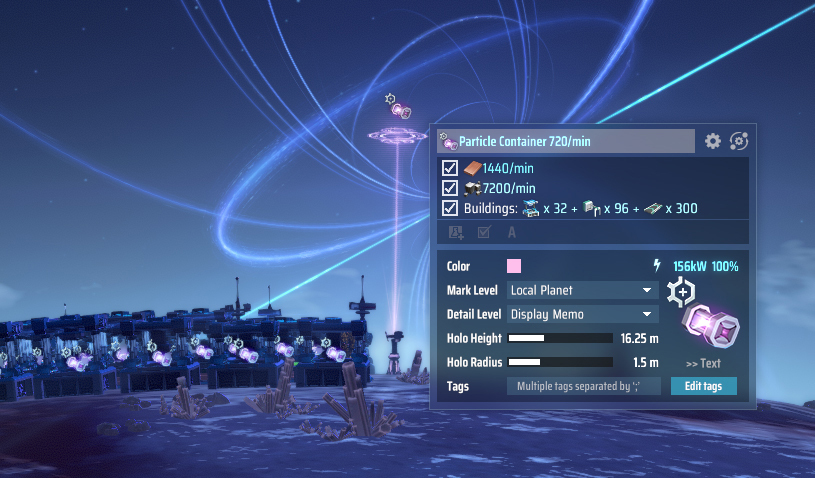
To solve those issues, we've added a brand new building: Holo Beacon.
It can be placed anywhere as a map marker and annotation tool, helping you plan production lines and label key locations so you never lose your way in your massive interstellar factory.
It's more than just a marker; it integrates a Memo System where you can write notes and reminders at any time.
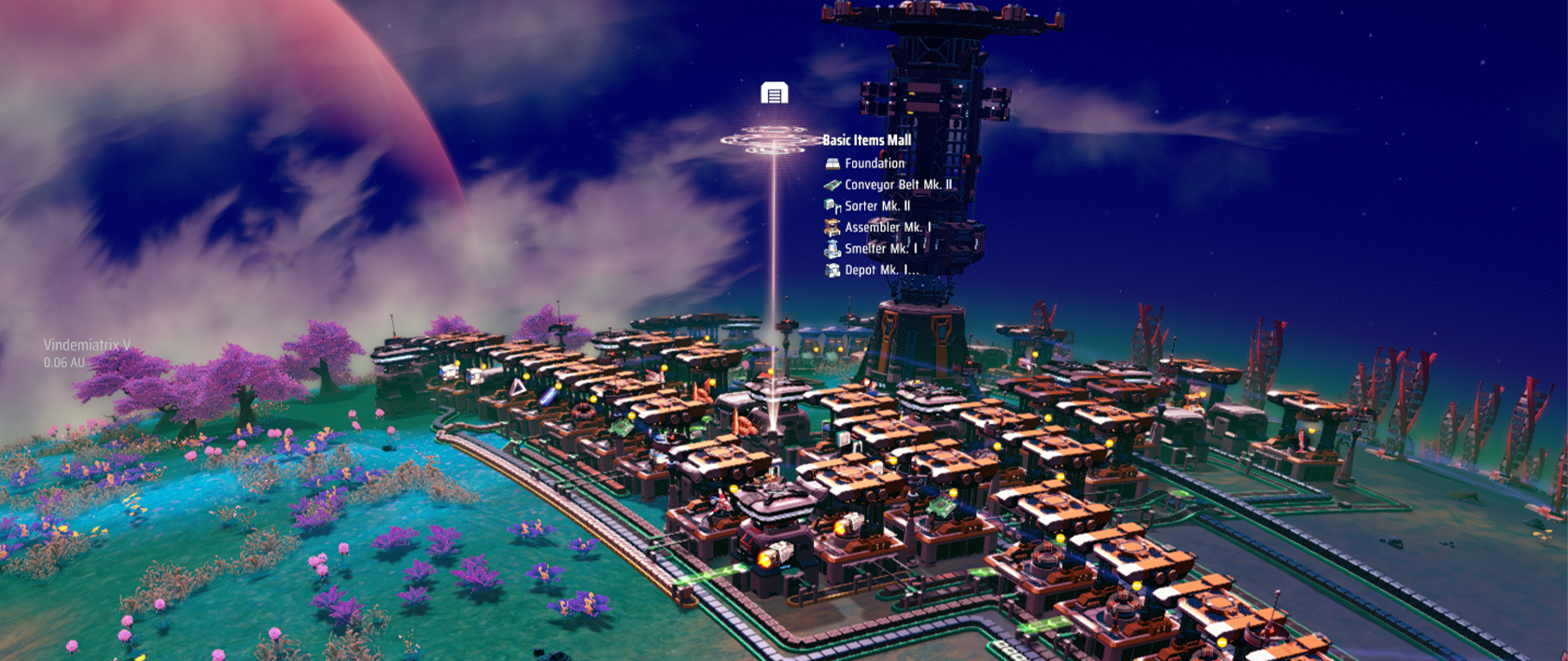
There are some usage scenarios:
◆ Map Marking & Navigation
Place beacons on a planet's surface to label resource points or factory zones. These are clearly visible even in Planet View (M Mode).
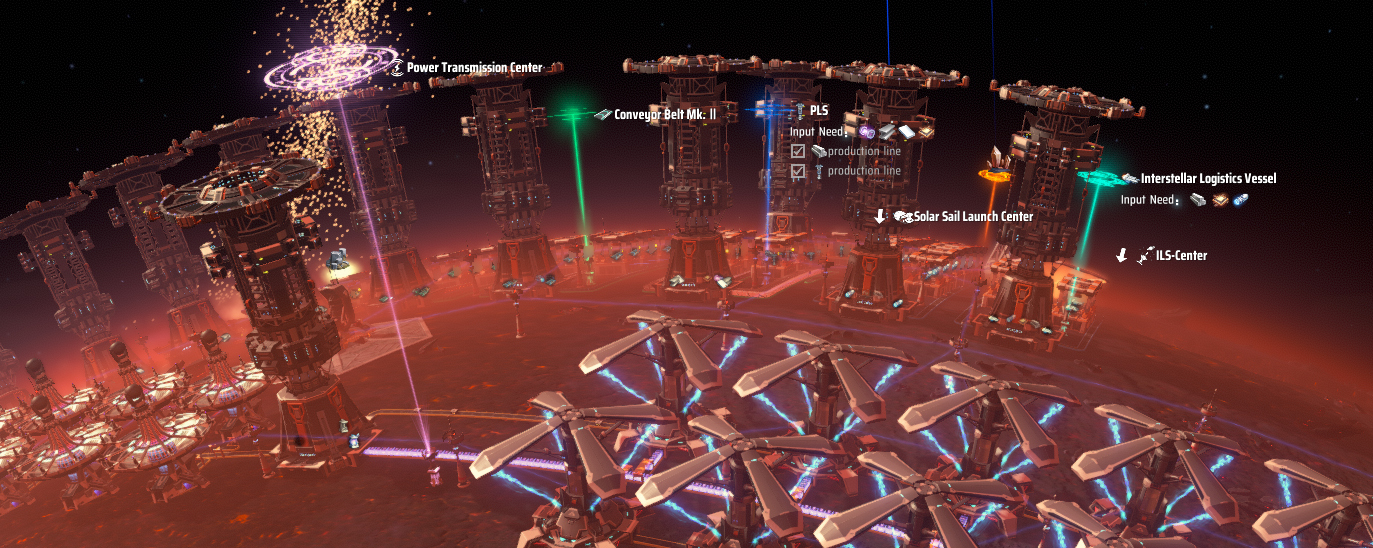
◆ Production Line Annotations
Add notes to complex logistics hubs or processing zones to explain supply/demand logic or future plans.
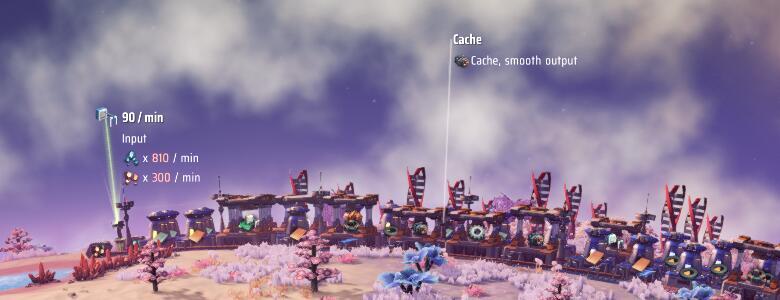
◆ Planetary Info & Guidance
Beacons aren't just for the ground—they show up in Planet View, the Starmap, and even against the starfield to guide you through deep space.
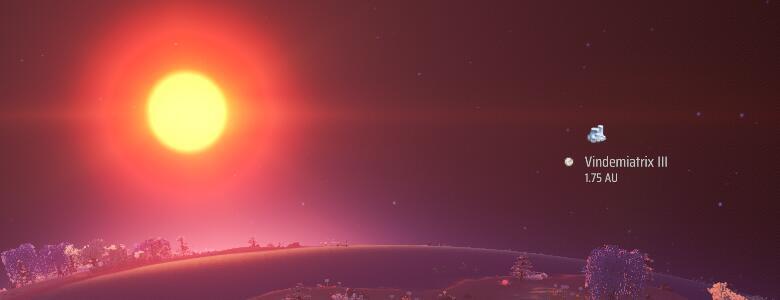
A memo system integrated directly into the game interface. You can create notes with icons, colors, and checkboxes directly on planets, the starmap, or blueprints, making complex planning and interstellar exploration more intuitive and organized.
Beyond Holo Beacons, Memos are integrated into several systems:
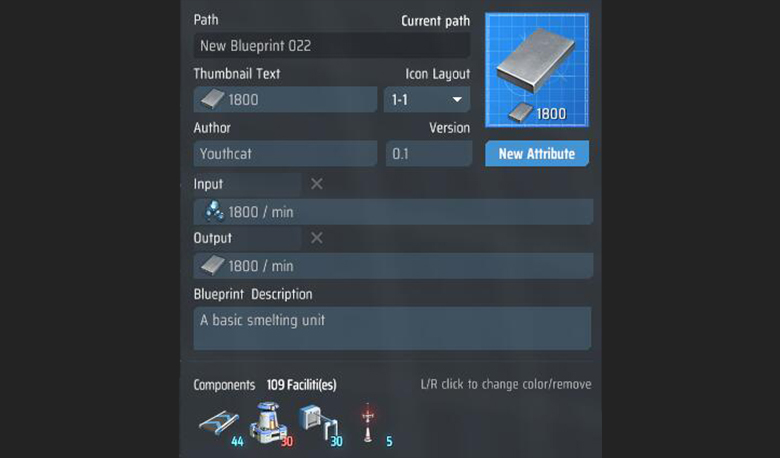
◆ Blueprint Descriptions
Insert I/O annotations into blueprints to make the logic clear when sharing or reusing them.
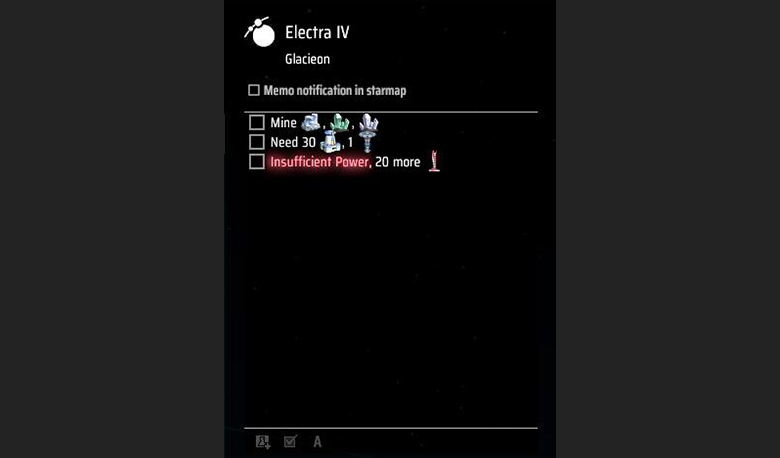
◆ Personal Notes & To-Do Lists
You can also write down your interstellar To-Do list directly on the Planet Panel. Memos support rich text formatting like checkboxes, icons, and text colors.
In our previous DevLog
(Full Breakdown of the ' New Multithreading System '), we mentioned that AMD generously lent us a machine equipped with a Threadripper 9985WX to test high-parallelism performance. This not only fills a gap in our testing for "god-tier hardware," allowing us to identify and fix bugs that would never surface on standard consumer-grade platforms, but also provides invaluable data on how different logic sections perform across various thread counts. This gives us a much clearer perception of potential performance hazards and bottlenecks.
Consequently, we conducted a round of targeted "deep optimization" on this device. However, average players can rest assured: this optimization isn't just for those who want to feel the raw power of their "performance monsters." Even for the vast majority of players using mid-to-low-end consumer platforms, this update will provide a significant boost to frame rates and the overall gameplay experience.
◆ Conclusion First
In conclusion, the results of this optimization are illustrated in the following figure:
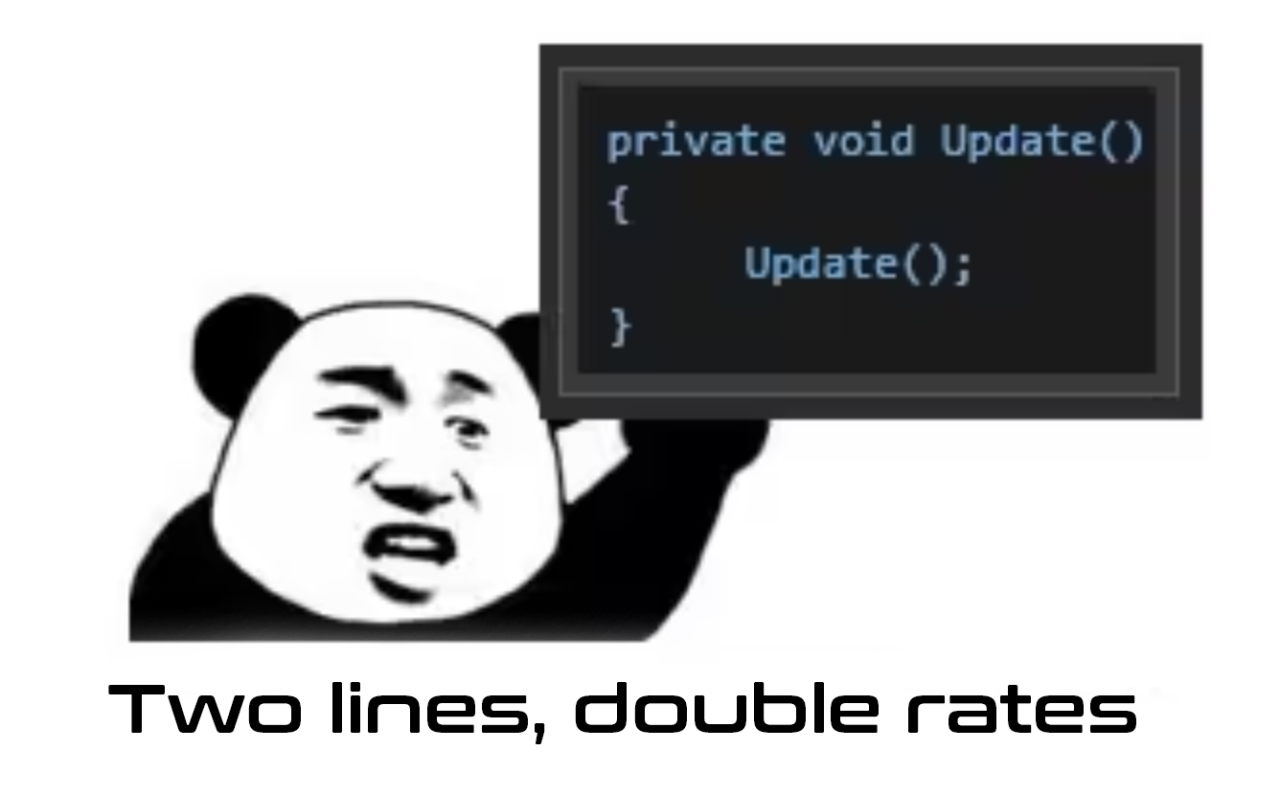
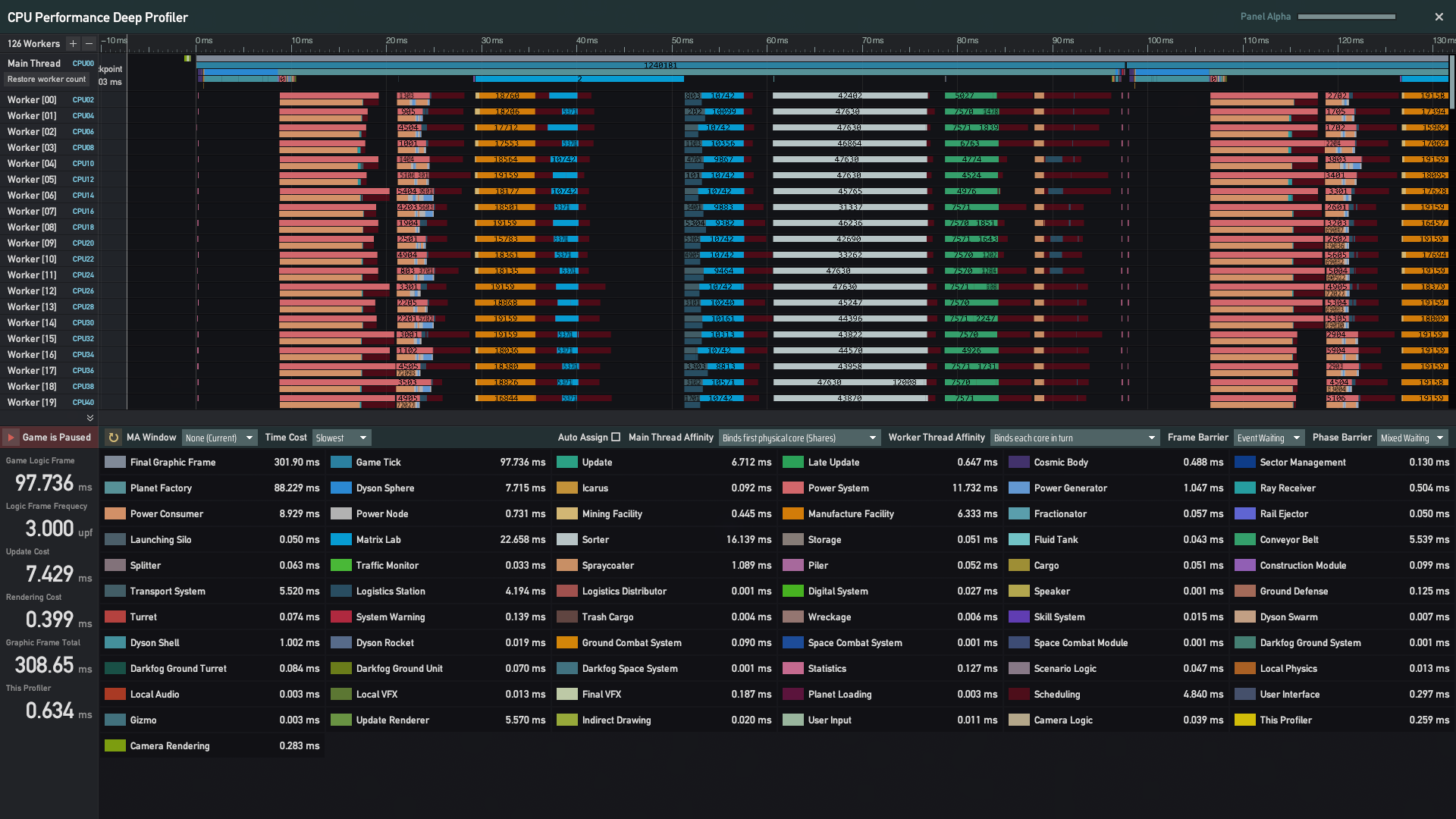
This meme might have been used a few too many times, but on this Threadripper, the frame rate doubling is the absolute truth. Here are the test results for an extreme save file with 6.8 million Universe Matrices running on a system with a Threadripper 9985wx + 64g ddr5 5600MHz×8 + win10:
Before Optimization(~95–100ms per non-critical frame):
After Optimization(~43–46ms per non-critical frame):
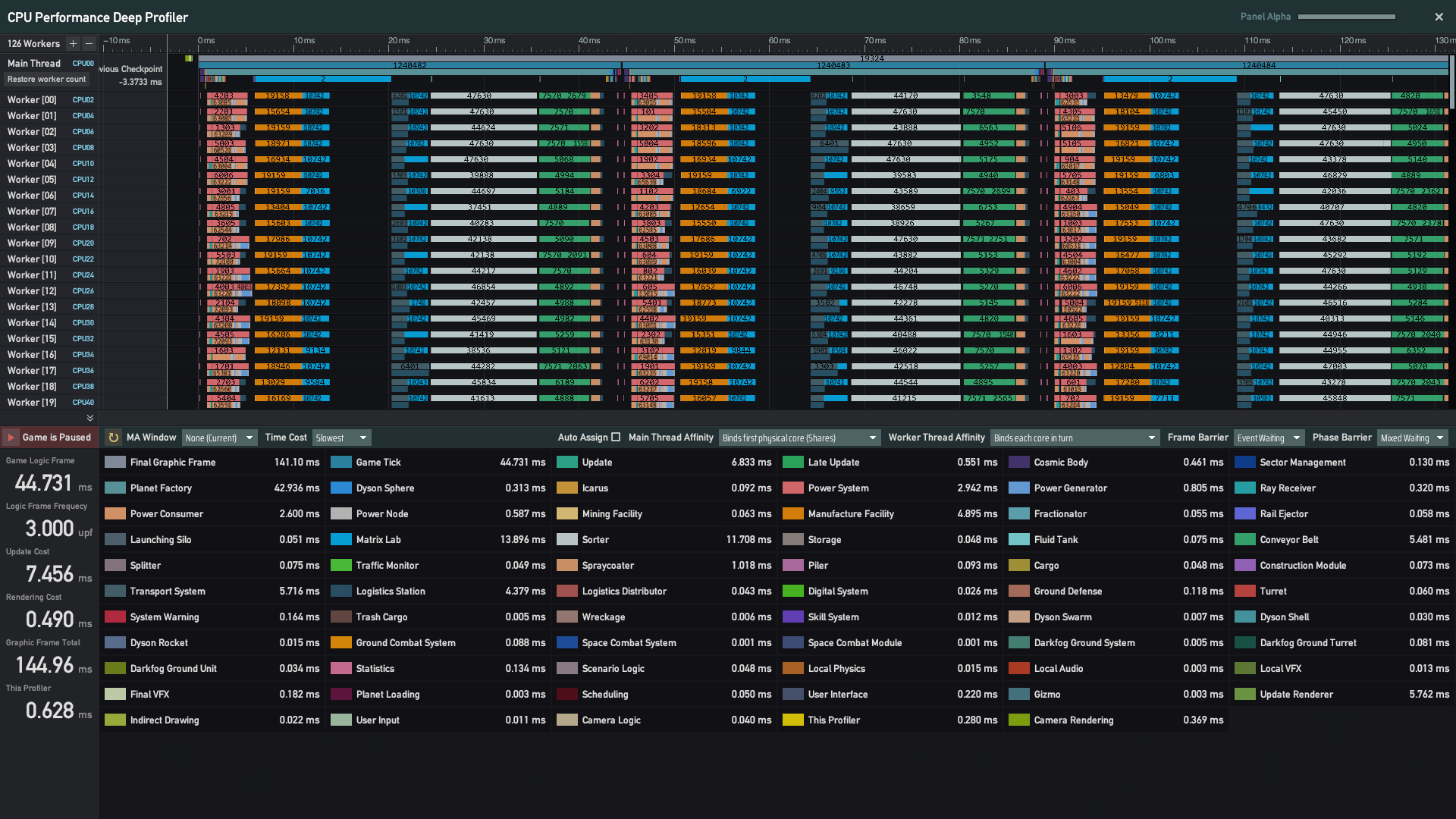
For the same save file on an Intel i5-14400F (6P4E), the non-critical frame overhead was reduced from 290ms to 205ms. Additionally, the per-frame overhead for a 300,000 Universe Matrix save dropped from 14.5ms to 11ms, and a 100,000 Universe Matrix save dropped from 8ms to 6ms. Generally speaking, players with factory scales below 50k Matrices will see a 5%–10% improvement in final frame time, while those exceeding 100k can expect a significant boost of 20%–30%. For top-tier platforms like the 9985WX, not only did the 6.8 million Matrix save drop from nearly 100ms to less than 90ms for two combined frames, but the logic frame time for a 1.2 million Universe Matrix save also plummeted from 22ms to 11ms.
◆ Specific Details
This optimization primarily focuses on the Dynamic Task Allocation Algorithm and Cache Hit Rate. Below, we will briefly introduce our optimization logic and the experience we've gained.
◆ Dynamic Allocation Logic
When running the original game logic on a high-end processor like the 9985WX, a prominent feature in the performance profiler was the appearance of dark red regions following many parallel phases. We've labeled this overhead as "Scheduler Overhead", which primarily involves task scheduling, allocation, and the data synchronization required for inter-thread coordination.
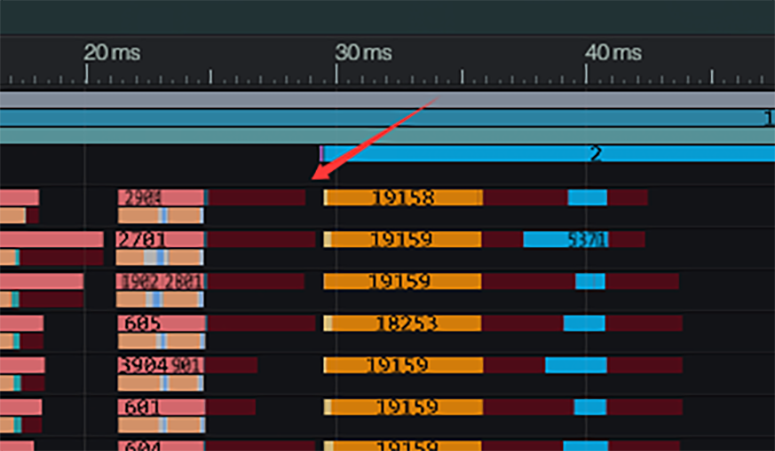
For players on standard consumer-grade platforms, this overhead should be nearly invisible. For instance, when running on a 14400F with 16 threads, this overhead averages less than 0.001ms per parallel phase. However, on the 9985WX, this overhead scales explosively as the thread count increases.
The reason lies in our previous implementation of the common "Work-Stealing" strategy: once a thread completes its own tasks, it identifies the target thread with the most remaining work and "steals" half of it. To prevent multiple threads from competing for the same target simultaneously, our design only allowed one thread to perform a steal operation at a time. Other threads had to wait for that thread to update the remaining task data before they could proceed.
This logic performs admirably at lower thread counts, but issues arise as the scale grows. To make this easier to visualize, let’s use an analogy to helping you understand: Imagine an Adventurer's Guild. Whenever an adventurer finishes their quest, they return to the guild to find the next most valuable quest on the Quest Board. To prevent two adventurers from fighting over the same quest, the guild uses a "random draw" system: the hall master calls out one person at a time to pick a quest. Only after that person finishes picking can the next person be called. When the guild is small, most people are out in the field; the hall is mostly empty, and at most, only one or two people are waiting.
But as the scale expands—more quests, more people—the time it takes to pick a quest increases, and the crowd in the hall grows. Hardware architectures like NUMA or CCD are like the guild being forced to open branch offices. However, all branches still share a single Quest Board, and only one person in the entire organization can pick a quest at a time. Every time a branch office starts or finishes a pick, they have to call every other branch to sync the status. This causes the "quest picking" time to skyrocket. We even saw cases where Adventurer A finished a quest and returned to wait before Adventurer B had even been called for their turn. If B was unlucky, the wait time became massive. This led to the extreme phenomenon where increasing threads from 16 to 128 (8x) caused the maximum wait time to jump from 0.001ms to 5ms (a 5000x increase).
Looking at the big picture: in a 16-thread environment, after threads finish their initial share and "return to the guild" to steal work, an average of 15.9 threads remain productive. However, at 128 threads, that average could drop to only 3 or 5 threads actually working at any given moment while the rest "wait for their number to be called," leading to a net loss in efficiency.
To solve this issue, we have refactored the Dynamic Task Allocation System. We now allow a small probability where two threads might steal from the same target simultaneously—the first takes half, and the second takes half of what remains. By accepting the trade-off that a stolen target might not strictly be the one with the most tasks, we enable multiple threads to pick their "most valuable" tasks at the exact same time.
Furthermore, we now group threads into sets of 32, restricting stealing to within the group.This strategy serves two purposes: it limits the time an individual thread spends searching for a target, and it prevents the extreme "diminishing returns" seen at high thread counts—where the n^{th} thread in line might only receive a meager 0.5^n of the remaining tasks. With Thread Affinity enabled (which is the game's default setting), this also significantly reduces the frequency of data synchronization across NUMA/CCD boundaries.
Returning to our guild analogy: multiple adventurers can now pick quests simultaneously. If two happen to pick the same quest, they follow a strict sequence where the second person takes half of what the first left behind. Instead of all branches sharing one board, only 3–4 neighboring branches share a board, drastically reducing communication costs.
The final optimization result is clear in the new performance charts—the previously glaring red "Scheduler Overhead" regions have essentially vanished.
◆ Optimizing Memory Bottlenecks
Regarding memory performance, we must first thank our community for their incredible passion and insight. Since launch, many keen-eyed players have noted how memory performance impacts frame rates. Some modders even released memory-specific optimization mods, providing us with invaluable insights and experience.
That Dyson Sphere Program places higher demands on memory than many other game genres is not surprising. The game features a massive number of independently operating entities, each with its own unique data. To keep performance under control, we have deliberately avoided overly complex logic in entities that players may build in large quantities. As a result, most entity logic remains straightforward: the CPU “reads data → makes a small change → reads the next data,” which naturally leads to very frequent communication between the processor and memory.
In addition, while the game is highly parallelized and deliberately follows sequential memory access patterns during data traversal, memory performance can still become the primary limiting factor on newer consumer platforms.
For those curious about which part of their hardware is the "limiting factor," here is a general guide: Modern Consumer Platforms (e.g., Intel 12th Gen+, AMD Zen 2+): With high core counts, large caches, and strong pre-fetching, the bottleneck usually tends to be limited by memory bandwidth. Earlier Consumer Platforms (e.g., Intel 7th–10th Gen, AMD pre-Zen architectures): With smaller caches and limited concurrency, the bottleneck often leans toward memory latency. Legacy Platforms: The raw performance of the processor itself is likely the primary constraint.
When designing our data structures, we always consider memory and performance—we avoid designs that are obviously cache-unfriendly. However, we must also balance this with maintainability and scalability. Hardware evolves rapidly; over-optimizing too early can sacrifice development efficiency and increase maintenance costs, only for the optimization to become obsolete as technology changes. Therefore, during the middle stages of development, we continue to keep on feature implementation. Once a stable version is achieved, we pivot our focus to systematic optimization.
In this update, we have optimized the data structures for common buildings like Production Facilities and Sorters. Specifically, we have separated rarely-used data to "slim down" the structures, reducing bandwidth pressure during sequential traversal. For data shared by a large number of buildings(such as recipes), we have consolidated them. This ensures that when the CPU accesses multiple same-type buildings using the same recipe, the relevant data is much more likely to already be in the cache. We have also implemented low-cost caching for data that is frequently accessed but stored far away in memory, while eliminating unnecessary non-local memory access.
Since a processor's cache management is essentially a "black box" to us, many optimizations require empirical testing. A change might provide a slight boost on one device but a noticeable performance hit on another. To address this, we tested over twenty different variations and built twenty internal builds of the game, ultimately selecting the dozen-plus optimizations that showed the most significant, consistent improvements for this update.
◆ Other Optimizations
Beyond the two major optimizations mentioned above, we have also refined other areas that showed significant room for improvement in late-game saves, particularly on enthusiast-tier hardware like Threadripper.
For instance, fully constructed Dyson Spheres no longer require intensive per-frame calculations. We have also replaced standard thread locks with Read-Write Locks in "multiple-reader, single-writer" logic scenarios to improve concurrency. Furthermore, the pre-calculation logic for power system demand has been relocated to a stage that better supports multi-threaded parallelism and cache hits, which significantly mitigates performance issues caused by False Sharing.
◆ Future Directions
Optimization is a journey without a finish line. We still have several optimization milestones on our future roadmap(such as refining the Cargo System and addressing sudden stutters in the Logistics System that can occur in extreme save files). However, these modifications are broad in scope and involve intricate logic; any unexpected issue could carry significant risks. Because each change requires extensive testing to ensure stability, they were not included in this current update.
Furthermore, for a long-term project, premature optimization can often disrupt the development rhythm and increase the complexity of code maintenance. We intend to revisit these plans once the current versions are stable and the team has sufficient bandwidth. This will allow us to thoroughly validate and refine these solutions before steadily introducing them to the game.
Unity's native text components (Text/TextMeshPro) offer limited support for Chinese typesetting. Originally designed for Latin scripts (specifically English), their underlying mechanisms do not account for the complex layout rules of non-alphabetic languages like CJK (Chinese, Japanese, and Korean).
The core issue lies in the fact that native text components rely on spaces for layout with line-breaking logic is tied to word-dividers like spaces and hyphens. Since languages like Chinese do not use spaces to separate words, the native component cannot accurately determine where a line break should occur. It simply forces a break at the last character before the margin is exceeded. Consequently, this often leads to punctuation errors, such as a "," or "。" appearing at the start of a new line, or an "(" being left hanging at the end of a line.
To resolve these issues, support our various design needs (such as the rich text used in Memos), and ensure better formatting for newly added languages, we have completely remade the text component within the Unity engine. While this task demanded a significant amount of time and effort, we believe this remake is more than just a technical milestone for the team—it is a vital step toward bringing Dyson Sphere Program to a broader global community.
The remade text component features the following capabilities:
◆ Custom Character and Mixed-Language Spacing
The new component allows for fine-tuned control over character spacing and the specific kerning between Chinese, English, and numerical characters. This can be adjusted based on the specific text to ensure a clean, aesthetic layout.

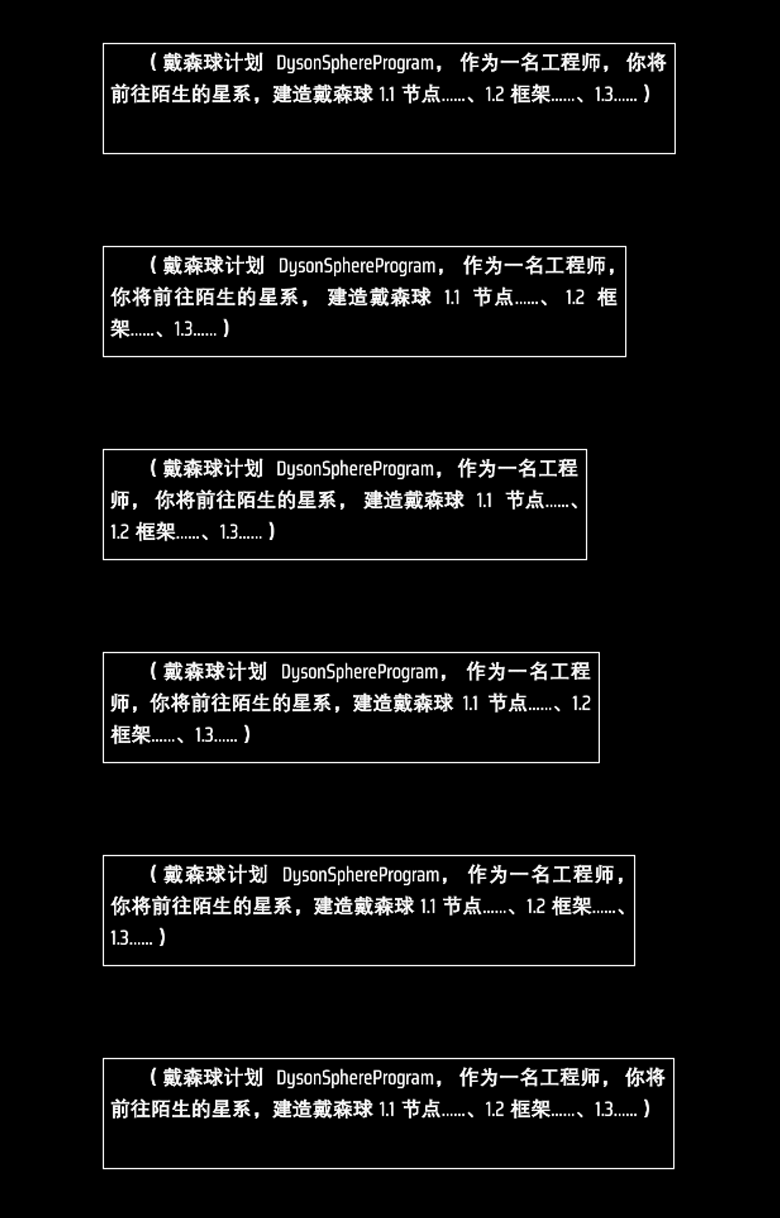
◆ Smart Justification and Line Breaking
As the text container width changes, the component automatically adjusts spacing for a more natural visual flow. Additionally, we have built-in rules for Chinese punctuation, ensuring that line breaks now follow standard typesetting conventions.
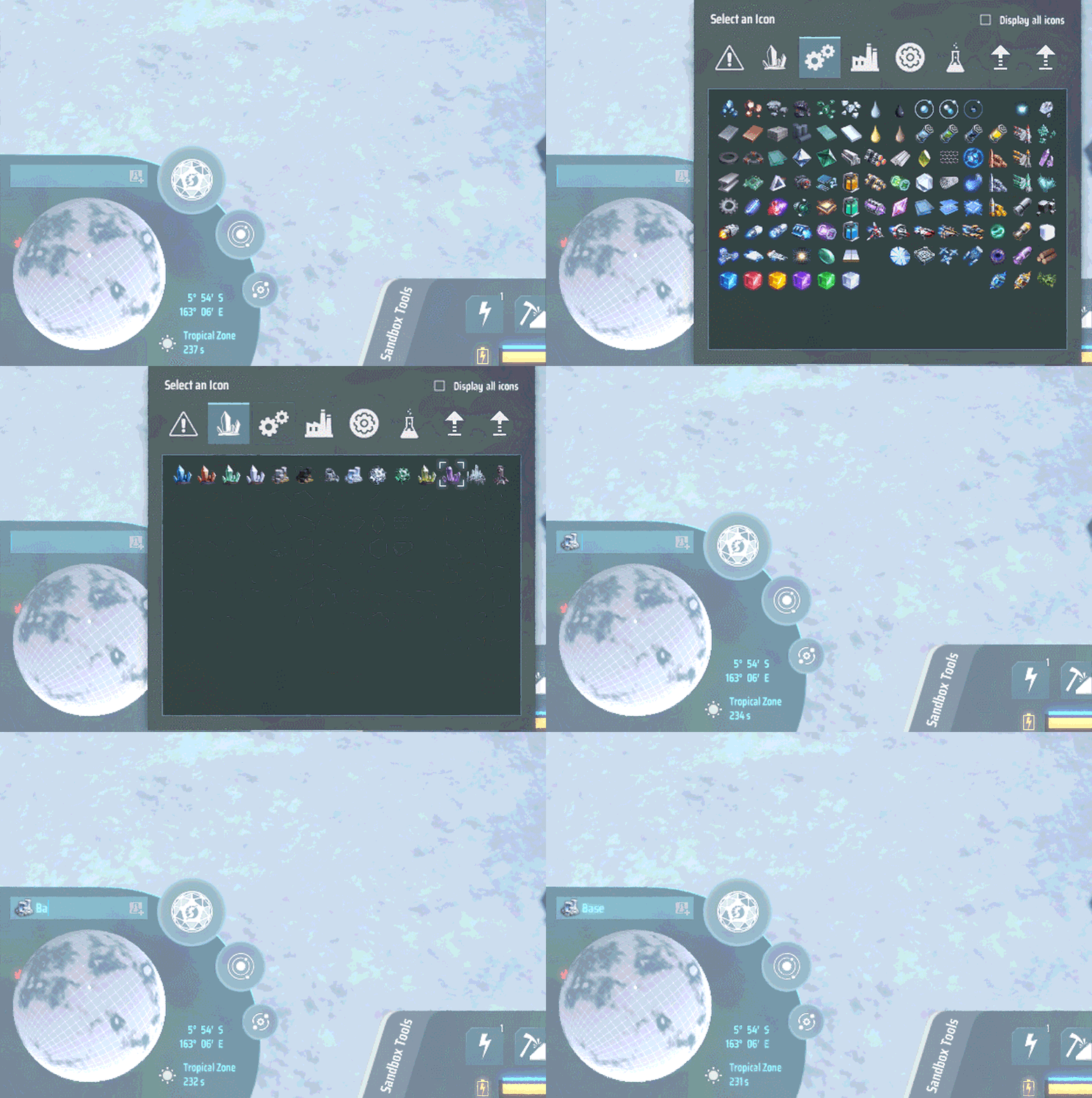
◆ Icon Mapping
The new component supports the insertion of in-game icons directly into the text (such as planet names, Logistics Stations, etc.). This allows players to create much more vivid and informative text content.
◆ Advanced Extensibility
We have also developed a wide range of extended features for the new component, including:
Checkboxes Support

Hyperlink Support

Table Support
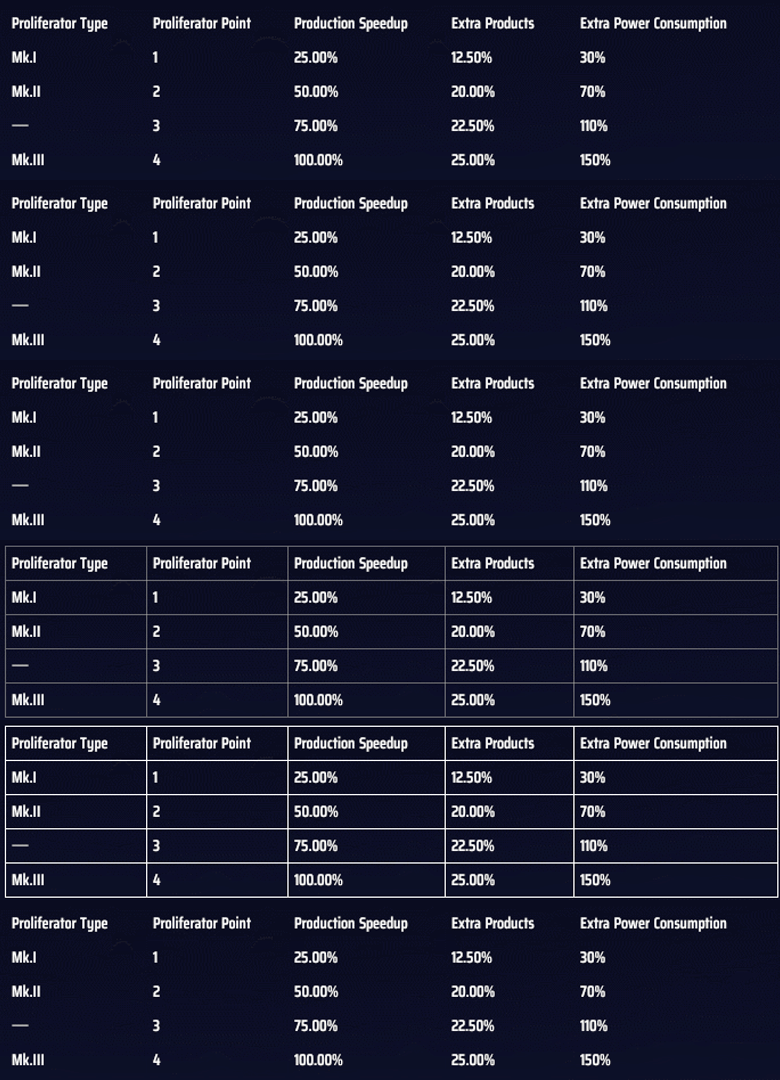
These powerful features provide a solid foundation for the future implementation of an in-game Wiki. Furthermore, this architectural work serves not only the current version but will also benefit the team's future projects. The time and heart invested in this are well worth it; we are truly paving the way for the future.
Alongside our routine development, we are pushing full steam ahead with German and French localization. This is both a fulfillment of the promises made to our backers during the crowdfunding campaign and a major step in bringing Dyson Sphere Program to a wider community.
By integrating into the German and French-speaking communities, we are doing more than just translating words—we are building bridges. We want more players across the globe to be able to immerse themselves in the world we’ve built without any barriers. This is not the finish line; we will continue to roll out more official localizations in the future so that engineers from all over the world can explore the same starry sky together.
Of course, localization involves much more than text translation. It requires a reconstruction of the UI and systems to ensure that players of different languages can experience the game's complex mechanics with clear information and comfortable layouts.
In German and French, phrases are often significantly longer than their English counterparts. For example:
能耗倍率
Energy Cost Ratio
Taux de consommation d'énergie
Energiekosten-Verhältnis
We are actively studying the characteristics of these languages to find the best expressions for the game interface. Where necessary, we will adjust the UI layout to balance visual aesthetics with readability, striving to provide a smooth and complete experience for all players.
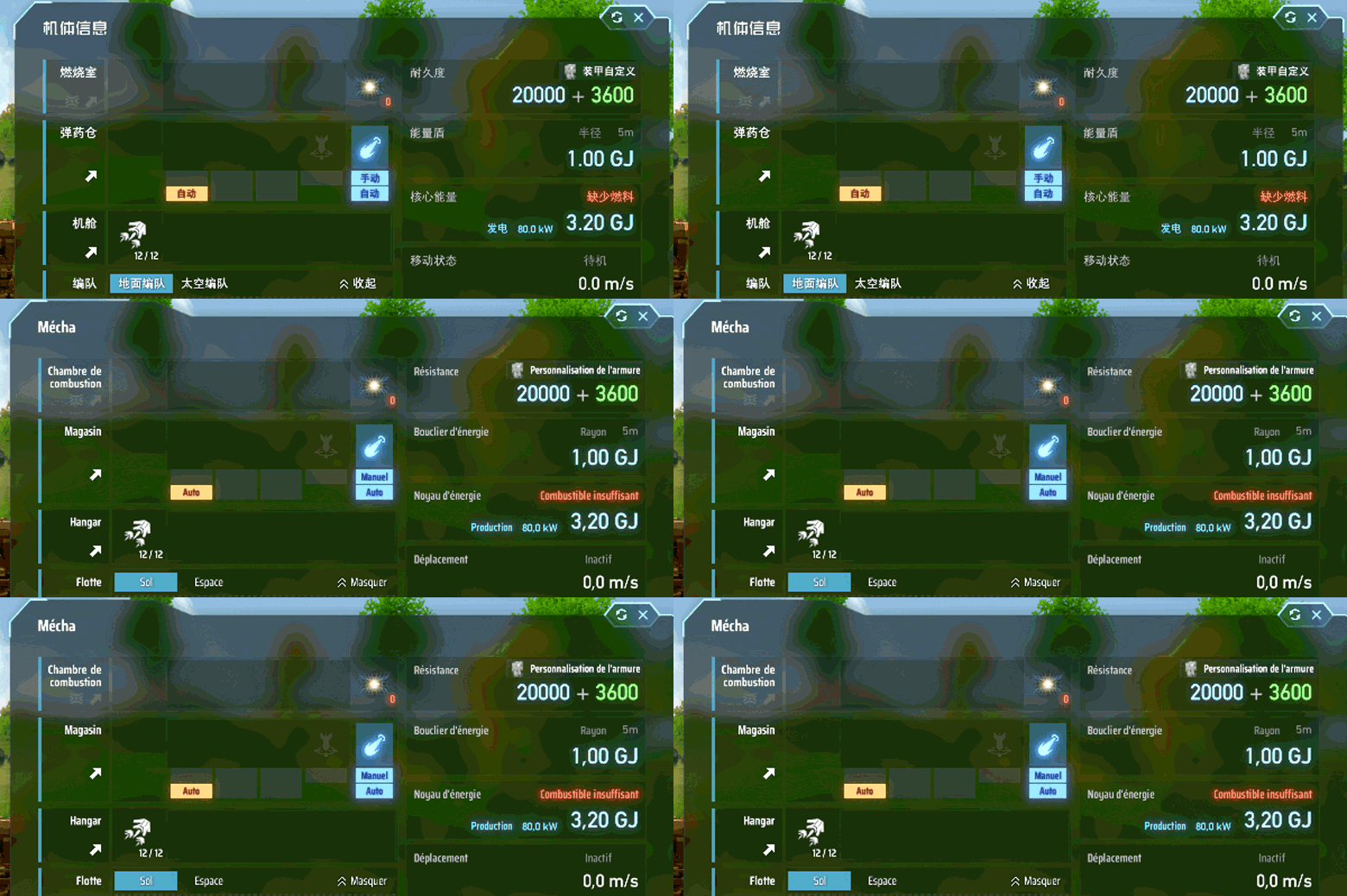
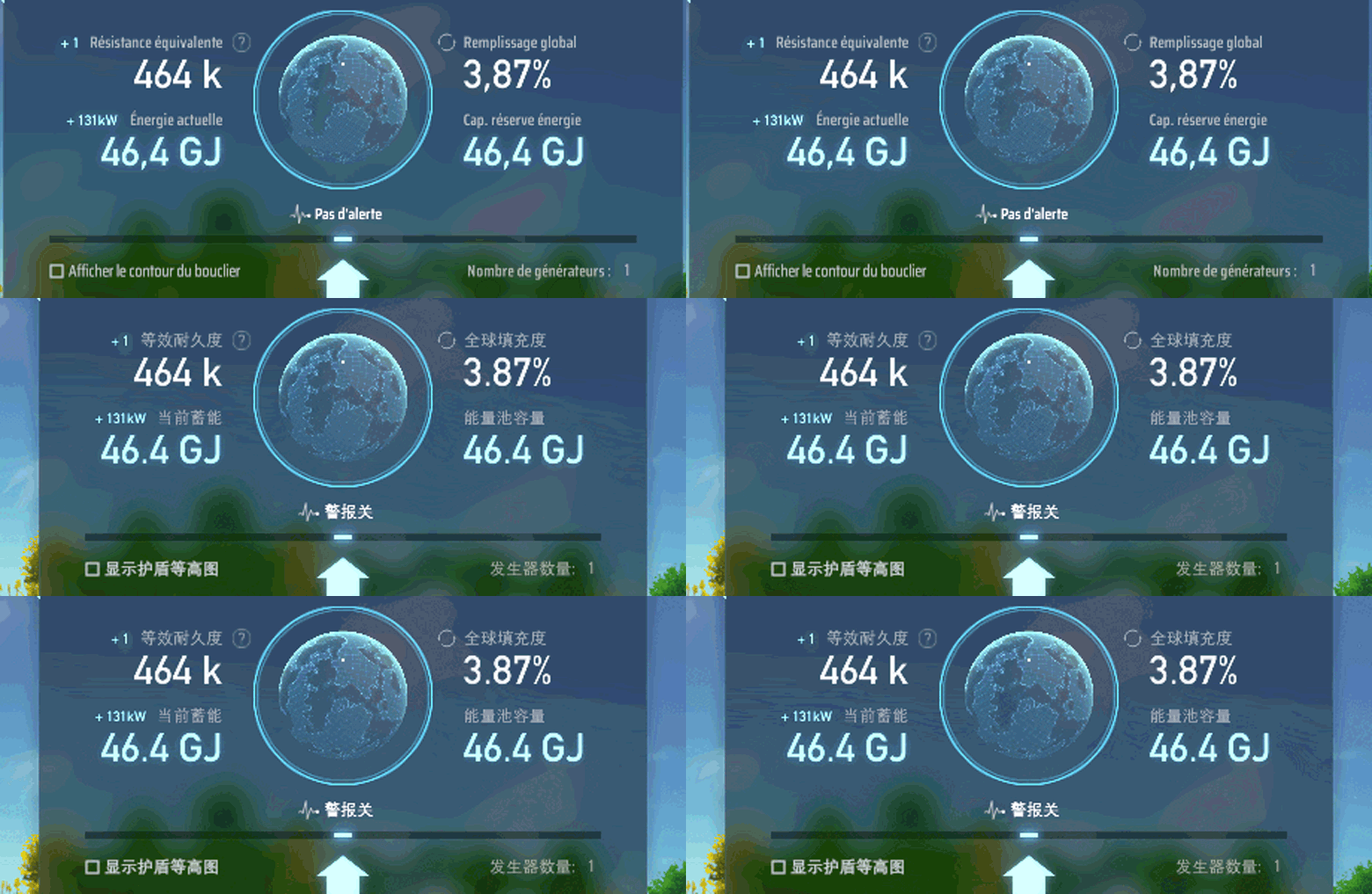
To advance our localization efforts more efficiently, we have developed our own internal localization tool. This allows the team to compare source text with various translations clearly and preview how the text appears in-game in real-time, ensuring accuracy and stylistic consistency.
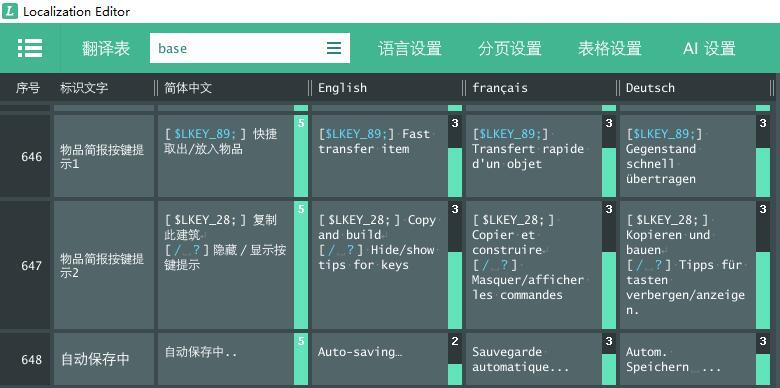
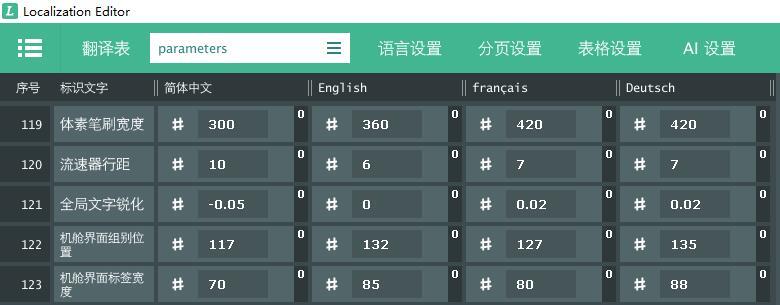
The tool also supports flexible parameter adjustments for multiple languages, allowing us to optimize the interface layout based on the length and typesetting habits of different languages, keeping the display clear and coordinated.
Five years have passed since the first glimmer of a Matrix Research Lab was lit. Today, countless magnificent Dyson Spheres weave across the galaxy. This vast and grand spectacle exists only because of the wisdom and hard work of every single one of you. Your creativity and passion have collectively painted this cosmic canvas.
New tools, new languages, and new technical remakes—all these changes and upgrades are here to better support your boundless imagination. Looking further ahead, vehicle systems, space combat, and space stations are already on the horizon.
The universe is vast and limitless.
Let’s keep building toward the future together!
(A Special Shout-out: The header image for this update was captured by zensstrive, one of the winners of our "Lunar Mission" screenshot contest. Thank you for sharing your journey through the stars with us!)

The new year begins, and time moves forward. No matter where you are or how fast your pace, there is always a universe waiting for your return. Thank you for every session, every effort, every moment of persistence. In the year ahead, Dyson Sphere Program will still be by your si

Santa Icarus sends his Xmas wishes to all Engineers: May this Christmas be a time to slow down a little and spend it with those who matter most — and let Icarus keep the factories running across the universe. 🎁 Wishing you a Merry Christmas, full matrices, and smooth production
Dear Engineers, Time flies — another year, another round of the Steam Awards! Dyson Sphere Program has now been with you for almost five years. From the very first factory rising from the ground, to countless Dyson Spheres shining across the stars, this journey has been made spec
Dear Engineers,
Time flies — another year, another round of the Steam Awards! Dyson Sphere Program has now been with you for almost five years. From the very first factory rising from the ground, to countless Dyson Spheres shining across the stars, this journey has been made special by every build you placed and every piece of feedback you shared.
Throughout these five years, we've kept our sense of awe and passion, continually cultivating this shared universe of ours.
Since the start of Early Access in 2021, here's what we've added:
2021 — Civilization Type III System, Blueprint system, Milestones & Achievements
2022 — Mecha Customization and Sandbox Mode
2023 — Combat System added with the Rise of the Dark Fog update
2024 — New Logistics System
2025 — New Multithreading System
…and more to come.
We know many of you are eager for even more content — rest assured, the team is still working at full speed to bring fresh energy into the game!
Because of this continued effort, we hope to once again earn your support. Please cast your vote for Dyson Sphere Program in the Labor of Love Award category. This award is not only recognition of our long-term updates, but also a tribute to every Engineer who has stayed with us through it all.
🗳️ How to Vote:
1:Visit the Steam Awards page:
https://store.steampowered.com/steamawards/nominations/2025

2:Find the Labor of Love Award category

3:Select Dyson Sphere Program and submit your vote!
And here's a little preview of something exciting—our 5th Anniversary Celebration for Dyson Sphere Program! On January 21st, 2026, together with our publisher GamirrorGames, we'll launch the 5th Anniversary Celebration! We'll share development updates and reveal some new content we've been working on—something worth looking forward to!
You are the ones who keep this universe expanding. You are the reason every update matters. Cast your vote today, and let's show that sincere dedication deserves to be seen—and long-lasting passion always echoes back. Stay tuned for more news. See you at the 5th anniversary!

For Icarus, it’s the perfect time to suit up in a brand-new mech! Jump into Dyson Sphere Program, give your Icarus a festive makeover, and then—go “visit” our lovely neighbors, the Dark Fog! 👻
Greetings, Engineers! Here is today's full update log: Version 0.10.33.27024 ● Fixed a bug when copying blueprints, if a slightly exceeded the tropic line, the blueprint would be split into two subareas. ● Fixed an issue where the ’s brief information panel would retain item info
Greetings, Engineers!
Here is today's full update log:
● Fixed a bug when copying blueprints, if a [Conveyor Belt] slightly exceeded the tropic line, the blueprint would be split into two subareas.
● Fixed an issue where the [Logistics Distributor]’s brief information panel would retain item information from other buildings when there were excess items.
● Fixed an issue where SSAO display errors caused incorrect perspective effects in certain situations.
● Fixed a bug where the Central Core visual effects of the Spce Dark Fog appeared incorrectly scaled.
● Fixed a bug where Starmap grids might exhibit intense white overexposure on AMD graphics cards.
● Fixed an issue where [Ground Plasma Towers] might display black dots on AMD graphics cards.
Greetings, Engineers! In our last update, we rolled out and the . Since then, we’ve been keeping a close eye on your discussions and feedback — and we really appreciate all the ideas and reports you’ve shared with us! Based on your input, we’ve been hard at work polishing things
Greetings, Engineers!
In our last update, we rolled out [Blueprints with Foundations] and the [New Multithreading System]. Since then, we’ve been keeping a close eye on your discussions and feedback — and we really appreciate all the ideas and reports you’ve shared with us! Based on your input, we’ve been hard at work polishing things up with a round of fixes and improvements.
Here is today's full update log:
● Added an [Auto-Assign] mode to the advanced settings of multithreading system, which is selected by default. When enabled, the operating system will automatically assign logical processors to game threads.
● Added an [Attack Dark Fog Buildings] toggle to the fleet panel in the combat interface, allowing players to control whether Icarus’ ground or space drone fleets attack Dark Fog structures.
● When a Splitter inputs stacked cargos into a Depot above it, if the slots in the Depot cannot fully
accommodate the stack, the stacked items will be split before being input.
● Newly saved blueprints will now be auto-selected in the [Blueprint Library].
● Players can now directly enter blueprint mode from the [Planetary View].
● Fixed a bug where thread affinity binding failures were not handled silently in certain system environments.
● Fixed an issue where the copied blueprint area might be slightly larger than the actual range when copying blueprints.
● Fixed a bug where Logistics Bots interact with Inventory might cause an error when viewing blueprint data.
● Fixed an issue where dragging the [Research Queue] after pausing game time in the [Tech Tree] would cause incorrect animation behavior.
● Fixed a bug that prevented pasting a Dyson Sphere blueprint with a text length exceeding 300,000 characters after copying it.

Engineers, long time no see! Over the past few weeks, we've gone through the public test of the new multithreading system together. A big thank you to everyone who actively joined the test and shared feedback — your patience and valuable input helped us improve stability and effi
Engineers, long time no see!
Over the past few weeks, we've gone through the public test of the new multithreading system together. A big thank you to everyone who actively joined the test and shared feedback — your patience and valuable input helped us improve stability and efficiency step by step.
Today, we're excited to announce: The old multithreading system has officially retired, and new one is live!
To help everyone get the most out of the new system, we've prepared a Multithreading Setup Guide.
Offering different core binding strategies tailored for different hardware and needs. We hope this helps you enjoy smoother and more stable gameplay with noticeable performance improvements.
If you run into any issues, please check out the guide for reference, or join our official Discord server and report in the #bug-report channel. Our team will review and address problems as soon as possible.
In addition to the new multithreading system, we've also made a number of gameplay optimizations and updates.
● Added foundation copy-paste in [Blueprint Mode]: Create blueprints with foundation data in [Blueprint Copy Mode], and paste foundations in [Blueprint Paste Mode].
● Added [Blueprint Foundation Limit] upgrade under [Mass Construction] tech to increase blueprint foundation capacity.
● In [Surface Modification Mode], hold [Shift] to drag-place straight foundations along latitude/longitude lines.
● Added rectangle drag-building (hold [Ctrl]) for [Tesla Tower], [Wind Turbine], [Solar Panel], [Accumulator], and [Ray Receiver].
● Added drag-reordering for technologies in the [Research Queue].
● Optimized the Vein Stats charts in the[Dashboard]; now the minimum vein reserves can be viewed. Even if all veins in the chart are depleted, the mineral type remains visible.
● Most charts in the [Dashboard] now include a [Continuous Tracking] feature. Clicking the button allows continuous tracking of the chart’s target in the main scene.
● Modified the Power tab in the [Statistics Panel], adding statistics for [Planetary Shield Charging Power].
● After enabled power grid visualization, now it shows coverage area during pre-construction of power node buildings.
● Updated building panels for [EM-Rail Ejector], [Vertical Launch Silo], [Energy Exchanger] and power generators like [Artificial Star] to display Proliferator effects, improving pre/post-application comparison.
● During demolition or upgrading, building types that are not checked will be ignored, allowing clicks to directly select eligible buildings behind them.
● Fixed a bug where the phase shift of a [Jammer Tower] might be inconsistent after saving and loading game data.
● Fixed a bug where vegetation removal in Sandbox Mode accidentally deleting planetary visual effects.
● Fixed a bug where errors might occur during area vein removal in Sandbox Mode.
● Completely overhauled the [Multithreading System]. The new multithreading system can more efficiently unleash performance potential, bringing more frame rate improvements in large-scale factories.
● [Game Settings]: Added advanced settings for the new multithreading system. The advanced settings include [Main Thread Binding Strategy], [Worker Thread Binding Strategy], [Thread Phase Waiting Strategy], and [Thread Frame Waiting Strategy] — 4 customizable strategies. By customizing these strategies, players can better utilize the new multi-threading system.
● Overhauled the [Statistics Panel] performance test. The new performance test is compatible with the overhauled game core logic, helping players better analyze game performance overhead.
● Added [Performance Deep Profiler]. This tool can be accessed by clicking the [Deep Profile] button in the Performance Test (CPU). It provides real-time operational data for all game logic, allowing players to directly observe the execution methods and efficiency of the game's core logic.
● Remade [Video Settings] display mode. It provides 3 options: Borderless(cursor freed / confined), Exclusive Fullscreen, Windowed. The maximum resolution for Windowed mode is the maximized window size excluding window borders and taskbar space.
● Now shadow casting can be set in [Video Settings]. Turning it off can slightly reduce rendering overhead.
● Now the maximum duration of ground Dark Fog debris can be set in [Video Settings].
● [Statistics Panel] Production: Added sorting by ascending / descending consumption rate.
● [Build Menu] Upgrade Facilities: Added upgrade/downgrade by 3 levels functionality.
● [Blueprint Library]: Added [Facility Only] button. When pasting a blueprint code, information related to the blueprint such as description will remain unchanged.
● [Sandbox Mode]: Added [Instant Dismantle] in sandbox tools. When enabled, dismantling a building will destroy all items inside and return the building only.
● Add 3 [Monitor Mode] for Dark Fog Monitor in [Starmap]. Now it can monitor Dark Fog Space Hives and Planetary Bases in other planets or planetary systems. (This setting will not import or export to gamesave due to maintain the consistency of archived data of test branch and main branch.)
● [Mecha Panel]: Add [Auto Replenish Warper]. After enabled, it will replenish warpers from Inventory to mecha if mecha ran out its warpers. (This setting will not import or export to gamesave due to maintain the consistency of archived data of test branch and main branch.)
● Added custom thread affinity mask functionality, which can customize CPU binding strategy for each thread. It can be accessed through the [Performance Deep Profiler] or advanced settings for the multithreading system.
● [Ray Receiver] logic now uses Dynamic Allocation Strategy in multithreading, improving CPU core utilization.
● [Power System] updates in worker threads synchronize with [Logistics Station Conveyor Inputs] in the main thread, improving CPU core utilization and operational efficiency.
● [Dark Fog Ground Towers and Units] logic added to multithreading with Dynamic Allocation Strategy, improving CPU core utilization and operational efficiency.
● [Various Factory Facilities] logic uses Dynamic Allocation Strategy in multithreading, improving CPU core utilization.
● [Sorter], [Conveyor Belt], and [Cargo Rendering] logic adopt Dynamic Allocation Strategy in multithreading, improving CPU core utilization.
● [Sorter] logic updates in worker threads synchronize with [Storage Tanks], [Enemy Animations], and [Trash] in the main thread, improving operational efficiency.
● [Splitter], [Automatic Piler], [Spray Coater], [Monitor], and [Logistics Station Conveyor Outputs] logic added to multithreading with Dynamic Allocation Strategy, improving CPU core utilization and operational efficiency.
● Core logic of [Turrets] added to multithreading with Dynamic Allocation Strategy. Updates synchronize with related positional logic of [Dyson Swarm] and [Dyson Sphere] in the main thread, improving CPU core utilization and operational efficiency.
● [Rockets] use Dynamic Allocation Strategy in multithreading and synchronize with [Sector Management] in the main thread, improving CPU core utilization and operational efficiency.
● [Statistics] added to multithreading and synchronized with [Warning System] in the main thread, improving CPU core utilization and operational efficiency.
● [Solar Sail Projectile] added to multithreading with Dynamic Allocation Strategy, improving CPU core utilization and operational efficiency.
● [Logistics Station Conveyor Inputs] logic added to multithreading with Dynamic Allocation Strategy, improving CPU core utilization and operational efficiency.
● Swapped the execution order of the [Lab Transfer Logic] and the [Logistics Station Transport Logic] within the same barrier. Since the [Lab Transfer Logic] adopts a Dynamic Allocation Strategy, executing it last within the barrier can improve CPU core utilization.
● Optimized the space-searching algorithms for both the [Ground Defense] and [Turret] , improving CPU runtime efficiency. Additionally, enhanced the [Turret] kill efficiency against space units.
● [Statistics Panel] Power: Facilities not connected to a power grid will no longer be recorded in power demand.
● When opening the [Blueprint Library], it now defaults to the latest browsed folder from current session.
● [Replicator] Recipe tip now only displays the formula for that recipe, and no longer shows all formulas for this item.
● Optimized the pop-up position of [Dashboard] tooltips to ensure that the content is not obscured by other UI elements.
● Adjusted the box colliders of miniature particle collider. After dragging to build, it allows a Tesla Tower to be built between two miniature particle colliders.
● The maximum level of [Communication Control] has been modified to 88.
● Click the in-game clock in the bottom-right menu to toggle between 12-hour clock and 24-hour clock.
● Optimized the overhead of scheduling in the multithreading logic of the Power System and Trasnport System.
● The multithreaded logic of Splitters implements a post-barrier in sandbox mode to prevent corruption in some digital circuit save files.
● When a Dyson Shell absorbs solar sails, it prioritizes starting with the solar sails that have the shortest remaining life.
● Fixed an issue where opening the Dyson Sphere Panel (Y) while the Dashboard was active could cause incorrect background colors on side UI elements.
● Fixed mouse wheel zoom responsiveness in the Dyson Sphere Panel (Y) when accelerating logic frame rates in outer space.
● Fixed incorrect display of the 3×1 layout of [Facility Storage Stats] for conveyor belts and logistics stations in the Dashboard.
● Fixed a bug where the number of [Facility Storage Stats] for storage tanks is incorrect after selected monitoring current and overhead facilities.
● Fixed a bug where destroying space units such as Relay Stations and Lancers may leave black shadows at the original location.
● Fixed a bug where disabling the construction function of mecha construction drones might cause an error.
● Fixed an issue on the [Load Game Panel] where pressing [Esc] after clicking “Load” would exit the entire panel instead of just closing the dialog.
● Fixed a bug where "Matrix" text fails to highlight when the mouse quickly moves across different matrices in the [Matrix Lab Panel].
● Fixed a bug where some plants are missing icons in [Combat Tab].
● Fixed a bug where abnormal detection could be incorrectly triggered upon reaching extremely high mineral utilization levels.
● Fixed several UI layering issues.
● Corrected various localization text.
● Fix text display issues in the Performance Test panel when CPU real-time monitoring is disabled.
● Fixed incorrect key mapping issues for non-QWERTY keyboards.
● Fixed a bug where the soil pile consumption amount was incorrect when blueprint pasting under certain situations.
● Fixed a bug where the camera will respond incorrectly when mouse scrolling in the [Update Log Window].
● Fixed a bug where taking a Laser Turret from the inventory and placing it over an existing one or its preview hologram would disable the attack priority settings for all enemy types.
● Fixed a bug where when removing nodes in a power grid with a large number of nodes may cause stack overflow.
● Fixed the inconsistent power grid connection relationship after removing a shared building that connected more than 24 independent grids.
● Fixed a bug where the amount of soil pile consumed was displayed or calculated incorrectly when using foundation to fill in a Dark Fog Core Driller.
● Fixed a bug where Solar Sail bullets were rendered at incorrect positions in single-threading mode.
● Fixed a bug where the [Logistics System] segment in the CPU pie chart of the performance test could have an incorrect position or length.
● Fixed a bug where the tip may be incorrect when entering Blueprint Paste Mode.
🌌 Multithreading Setup Guide In this update, we have completely rebuilt the multithreading system and provided multiple options for players to customize their threading strategy. These options can be adjusted through the (accessible from Performance Test (CPU), click the button)
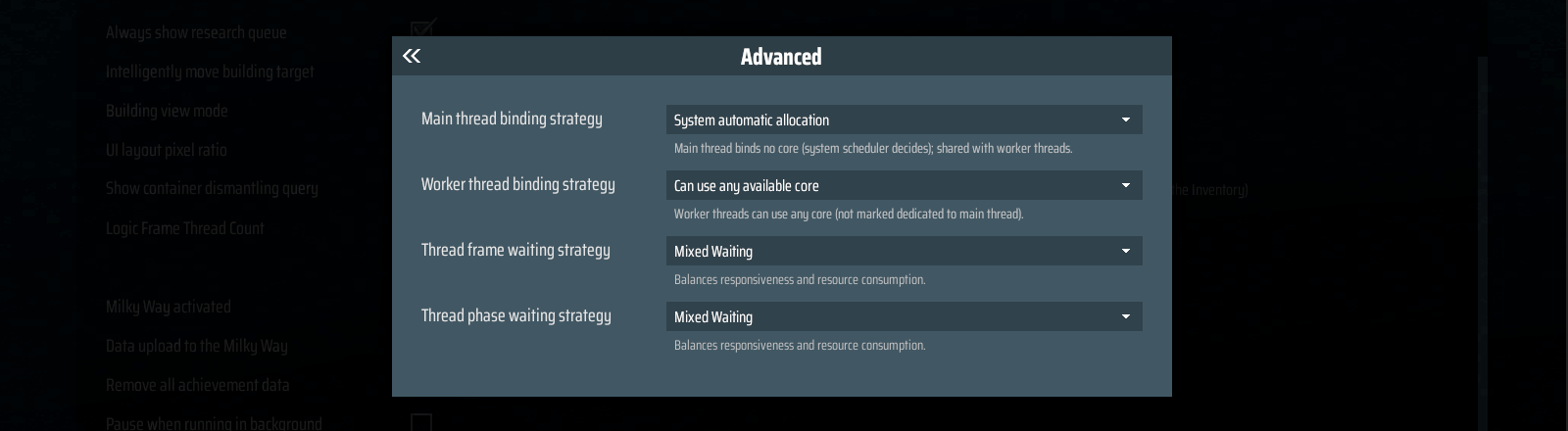
In this update, we have completely rebuilt the multithreading system and provided multiple options for players to customize their threading strategy. These options can be adjusted through the [Deep Profiler] (accessible from Performance Test (CPU), click the [Deep Profile] button), or in the Advanced Multithreading Settings under the [Settings]-[Gameplay].
During the testing phase, many players felt uncertain about how to configure the multithreading system. Below, we'll share some commonly used setup plans.
For players who don't want to tweak too much, the default settings are usually fine. However, if the default setup causes some stuttering, you can try the following configuration instead:
● Main Thread Binding Strategy: System Automatic Allocation
● Worker Thread Binding Strategy: Can Use Any Available Core
● Thread Frame Waiting Strategy: Mixed Waiting
● Thread Phase Waiting Strategy: Mixed Waiting
This setup is highly versatile and works well for most situations.
Now let's look at some more advanced setup plans:
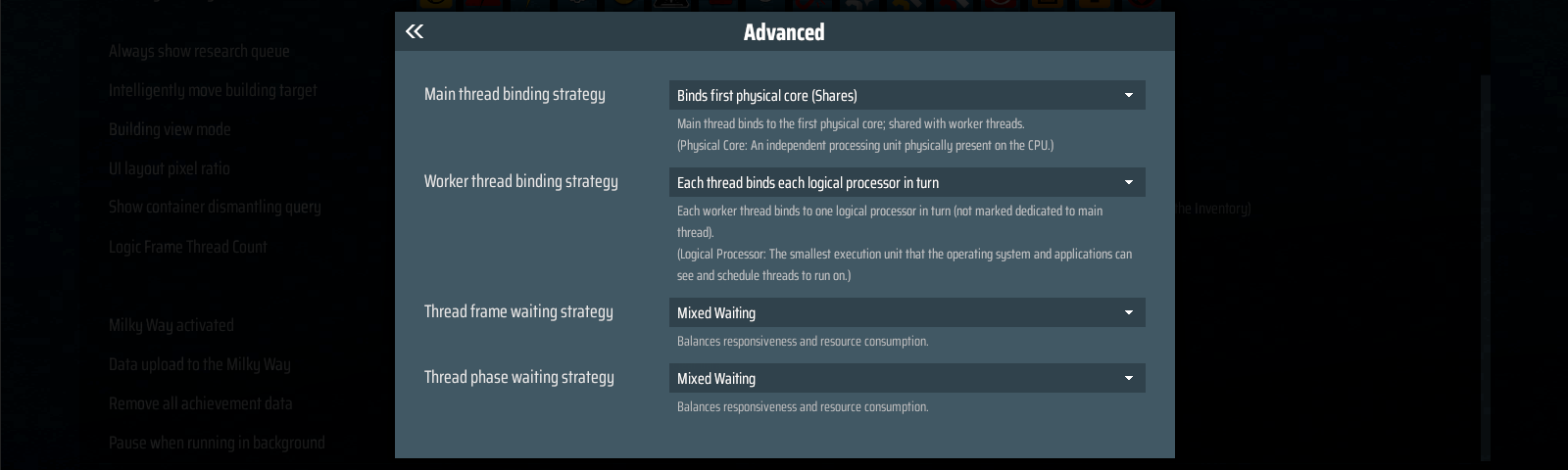
If you are aiming for better game performance, you can try:
● Main Thread Binding Strategy: Binds First Physical Core (Shares)
● Worker Thread Binding Strategy: Each Thread Binds Each Logical Processor in Turn
● Thread Frame Waiting Strategy: Mixed Waiting
● Thread Phase Waiting Strategy: Mixed Waiting
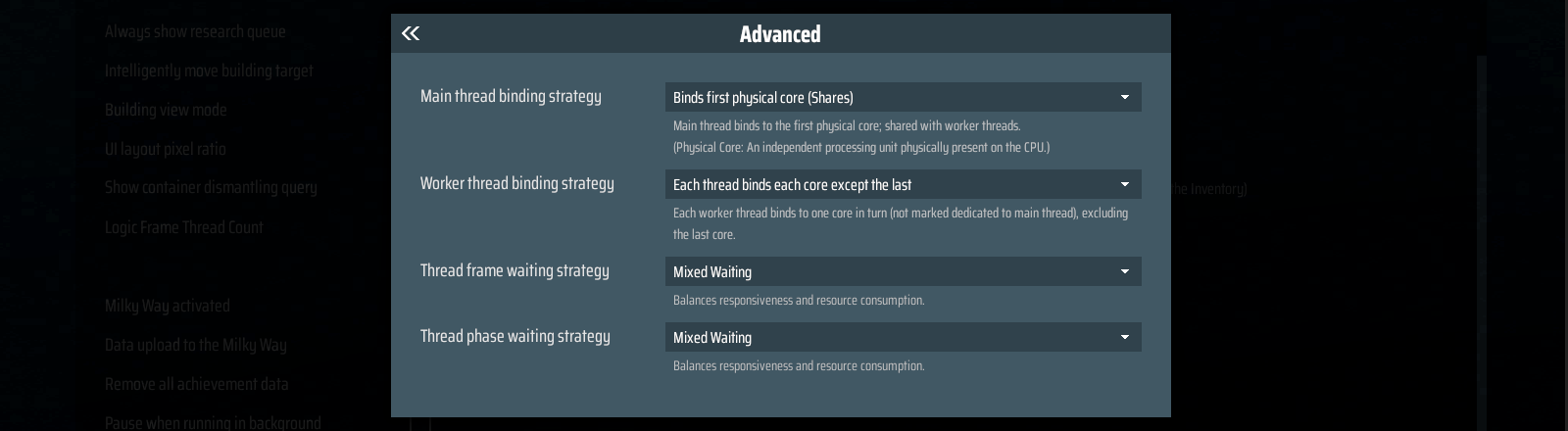
If you often run multiple applications at the same time and need to reserve performance for them, you can try:
● Main Thread Binding Strategy: Binds First Physical Core (Shares)
● Worker Thread Binding Strategy: Each Thread Binds Each Core except the last
● Thread Frame Waiting Strategy: Mixed Waiting
● Thread Phase Waiting Strategy: Mixed Waiting
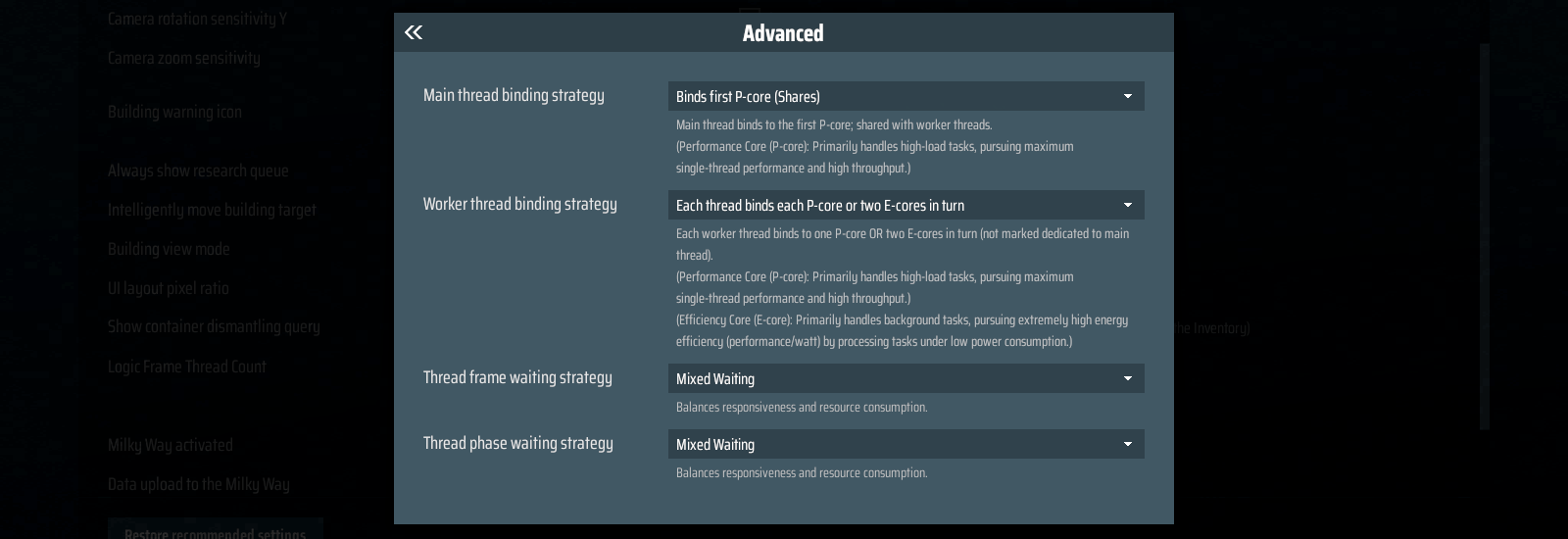
If you are aiming for better game performance, you can try:
● Main Thread Binding Strategy: Binds First P-Core (Shares)
● Worker Thread Binding Strategy: Each Thread Binds Each P-core or Two E-cores in turn.
● Thread Frame Waiting Strategy: Mixed Waiting
● Thread Phase Waiting Strategy: Mixed Waiting
If you often run multiple applications at the same time and need to reserve performance for them, you can try:
● Main Thread Binding Strategy: Binds First P-Core (Shares)
● Worker Thread Binding Strategy: Each Thread Binds Each Core Except the last
● Thread Frame Waiting Strategy: Mixed Waiting
● Thread Phase Waiting Strategy: Mixed Waiting
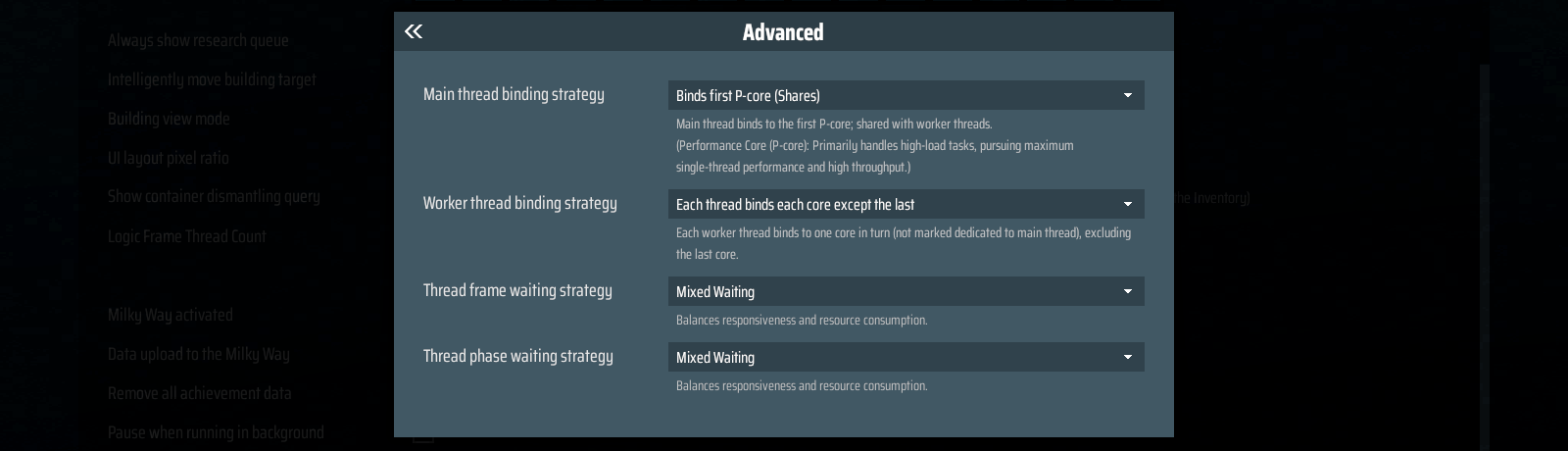
Above are general-purpose setups, but depending on your hardware, actual performance may vary — they are not guaranteed to be optimal.
Of course, for hardcore players who want to fine-tune and find the strategy that works best for them, we've also developed the Custom Core binding Feature. This allows players to configure CPU core binding strategies for each individual thread.
You can find this feature in the Advanced Multithreading Settings. By setting the Thread Binding Strategy to Custom Core Binding, you will be able to modify the binding for each thread.
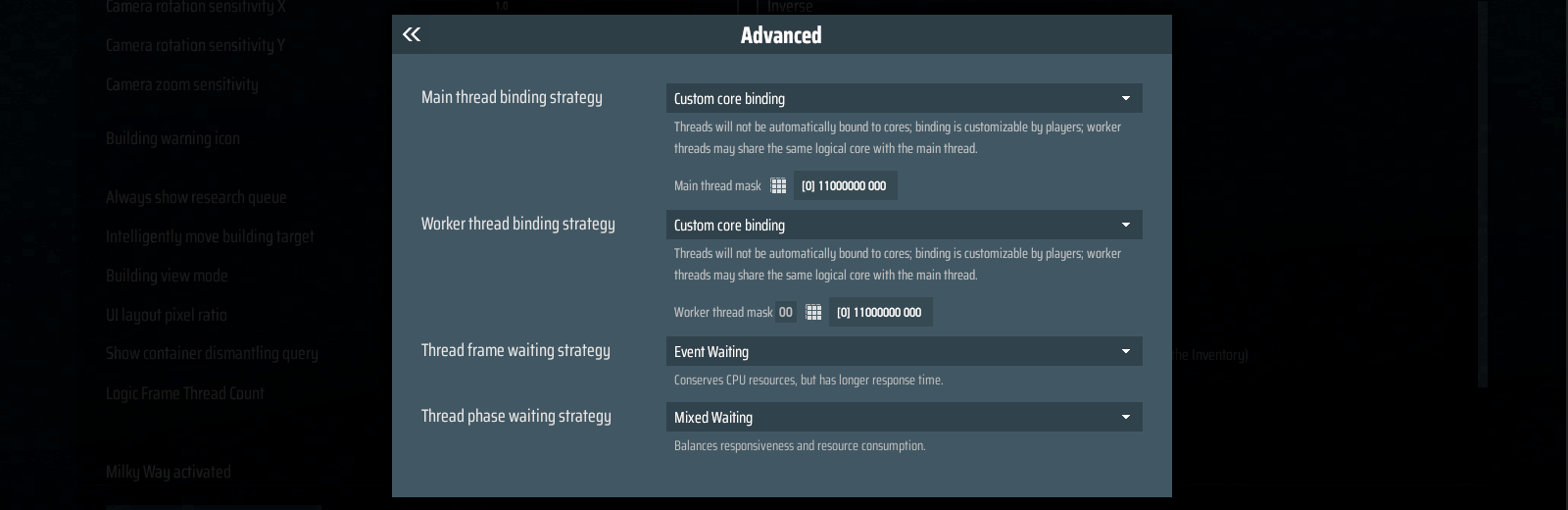
For example:
Worker Thread Mask 00 means you are editing the settings for Worker Thread 00. [0] 11000000 0000 is the mask. [0] is the thread group(this is usually set to 0, unless the thread count exceeds 64).
The binary mask after that indicates the logical processors for this thread: 1 means it can run on that processor, 0 means it cannot.
In this example, Worker Thread 00 is allowed to run on the first and second logical processors(CPU0 & CPU1), but not on the others.
This configuration can also be accessed through the [Deep Profiler], by clicking into each thread for settings.
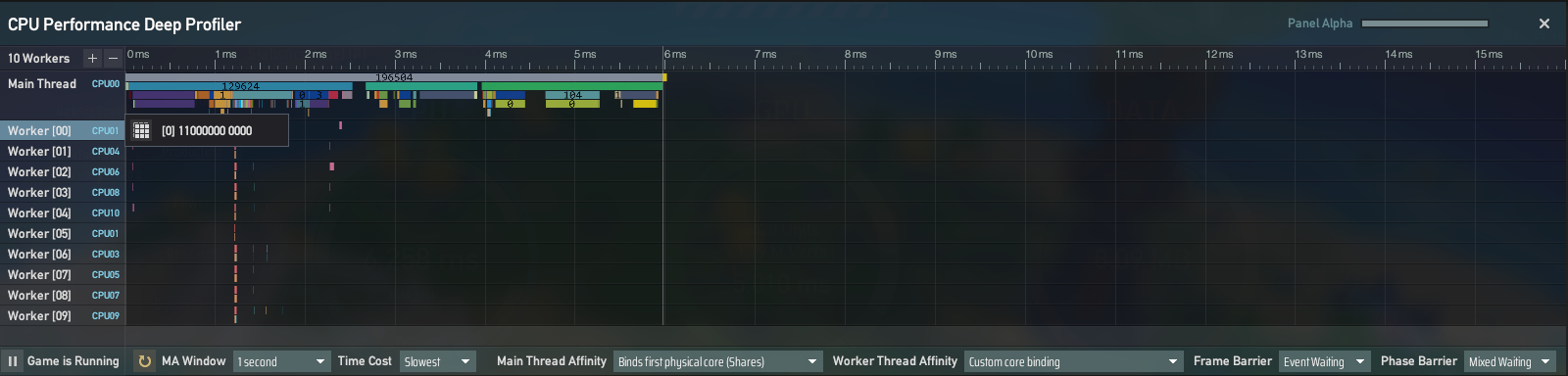
For players who want to further understand each option, we've also included detailed explanations for every setting inside the Advanced Multithreading Settings. Players can reference these notes while experimenting with their configurations.
During previous development and maintenance, we felt that the program's performance had reached its limits. If we implement the Vehicle System in the future, the game may need to simulate thousands of additional components, far beyond the capacity of the old multithreading system.
The old multithreading system had some major flaws by design: it supported very few task types, had high synchronization overhead at each stage, and splitting logic into forced multithreading often brought little performance gain while adding high maintenance costs. Hastily converting logic to multithreading could result in minimal performance improvement, while dramatically increasing code complexity.
That's why we've recently carried out a complete overhaul of Dyson Sphere Program's multithreading system, paving the way for the upcoming Vehicle System. Here's a closer look at the key features of this brand-new system.
1.Customizable Core Binding: In the old system, threads were automatically assigned by the operating system, a "black box" mechanism that often led to inefficient CPU utilization. Now, players can manually assign threads to cores, eliminating performance waste caused by system scheduling.
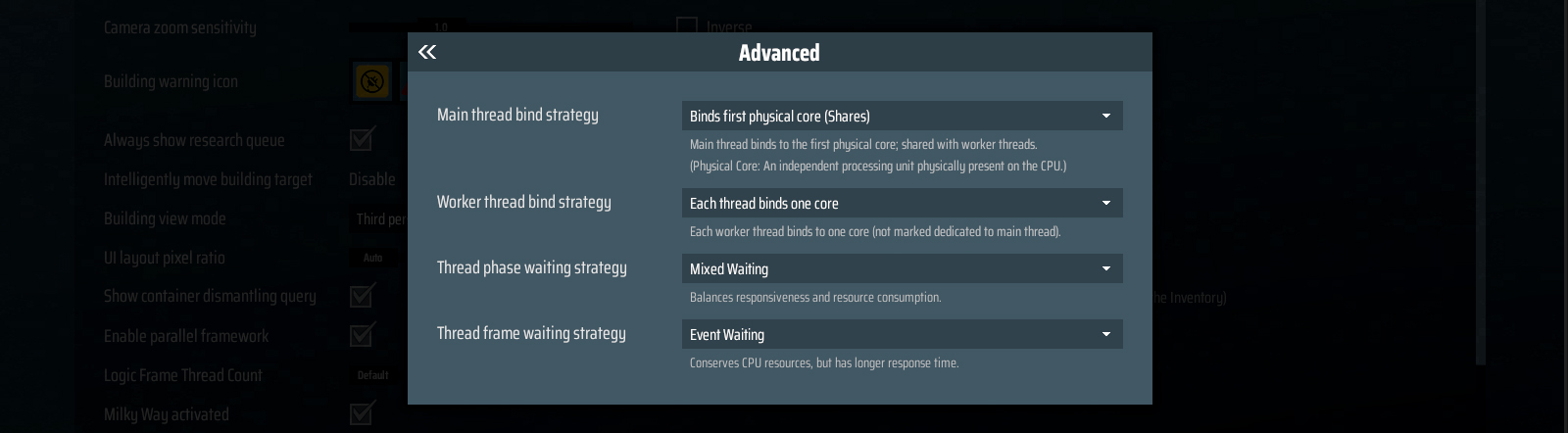
(Multithreading Strategy Customization Panel)
2.Dynamic Task Distribution: Tasks are now evenly distributed across threads, and once a thread finishes its share, it can assist with tasks from other threads until the workload is balanced.
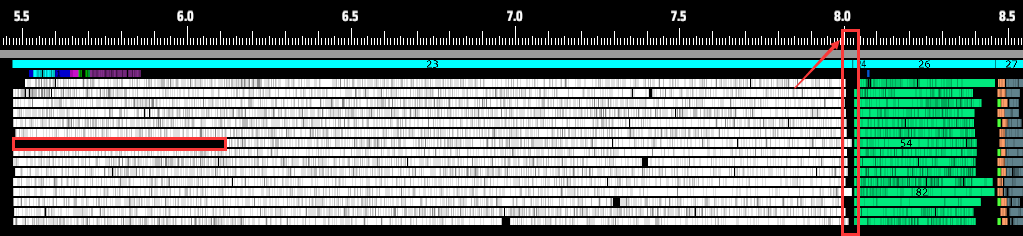
(Even if one thread starts slower, nearly all threads now finish at the same time)
3.More Flexible Framework Design: We are no longer limited to "one task type per multithreading stage." Instead, logic can be broken into multiple tasks and flexibly combined, enabling "multi-task per stage." This flexible framework allows running multiple tasks in parallel; offloading logic that was previously locked to the main thread into other facilities' logic; pairing non-distributable tasks with distributable ones, making better use of idle CPU cycles.
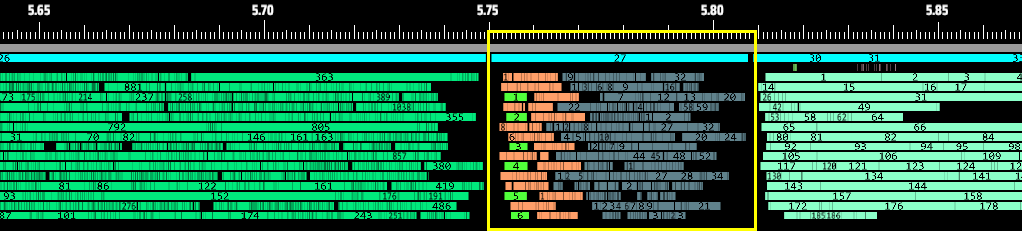
(Flow Monitors, Sprayers, and Logistics Station belt outputs running in parallel now take less than 0.1ms in total)
4.Multithreading Communication & Waiting Mechanism: The new system uses much faster spinlocks (~10ns) to link tasks, combined with a hybrid spin–blocking model: Spinlocks for very short execution times; and blocking locks for longer CPU-intensive tasks. This minimizes the response delay between one task ending and the next starting.

(New multithreading wait times are clearly shorter than the old system )
5.Brand-New Performance Profiler: Since the game’s core logic has been completely restructured to allow multiple task types to run in parallel, we’ve also developed a brand-new performance analysis tool.This profiler clearly shows how the new logic operates and how efficient it is.
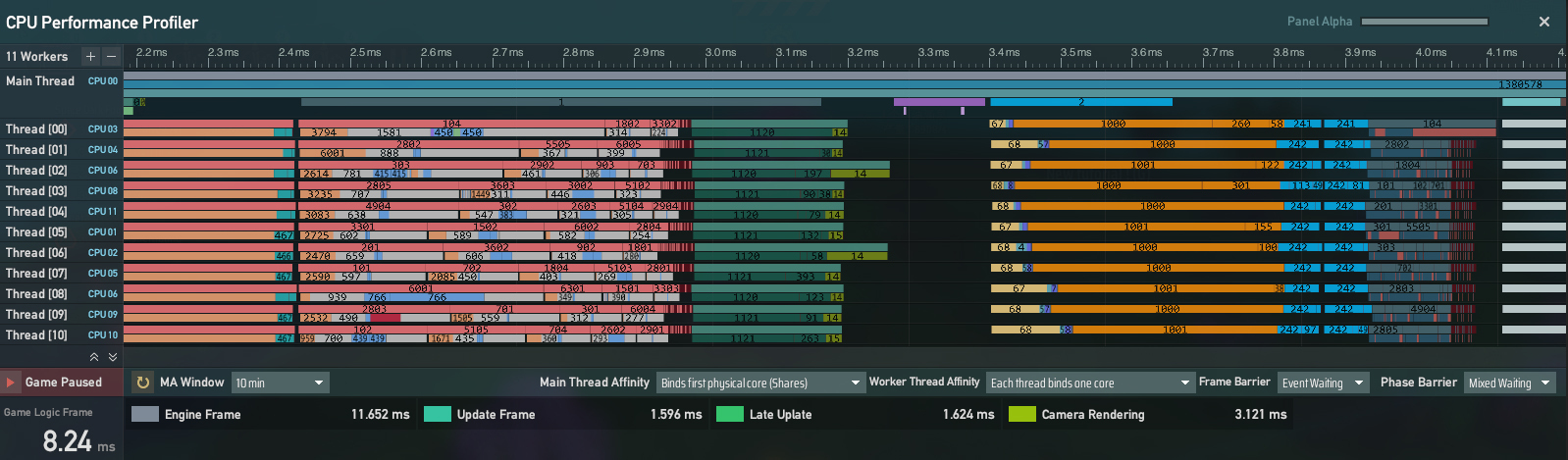
The above is the interface of the Deep Profiler: The horizontal axis represents game runtime. Each row corresponds to a specific thread’s workload per frame. This tool helps players understand the inner workings of their CPU in real time.
The above is excerpted from our earlier devr log on the multithreading system update. For more details, you can check it out here:
In the gaming community, you never know what surprises players will bring. During the public test, one player shocked us by running the multithreaded version of DSP on a Threadripper CPU!
Not only was it jaw-dropping, but it also brought us valuable feedback: our game didn't seem to support more than 64 threads. We quickly located and fixed this "happy problem."
But the story doesn't end there! Facing such high-end hardware, we ran into another problem—our team didn't have such a "god-tier" equipment to test on. So, we made a bold decision: shamelessly asking the player if we could "borrow" his CPU power for a round of benchmarking.
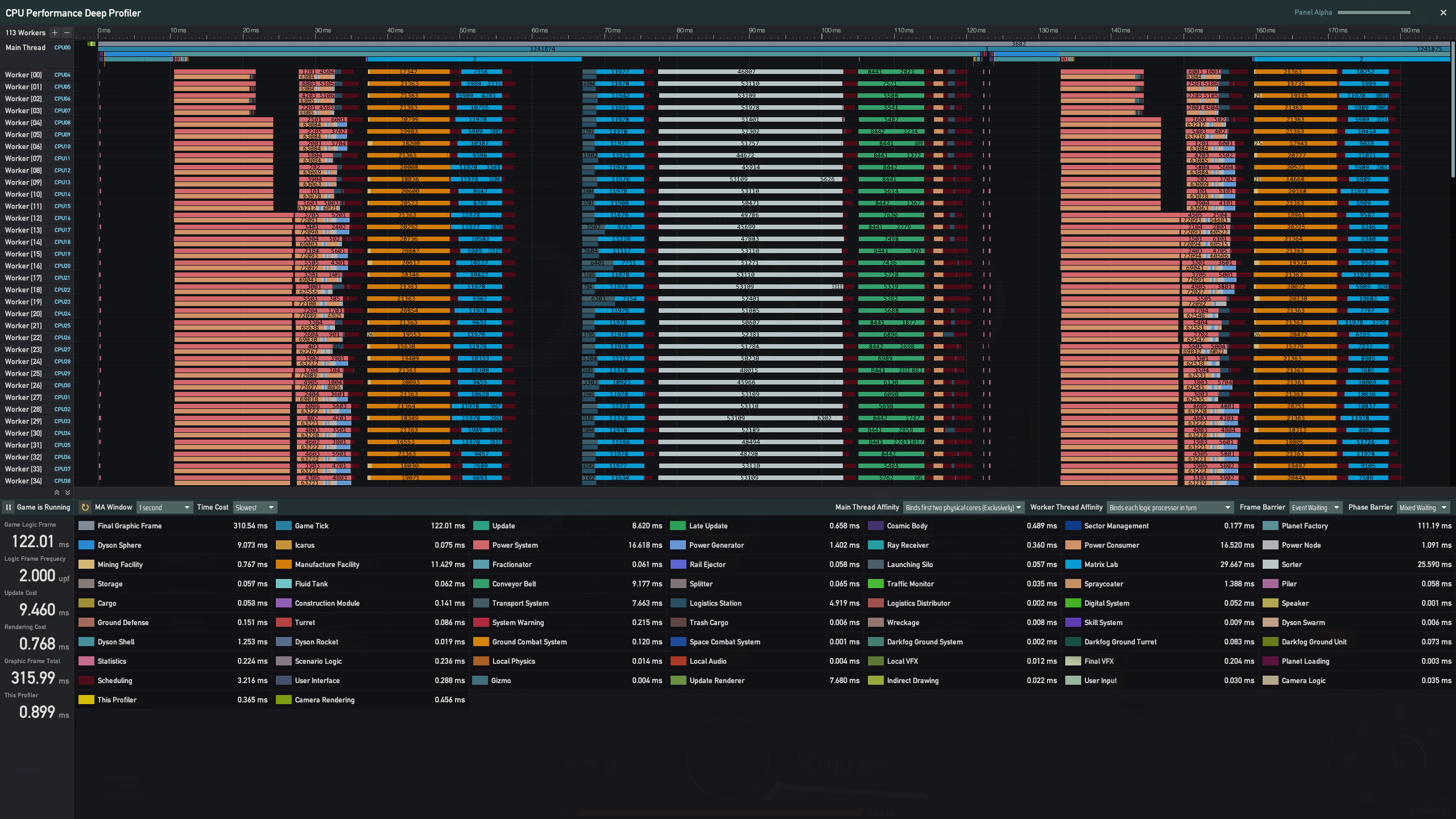 (Performance on a 680W Universe Matrix Save)
From the screenshot, the game didn't show much difference compared to consumer-grade CPUs. After some probing, we found the reason: the player's memory was DDR4-2666. The bottleneck was most likely the memory!
So the big question is: how do we optimize further? And what platform should we use to validate those optimizations?
Just as we were at a loss, we reached out to AMD. To our delight, they generously offered us a beast of a machine: a Threadripper PRO 9985WX system!
The specs alone are thrilling: 64 cores, 128 threads; Base clock 3.2 GHz, boost up to 5.4 GHz; Support for up to 8 memory channels. This is the ultimate testing platform tailor-made for us!
😿 Unfortunately, due to typhoon delays, this monster is still on its way to us. Please join us in waiting patiently for the unboxing moment!

Once the "beast" arrives, we'll immediately begin in-depth optimization and testing on this extreme hardware. And if you're a Threadripper owner yourself, stay tuned—the optimizations we're preparing for you are coming soon! (Of course, consumer-grade CPUs will also see performance improvements.)
Q: What should I do if I encounter a bug?
A: If you run into bugs, please first make sure your game is in a clean (unmodded) state. We suggest removing all mods and restarting the game before checking again.
If the bug still occurs in a clean environment, please report it in the #bug-report channel on our Discord. Our team will review and address the issues as soon as possible.
Q: Can old saves work seamlessly with the new multithreading system?
A: Yes. Old saves can be loaded directly in the new version — no need to start a new game. But we still highly recommend backing up your files before updating—just in case.
Default save location (if unchanged):
%USERPROFILE%\\Documents\\Dyson Sphere Program\\Save\[/i]
Q: Will my existing Mods still work?
A: Since this update completely overhauled the core logic of the game, with major code changes, most Mods will conflict with the base game.
If you've been using Mods, we strongly recommend backing up your saves and Mods before updating. Also, make sure your game files are unmodified during the update, otherwise unexpected errors may occur.
Q: What kind of performance boost should I expect? How can I feel it?
A: The main improvement is in the CPU's "game logic frame" time. As shown in the dev log, there is a noticeable boost in logic frame performance. If your save contains large factories or intense combat, the difference will be more noticeable.
Q: What if the game feels laggier after I adjusted the multithreading settings?
A: First, try resetting everything to the default settings (including the ratio between logic frames and render frames). You can also check our setup guide for more options. If you're aiming for even better performance, feel free to join our official Discord server to discuss with other players and admins to find the best configuration for your hardware.
Q: Why does the execution time of logic frames look longer after the update compared to before?
A: For saves that were already running very smoothly (logic frame execution time under 5ms), the reported values may appear slightly higher with the new system. But as long as it stays around 5ms, there will be no difference in actual gameplay experience. The real improvement is seen in heavier cases (when logic frames drop below 60 FPS and execution time goes above 8ms). In those situations, the new system delivers a significant boost.
Whether you're building a Dyson Sphere that envelops a star or forging a fleet empire that spans the galaxies, the infinite cosmos carries humanity’s ultimate dream. Dyson Sphere Program and X4: Foundations proudly present their new bundle— Cosmic Constructors . Master the journe
Whether you're building a Dyson Sphere that envelops a star or forging a fleet empire that spans the galaxies, the infinite cosmos carries humanity’s ultimate dream.
Dyson Sphere Program and X4: Foundations proudly present their new bundle—Cosmic Constructors. Master the journey from micro to macro; from solo builder to stellar empire
—everything lies in your hands!
Grab the bundle now and enjoy a 10% discount as you embark on your cosmic journey! 🚀
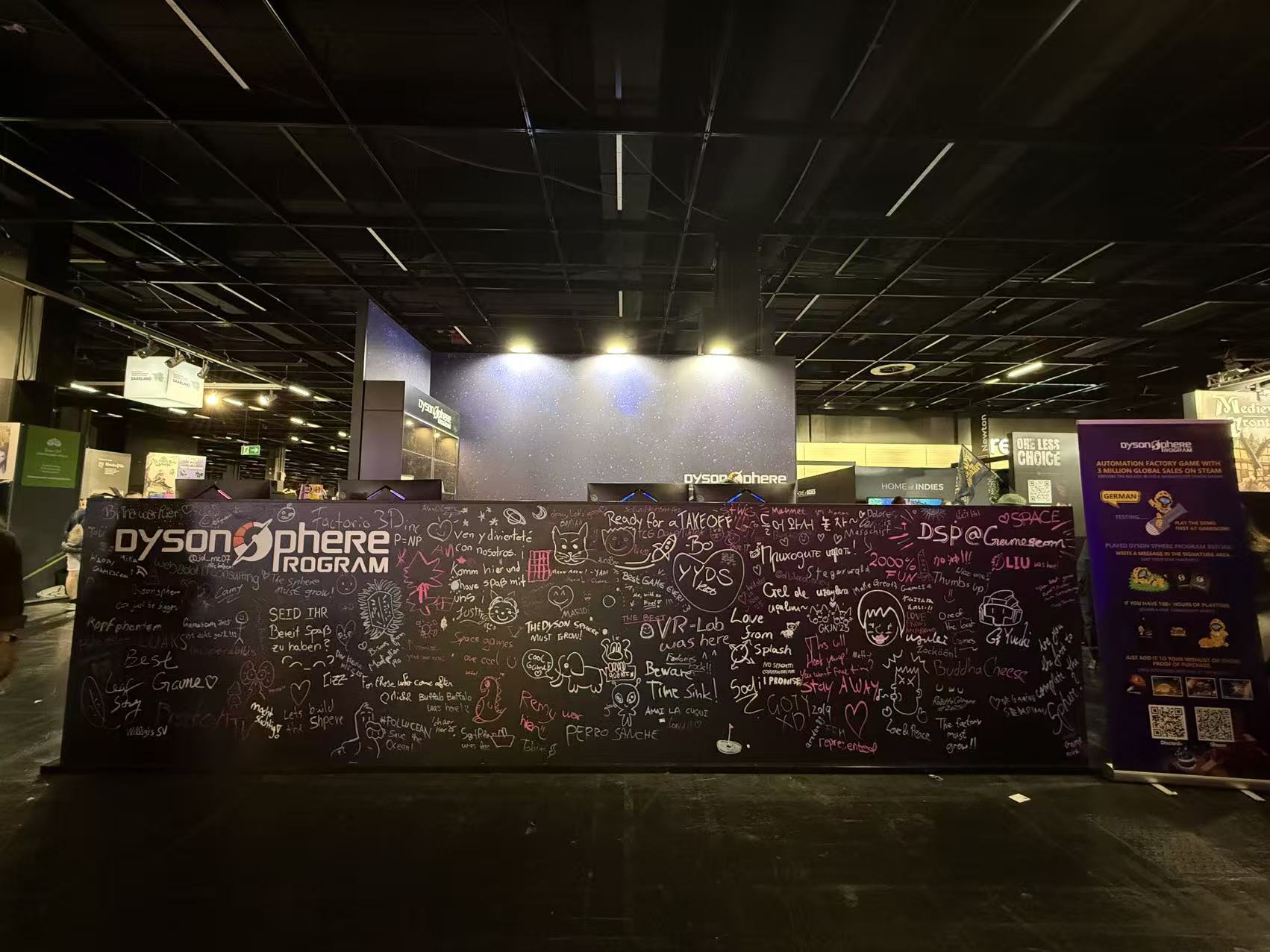
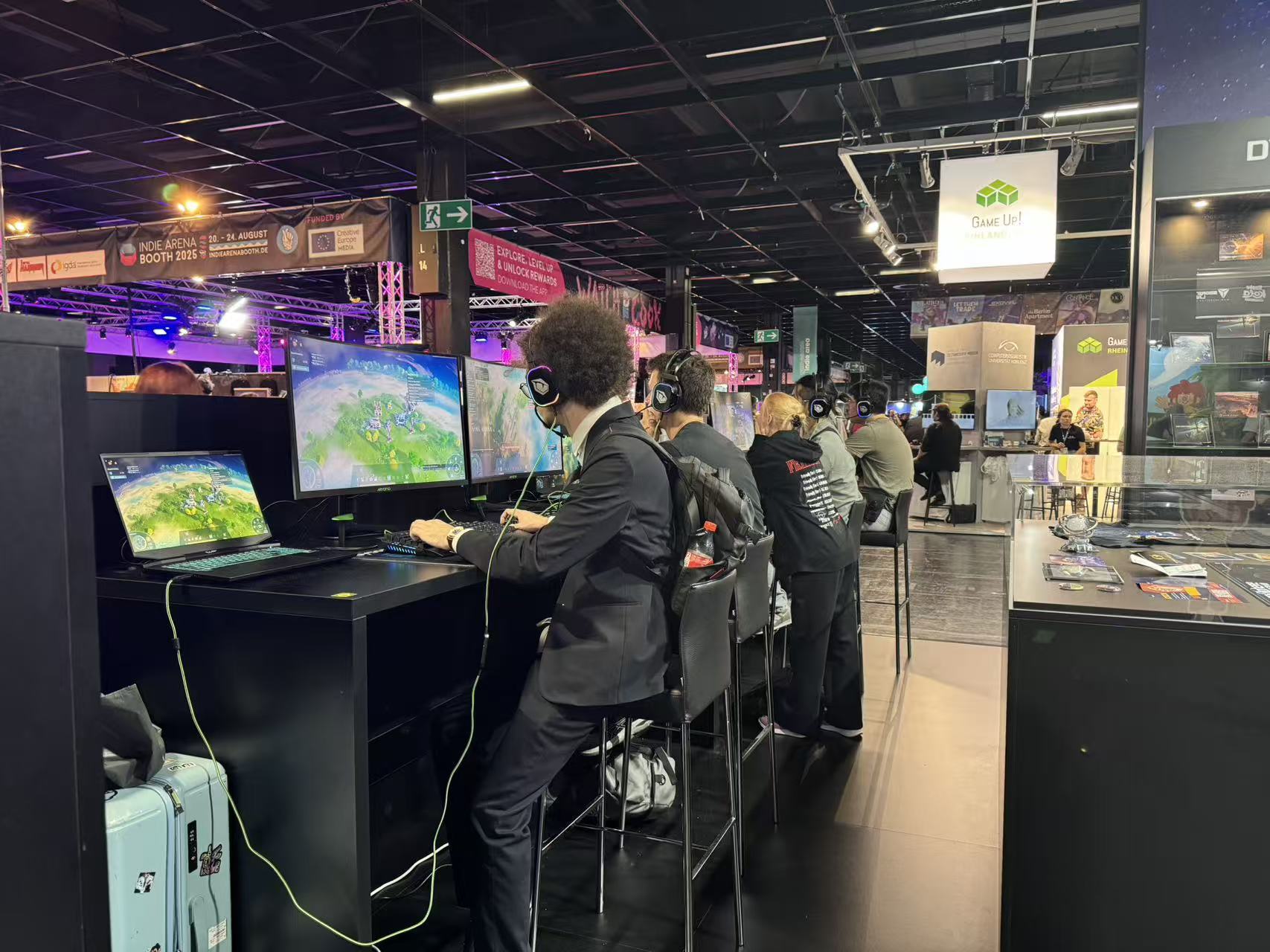
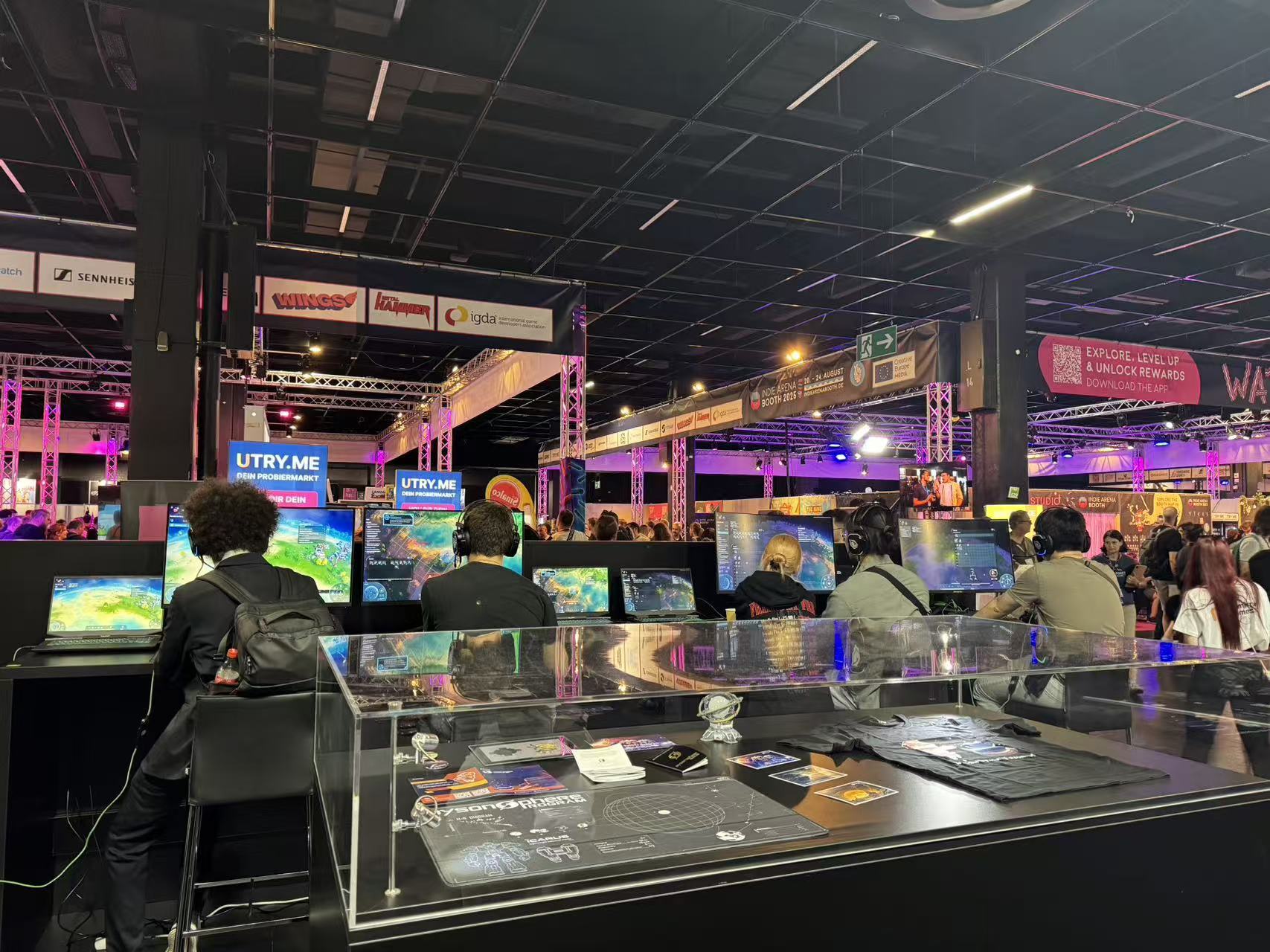
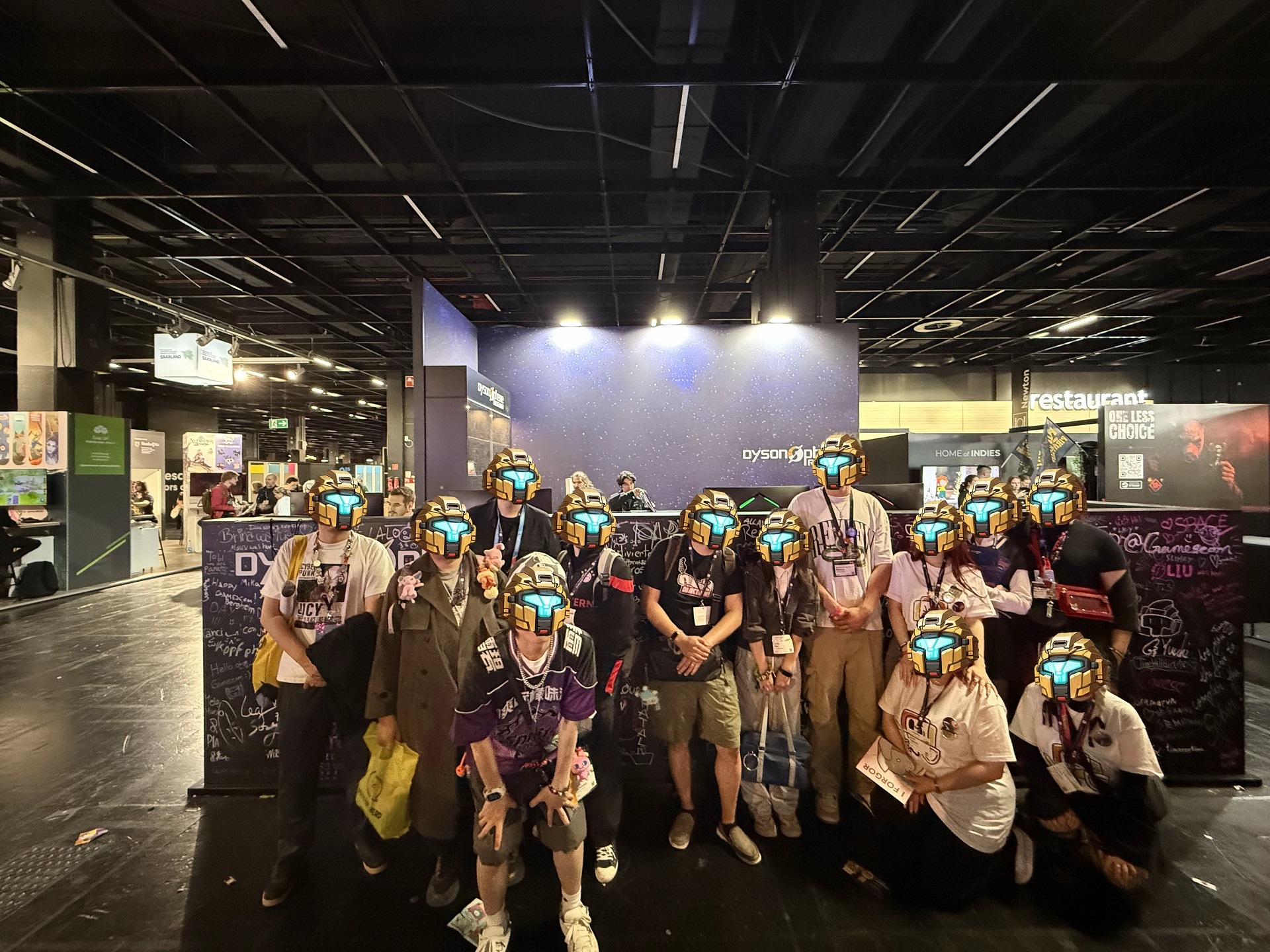
We're thrilled to have partnered with our publishers to bring Dyson Sphere Program to Cologne. Meeting players from around the world and hearing your amazing stories was truly an honor. Now, we'll be taking a short break before diving back into development (though let's be real -
We're thrilled to have partnered with our publishers to bring Dyson Sphere Program to Cologne. Meeting players from around the world and hearing your amazing stories was truly an honor.
Now, we'll be taking a short break before diving back into development (though let's be real - the dev work never really stopped! 😉).
Here's a look back at our adventure - see you next time!
Dyson Sphere Program and The Riftbreaker join forces in a special bundle Space factory automation × mech combat base-building. Get two iconic sci-fi experiences in one package — build, explore, and fight your way across the galaxy! View game page Enjoy a 10% discount on the bundl
Space factory automation × mech combat base-building. Get two iconic sci-fi experiences in one package — build, explore, and fight your way across the galaxy!
Enjoy a 10% discount on the bundle. Already own one of the games? You can grab the other at 10% off too, and complete your interstellar builder’s collection with ease!
Suit up your mech and conquer the stars!