Due to a great lack of time, I release an update to the DarkPaint functionality without a complete description inside the application, but I present the main features of the add-on here.
A complete HELP on the workflow with minor updates will be released within 7-10 days.
store.steampowered.com/app/1545310
Now let's go.
--------------------------------------------------------------------------------------------------------------
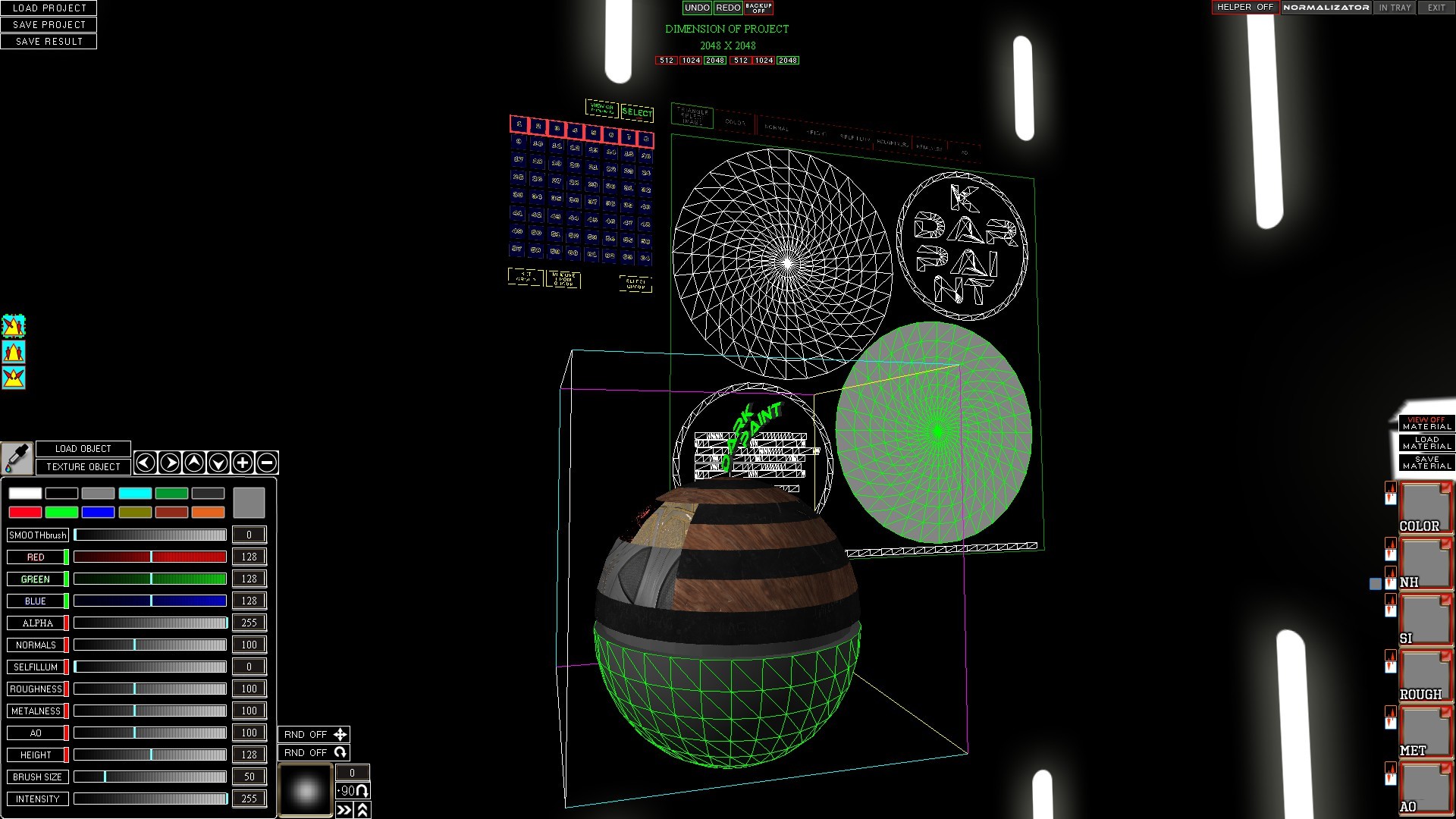
The skybox can be changed using buttons from 1 to 5 on the keyboard.
--------------------------------------------------------------------------------------------------------------
LOAD PROJECT
LOADS THE PROJECT WITH OBJECT, TEXTURE SET, TRIANGULAR GROUPS AND SELECTED TRIANGLES AT THE TIME OF SAVING THE PROJECT
--------------------------------------------------------------------------------------------------------------
SAVE PROJECT
SAVES THE PROJECT IN AN ARCHIVE FILE
THE PROJECT INCLUDES:
UNMODIFIED PORTED OBJECT
OBJECT
TEXTURE SET
PRE-ESTABLISHED TRIANGLE GROUPS
SELECTED TRIANGLES AT THE TIME OF SAVING
--------------------------------------------------------------------------------------------------------------
SAVE RESULT
SAVES A SET OF TEXTURES IN FORMATS:
DDS, PNG, BMP, JPG, TGA
WITH POSTFIXES:
_D - COLOR MAP,
_N - NORMAL MAP WITH HEIGHT MAP IN ALPHA CHANNEL,
_NGL - NORMAL MAP WITH HEIGHT MAP IN ALPHA CHANNEL (INVERTED GREEN CHANNEL FOR OPENGL),
_H - HEIGHT MAP SEPARATELY,
_I - SELFILLUMINATION MAP,
_G - ROUGHTNESS MAP (GLOSS INVERTED),
_M - METALNESS MAP,
_AO - AMBIENT OLCCUSION MAP
--------------------------------------------------------------------------------------------------------------
TRIANGLE DRAWING MODES.
DRAWING ON SELECTED AND NON-SELECTED TRIANGLES. DOUBLE CLICK ICON TO REMOVE SELECTION FROM ALL SELECTED TRIANGLES.
DRAWING ON SELECTED TRIANGLES ONLY. DRAWING ONLY ON NOT SELECTED TRIANGLES.
--------------------------------------------------------------------------------------------------------------
LOAD OBJECT
- LOADING OBJECTS IN FORMATS: X, OBJ, 3DS, FBX
NOT ALL FBX VERSIONS ARE SUPPORTED.
THERE IS A RESTRICTION ON THE NUMBER OF LANDS.
MULTI-TEXTURING IS NOT SUPPORTED.
--------------------------------------------------------------------------------------------------------------
TEXTURE OBJECT
- OPENS THE PANEL FOR VIEWING AND LOADING OBJECT TEXTURES
THE HEIGHT MAP IS DISPLAYED SEPARATELY FROM THE NORMAL MAP,
THE HEIGHT MAP IS IN THE WORKING PROCESS IN THE NORMALMAP ALPHA CHANNEL.
--------------------------------------------------------------------------------------------------------------
PIPETTE
- INCLUDING PIPETTE MODE YOU CAN CLICK ON THE MODEL AND GET A COLOR FOR DRAWING.
RECEIVED RGBA COLOR (CURRENTLY)
--------------------------------------------------------------------------------------------------------------
ROTATION AND ZOOM BUTTONS OF THE EDITED OBJECT
--------------------------------------------------------------------------------------------------------------
COLOR PRESETS FOR BRUSHING OR FILLING TRIANGLES
--------------------------------------------------------------------------------------------------------------
BRUSH BLUR
THE BRUSH IS SILICATED DEPENDING ON THE SETTING OF THE PARAMETER FROM 0 TO 10 PIXELS
--------------------------------------------------------------------------------------------------------------
BUTTONS AND SLIDERS RED, GREEN, BLUE, ALPHA
THE BUTTONS GIVE THE OPPORTUNITY TO TURN ON OR DISABLE THE EDITING OF THE CORRECT COLOR CHANNEL
SLIDERS SET THE COLOR CHANNEL EDIT INTENSITY
IT SHOULD BE NOTICE THAT THE CHANNEL SHUTDOWN BUTTONS DO NOT AFFECT ONLY THE SET EDITING COLOR,
BUT AND ON THE DOWNLOADED COLORMAP IN THE RIGHT PANEL OF THE SCREEN.
COLOR CHANNEL INTENSITY SLIDERS DO NOT AFFECT THE COLORMAP OF THE DOWNLOADED MATERIAL IN THE RIGHT SIDE OF THE SCREEN!
--------------------------------------------------------------------------------------------------------------
NORMALS
THIS BUTTON TURNS ON OR OFF NORMALMAP TEXTURE EDITING
SLIDER AFFECTS EDITING INTENSITY
PLEASE NOTE THAT THE RESULTS OF EDITING NORMALMAP DIRECTLY DEPEND ON USE OF HEIGHTMAP
IF HEIGHTMAP IS NOT USED WHEN EDITING THEN THE NORMAL MAP IS CALCULATED FROM THE PARAMETERS OF THE BRUSH AND MAY ONLY BE CONVEX
IF HEIGHTMAP IS USED WHEN EDITING THEN NORMAL MAP IS CALCULATED FROM HEIGHTMAP BRUSH SETTINGS
WHERE A FLAT SURFACE HAS A HEIGHTMAP SLIDER PARAMETER = 128
DEEP SURFACE HAS HEIGHTMAP SLIDER PARAMETER LESS <128
CONVEX SURFACE HAS A HEIGHTMAP SLIDER PARAMETER OVER> 128
A NORMAL MAP IS CALCULATED BASED ON THE HEIGHTMAP MAP WITH THE INTENSITY SPECIFIED ON THE NORMALMAP SLIDER
--------------------------------------------------------------------------------------------------------------SELFIILUMINATION
THIS BUTTON TURNS ON OR DISABLES SELFIILUMINATION TEXTURE EDITING
SLIDER AFFECTS EDITING INTENSITY
AT THE MOMENT ONLY WHITE (IN NEXT RGB UPDATE)
--------------------------------------------------------------------------------------------------------------ROUGHNESS
THIS BUTTON TURNS ON OR OFF ROUGHNESS TEXTURE EDITING (INVERTED GLOSS)
SLIDER AFFECTS EDITING INTENSITY
--------------------------------------------------------------------------------------------------------------METALNESS
THIS BUTTON TURNS ON OR DISABLES METALNESS TEXTURE EDITING
SLIDER AFFECTS EDITING INTENSITY
--------------------------------------------------------------------------------------------------------------AO
THIS BUTTON TURNS ON OR DISABLES AMBIENT OCCLUSION TEXTURE EDITING
SLIDER AFFECTS EDITING INTENSITY
--------------------------------------------------------------------------------------------------------------HEIGHT
THIS BUTTON TURNS ON OR OFF NORMALMAP TEXTURE EDITING
SLIDER AFFECTS EDITING INTENSITY
A FLAT SURFACE HAS A HEIGHTMAP SLIDER PARAMETER = 128
DEEP SURFACE HAS A HEIGHTMAP SLIDER PARAMETER LESS <128
CONVEX SURFACE HAS A HEIGHTMAP SLIDER PARAMETER OVER> 128
IF NORMAL MAP EDITING IS ENABLED AT THE SAME TIME THEN NORMAL IS CALCULATED FROM THE HEIGHTMAP MAP WITH THE INTENSITY SPECIFIED ON THE NORMALMAP SLIDER
--------------------------------------------------------------------------------------------------------------BRUSH SIZE
THE SLIDER CHANGES THE IMAGE SIZE OF THE BRUSH FROM 1 TO 255 PIXELS IN HEIGHT AND WIDTH
--------------------------------------------------------------------------------------------------------------INTENSITY
SLIDER CHANGES BRUSH INTENSITY IN COMBINATION WITH ALL CHANNEL AND TEXTURE SLIDERS
0 - ZERO INTENSITY
255 - MAXIMUM INTENSITY
--------------------------------------------------------------------------------------------------------------THE SLOT OF THE MATERIAL WHICH IS DRAWING ON THE OBJECT OR FILLING THE TRIANGLES (RIGHT SIDE SCREEN)
PRESSING THE SLOT WITH THE RIGHT MOUSE BUTTON OPENS THE DIALOGUE FOR LOADING THE IMAGE INTO THE SLOT
OPENING THE IMAGE DIALOGUE FOR THE NORMAL / HEIGHT (NH) SLOT OPENS THE DIALOGUE FOR NORMALMAP FIRST AND IMMEDIATELY AFTER LOADING OPENS THE SECOND DIALOGUE FOR HEIGHTMAP
GREEN FRAME DECIDES AN ONE SLOT AND TAKES PRIORITY BEFORE THE SETTINGS FROM THE LEFT OF THE IDENTICAL CHANNEL SCREEN
TURNING OFF THE CHANNEL ON THE LEFT OF THE SCREEN AFFECTS THE USE OF THE MATERIAL SLOT WHEN THE SLIDER DOESN'T AFFECT THE MATERIAL SLOT
RED FRAME MEANS DISABLED SLOT
WHEN THE SLOT IS DISABLED, THE SETTING FROM THE LEFT OF THE SCREEN IS USED
BLUR, BRUSH SIZE AND INTENSITY DO NOT DEPEND ON WHETHER YOU USE THE SETTINGS FROM THE LEFT SCREEN OR MATERIAL SLOTS
WHEN ENABLING OR DISABLING THE MATERIAL SLOT, THE SETTING OF THE CORRECT CHANNEL ON THE LEFT OF THE SCREEN IS TURNED ON OR OFF
THE SIZE OF THE TEXTURES OF THE MATERIAL MAY DIFFER FROM THE SIZE OF THE TEXTURES OF THE PROJECT.
IN THAT CASE IF THE TEXTURE SIZE OF THE MATERIAL IS GREATER THAN THE SIZE OF THE TEXTURES OF THE PROJECT, THEN THE TEXTURE OF THE MATERIAL IS CUT TO THE SIZE OF THE TEXTURES OF THE PROJECT.
IF THE SIZE OF THE TEXTURES OF THE MATERIAL IS LESS THAN THE SIZE OF THE TEXTURES OF THE PROJECT, THEN THE TEXTURES OF THE MATERIAL ARE DUPLICATED IN TILES BOTH VERTICAL AND HORIZONTAL.
REMEMBER THAT WHEN YOU CHANGE THE PERMISSION OF A PROJECT, YOU MUST RELOAD THE MATERIAL AND THE ABOVE RULES WILL APPLY TO IT.
IF YOU CHANGE THE PROJECT RESOLUTION AND THE MATERIAL DO NOT RESTORE THE MATERIAL TEXTURES WILL BE SCALED TO THE PROJECT SIZE,
IT CAN BE AS USEFUL IN ONE CASE, AS HARMFUL IN ANOTHER.
--------------------------------------------------------------------------------------------------------------DIMENSION OF PROJECT
NOW DARKPAINT SUPPORTS PROJECT RESOLUTIONS FROM 512 TO 2048
WHEN YOU CHANGE THE RESOLUTION OF THE PROJECT, ALL TEXTURES ARE SCALED TO THE APPROPRIATE RESOLUTION.
IT IS BEST PRACTICE IF A PROJECT PERMISSION IS ESTABLISHED AT THE BEGINNING OF EACH PROJECT, THIS WILL AVOID THE NEGATIVE EFFECTS OF TEXTURE SCALING WITH
DECORATION OF THE QUALITY OF THE WORK ALREADY DONE.
--------------------------------------------------------------------------------------------------------------OBJECT TEXTURE LOADING PANEL
OPENS THE OBJECT TEXTURE SLOT PANEL
CLICKING THE LEFT MOUSE BUTTON ON THE TEXTURE SLOT OPENS THE IMAGE DIALOGUE.
WHEN UPLOADED, THE IMAGE IS SCALED IN ACCORDANCE WITH THE PERMISSION OF THE PROJECT.
TO AVOID DISTORTION, YOU SHOULD FIRST SET THE RESOLUTION OF THE PROJECT AND THEN DOWNLOAD THE OBJECT TEXTURES.
--------------------------------------------------------------------------------------------------------------GROUPS
AVAILABLE 64 GROUPS TO WHICH YOU CAN ATTACH ANY NUMBER OF TRIANGLES FOR FURTHER WORK.
ONE TRIANGLE CANNOT BE BELONGED TO TWO DIFFERENT GROUPS.
WHEN SELECTING ANY NUMBER OF TRIANGLES FROM DIFFERENT GROUPS AND ASSIGNING THEM A GROUP, THE SELECTED TRIANGLES WILL BELONG ONLY TO A NEW INSTALLED GROUP,
THE OLD BINDING TO THE GROUP WILL BE REMOVED.
BINDINGS TO GROUPS WILL BE SAVED WHILE SAVING THE PROJECT AND THERE WILL NOT NEED TO BE ASSIGNED AGAIN.
BUTTONS
SET GROUP - SETS GROUP FOR SELECTED TRIANGLES (GROUP MUST BE SELECTED MANUALLY)
REMOVE FROM GROUP - REMOVES BINDING OF SELECTED TRIANGLES (GROUP MUST BE SELECTED MANUALLY)
SELECT GROUP - SELECT TRIANGLES OF THE ESTABLISHED GROUP
COLOR FRAMES AROUND THE GROUP BUTTONS
WHITE FRAME INDICATES THE GROUP WHICH IS UNDER THE CURSOR OF THE MOUSE
GREEN FRAME INDICATES THIS GROUP IS CURRENTLY SELECTED FOR ACTION
A RED FRAME INDICATES THAT A CERTAIN NUMBER OF TRIANGLES ALREADY BELONG TO THIS GROUP
--------------------------------------------------------------------------------------------------------------SELECT / DRAW
BUTTON TOGGETS UV MODE TO SELECT TRIANGLES OR DRAW ON A UV SCALE OF THE OBJECT
--------------------------------------------------------------------------------------------------------------VIEW ON / OFF MATERIAL
ENABLE / DISABLE DOWNLOADED DISPLAY MODE (RIGHT SIDE SCREEN)
--------------------------------------------------------------------------------------------------------------THE SELECTION OF TRIANGLES ON THE OBJECT IS CARRIED OUT BY HOLDING THE SPACE BUTTON AND HOVERING TO THE REQUIRED TRIANGLES
CANCELING THE SELECTION OF TRIANGLES IS CARRIED OUT BY HOLDING THE `LEFT ALT` BUTTON AND GUIDING TO THE REQUIRED TRIANGLES
--------------------------------------------------------------------------------------------------------------THE SELECTION OF TRIANGLES ON UV SCAN IS CARRIED OUT BY HELPING THE MOUSE BY INDICATION OF THE RECTANGLE OF SELECTION
ADDING TO SELECTED TRIANGLES ON UV SCAN IS CARRIED OUT BY HOLDING THE "+" BUTTON
EXCLUSION FROM SELECTED TRIANGLES ON UV SCAN IS CARRIED OUT BY HOLDING THE "-" BUTTON
--------------------------------------------------------------------------------------------------------------

 https://store.steampowered.com/app/1545310
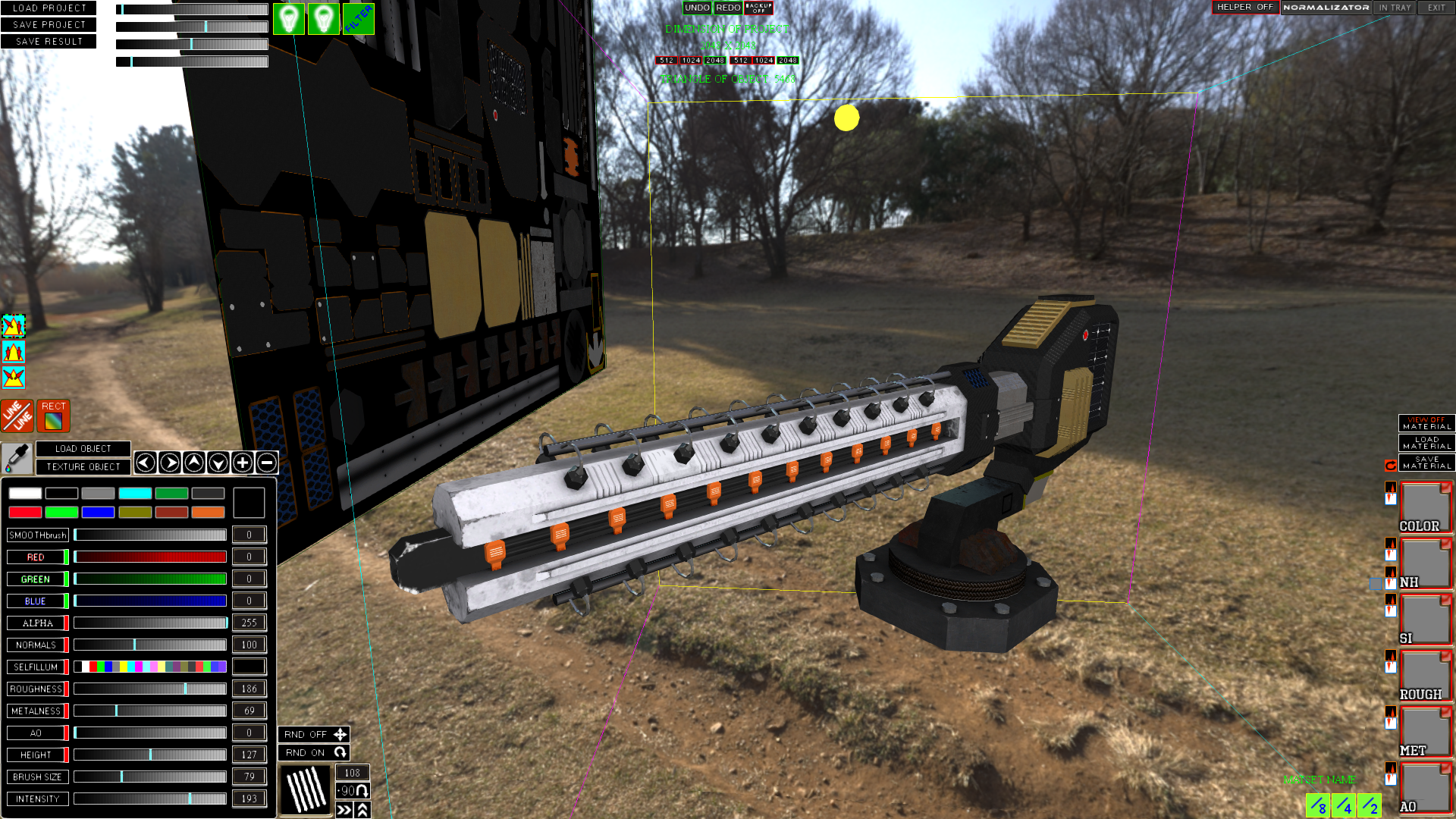
LINE tool:
The tool is easy to use. We include. Set the starting point with the left mouse button on the object, set the end point and voila))). The line is drawn using the brush settings, you can choose any brush to draw a line with it. The options for random rotation and positioning relative to the brush apply. (after drawing a line, do not forget to turn off the "LINE" tool if you no longer need it). Cancel the first point with the ESCAPE button.
Rectangle tool:
Usage is as easy as the line tool. Turn on, put two dots, you're done.
A new EXPAND TRIANGLES button has appeared above the UV. This button is required if you are filling selected triangles but need to extend the fill a few pixels around the triangles, it helps when you fill the triangles with material or a customized color at the edges of the UV seams.
A small rotation button appeared above the material on the right side of the viewport. Turning it on, you use the rotation of the material along with the brush. That is, if you rotate the brush while holding SHIFTKEY and the mouse wheel, then not only the brush is rotated, but also the material itself.
The three green buttons in the lower right corner "/ 2", "/ 4", "/ 8" are to change the scale of the material. To use them, you need to load the previously saved material and just click on the button according to your requirements.
"/ 2" will halve the texture size of the material and tile it twice.
"/ 4" will four times reduce the size of the material texture and tile it four times over.
"/ 8" will reduce the size of the material texture eight times and tile duplicates 8 times.
Objects with multiple UVs are now supported. If the object being loaded contains several UVs, then after loading you will see a certain number of spheres above the scan, which correspond to the number of UVs of your object. They can be turned on and off by clicking on them with the left mouse button.
On the upper left side of the screen, there are several sliders and three new buttons. Two buttons belong to the light sources. (On / off). The third button "FILTER" enables / disables texture filtering in the shader. Useful to get the mouse exactly where you want it to be.
Sliders without parameters:
The first one on top is responsible for Ambient lighting.
The second and third are specular and specular parameters. Indulge in them and you will understand what they are doing.
The fourth is the heightmap shader setting (fake parallax).
The supplement turns into a more or less complete tool. There is still a lot that can be done to improve the tool, and I will do it.
Priority areas:
High poly objects.
Higher resolution textures. (4096x4096 to start)
More formats for importing objects.
By the way, it was decided to double the cost of the add-on. Prices have been sent for approval. If you manage to buy it for $ 4.99, then you're in luck ..
Thank you for your support and faith in the development of the tool.
https://store.steampowered.com/app/1545310
LINE tool:
The tool is easy to use. We include. Set the starting point with the left mouse button on the object, set the end point and voila))). The line is drawn using the brush settings, you can choose any brush to draw a line with it. The options for random rotation and positioning relative to the brush apply. (after drawing a line, do not forget to turn off the "LINE" tool if you no longer need it). Cancel the first point with the ESCAPE button.
Rectangle tool:
Usage is as easy as the line tool. Turn on, put two dots, you're done.
A new EXPAND TRIANGLES button has appeared above the UV. This button is required if you are filling selected triangles but need to extend the fill a few pixels around the triangles, it helps when you fill the triangles with material or a customized color at the edges of the UV seams.
A small rotation button appeared above the material on the right side of the viewport. Turning it on, you use the rotation of the material along with the brush. That is, if you rotate the brush while holding SHIFTKEY and the mouse wheel, then not only the brush is rotated, but also the material itself.
The three green buttons in the lower right corner "/ 2", "/ 4", "/ 8" are to change the scale of the material. To use them, you need to load the previously saved material and just click on the button according to your requirements.
"/ 2" will halve the texture size of the material and tile it twice.
"/ 4" will four times reduce the size of the material texture and tile it four times over.
"/ 8" will reduce the size of the material texture eight times and tile duplicates 8 times.
Objects with multiple UVs are now supported. If the object being loaded contains several UVs, then after loading you will see a certain number of spheres above the scan, which correspond to the number of UVs of your object. They can be turned on and off by clicking on them with the left mouse button.
On the upper left side of the screen, there are several sliders and three new buttons. Two buttons belong to the light sources. (On / off). The third button "FILTER" enables / disables texture filtering in the shader. Useful to get the mouse exactly where you want it to be.
Sliders without parameters:
The first one on top is responsible for Ambient lighting.
The second and third are specular and specular parameters. Indulge in them and you will understand what they are doing.
The fourth is the heightmap shader setting (fake parallax).
The supplement turns into a more or less complete tool. There is still a lot that can be done to improve the tool, and I will do it.
Priority areas:
High poly objects.
Higher resolution textures. (4096x4096 to start)
More formats for importing objects.
By the way, it was decided to double the cost of the add-on. Prices have been sent for approval. If you manage to buy it for $ 4.99, then you're in luck ..
Thank you for your support and faith in the development of the tool.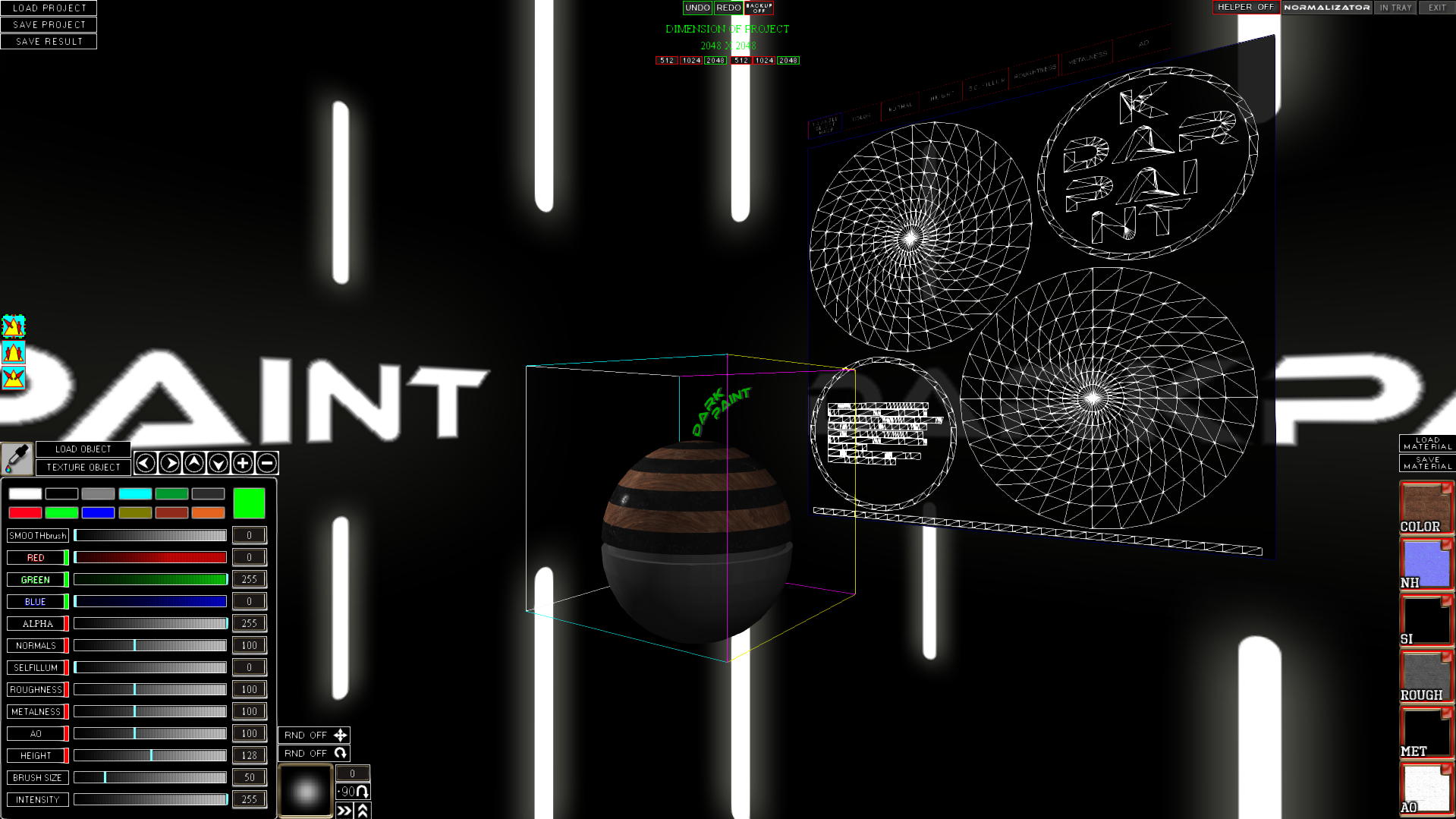 There are many plans for the development of this add-on, but very little time.
sorry...
There are many plans for the development of this add-on, but very little time.
sorry...

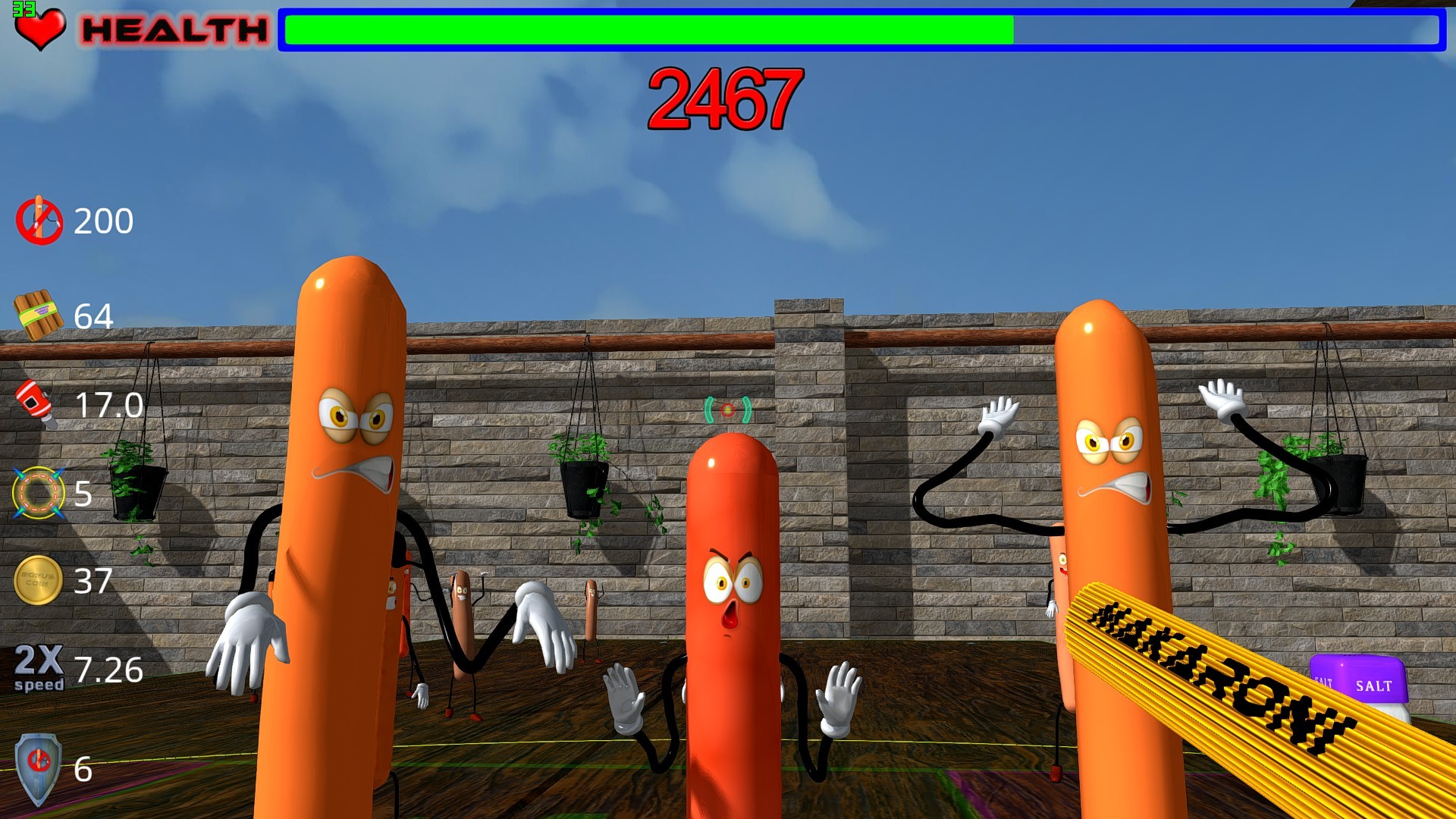 This is arcade for the little ones. Hold on to the table against the zombie sausages as long as possible. Make your way to the top of the leaderboard.
You have to survive among the constantly coming zombie sausages. Every minute they are more and more. You will push, slap you slaps and cuffs. Do not be afraid and do not be discouraged you will have a chance to become the best survivalist!
This is arcade for the little ones. Hold on to the table against the zombie sausages as long as possible. Make your way to the top of the leaderboard.
You have to survive among the constantly coming zombie sausages. Every minute they are more and more. You will push, slap you slaps and cuffs. Do not be afraid and do not be discouraged you will have a chance to become the best survivalist!