Hi, there is new beta branch build available. Change log: Running backwards is enabled Game engine is updated by one generation. So it's important to check if everything is working as before. Please let me know if you would find something strange. Vegetation rendering was replace
Hi,
there is new beta branch build available.
Change log:
Running backwards is enabled
Game engine is updated by one generation. So it's important to check if everything is working as before. Please let me know if you would find something strange.
Vegetation rendering was replaced with new system in each map which uses instanced rendering and it will help eliminate
hiccups when building grass patches around player.
There are new graphics options for Grass Density, Vegetation Distance, Additional Tree Distance, Additional Billboard Distance. Which are adjusted automaticlaly with graphics preset slider. But you can still override them manually.
Grass Density
You can now adjust grass density dynamically. 100 is really only for ultra settings.
75 is nice and peformant. But if you have lower graphics you can lower it down to get much better performance.
Vegetation Distance
Is the visible range for grass and trees.
Additional Tree Distance
Is added to the Vegetation Distance. It will render Trees as meshes in this additional Range.
Additional Billboard Range
Is distance on top of the additional tree distance. In this range billboards of trees will be rendererd.
You can access this beta branch if you perform these steps.
1. Right click on Virtual-O in Steam library. Choose Properties -> Betas
2. Pick beta branch in beta dropdown
3. New build will start to download
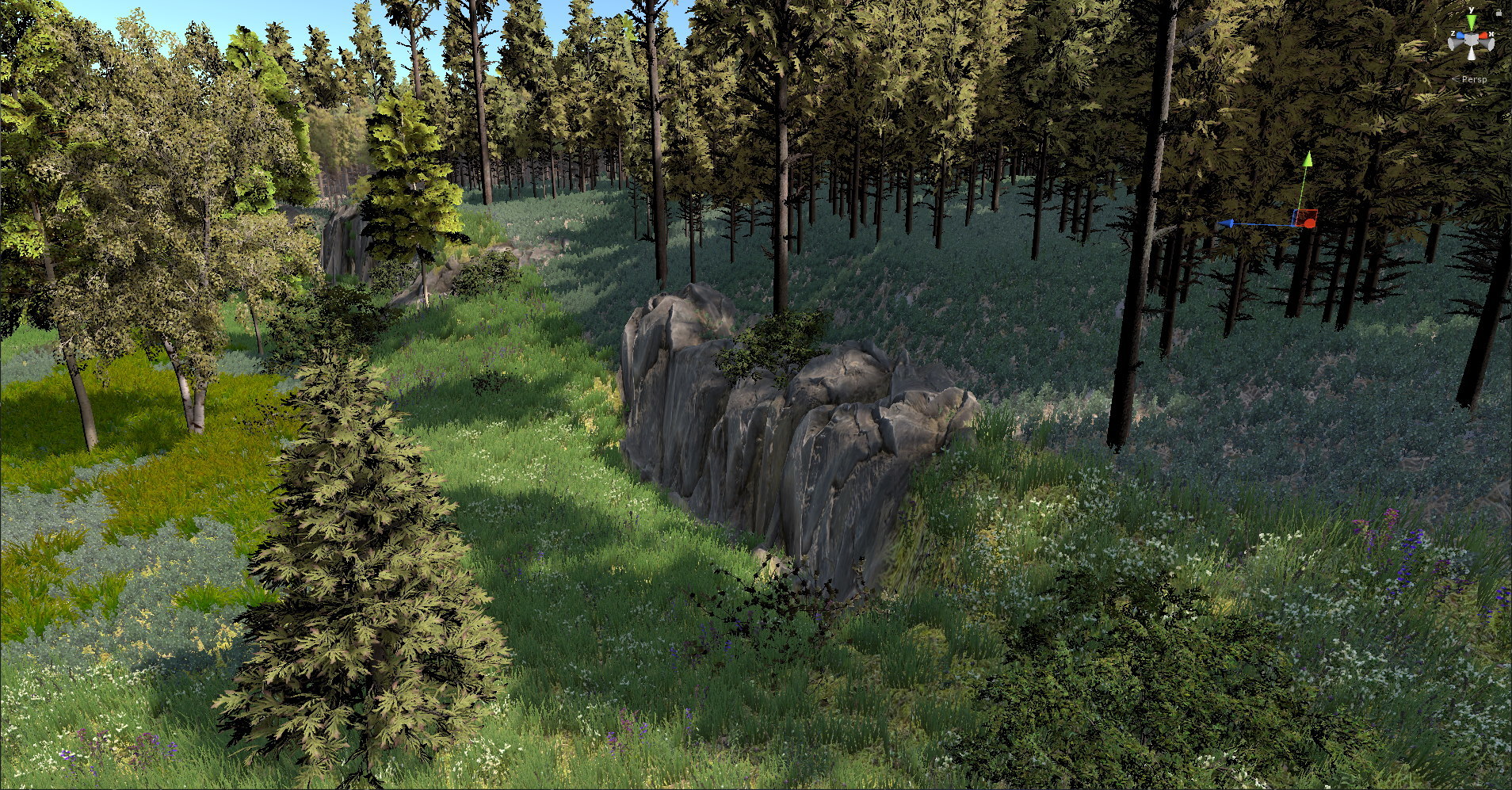
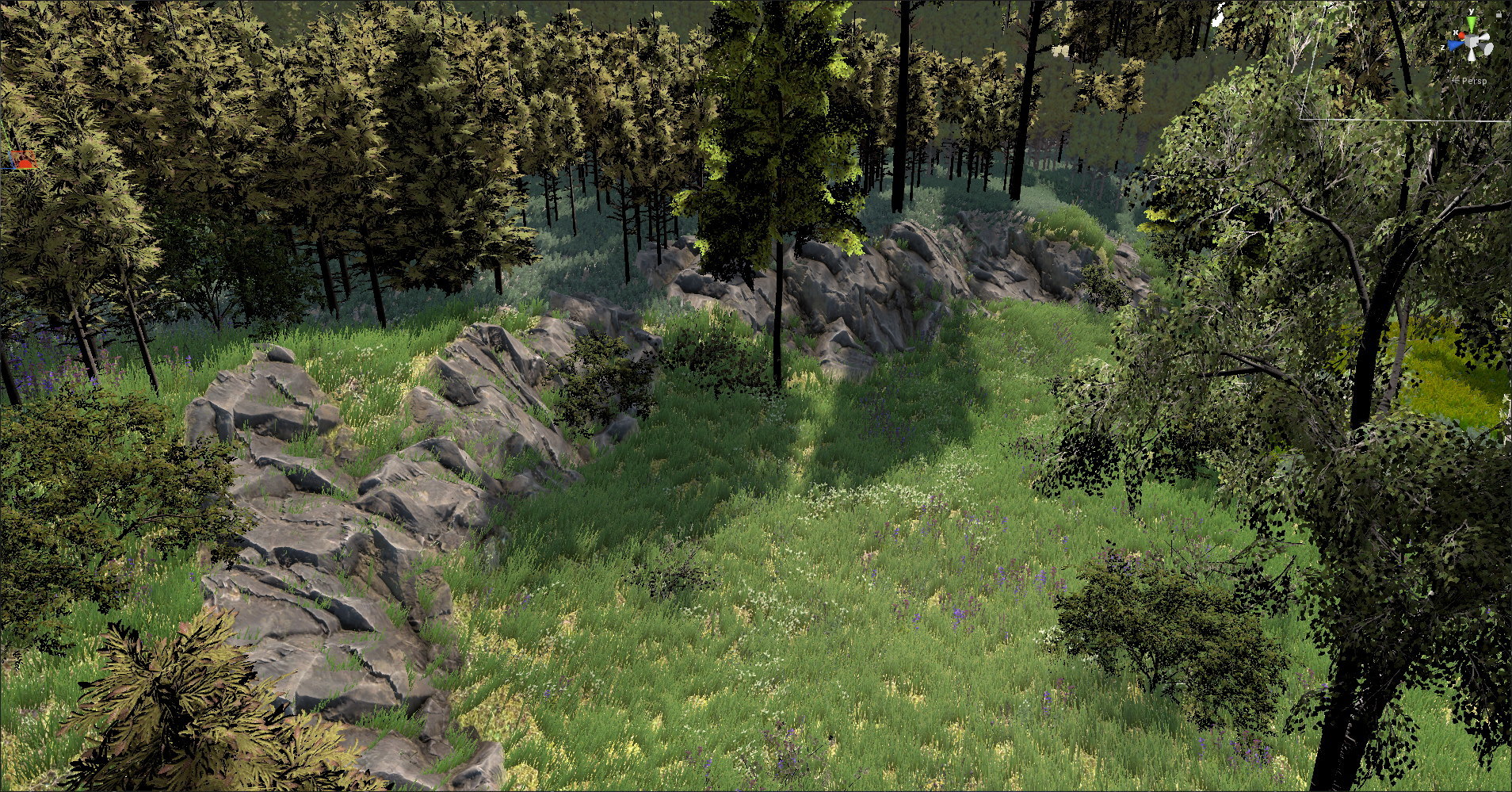
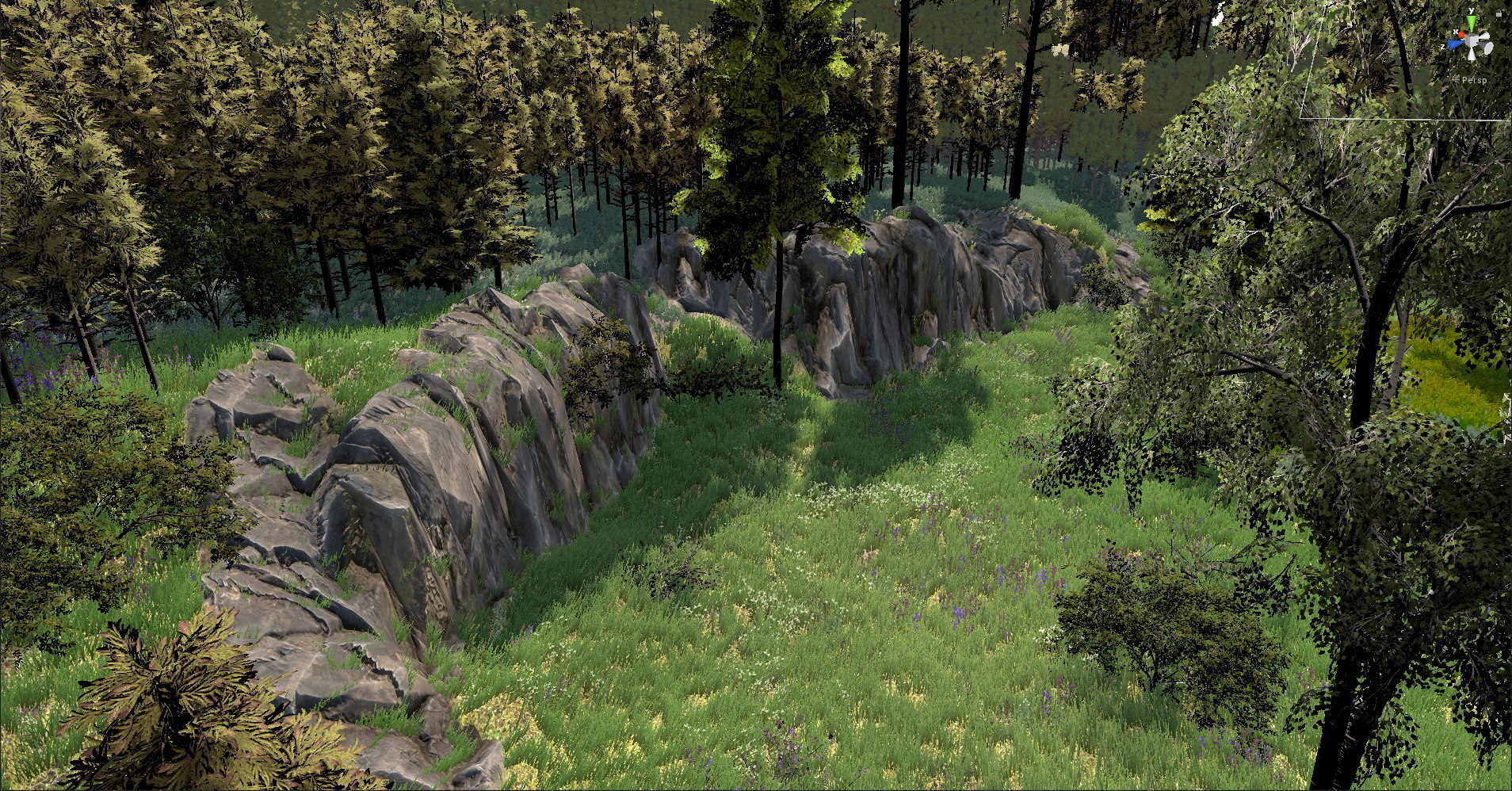
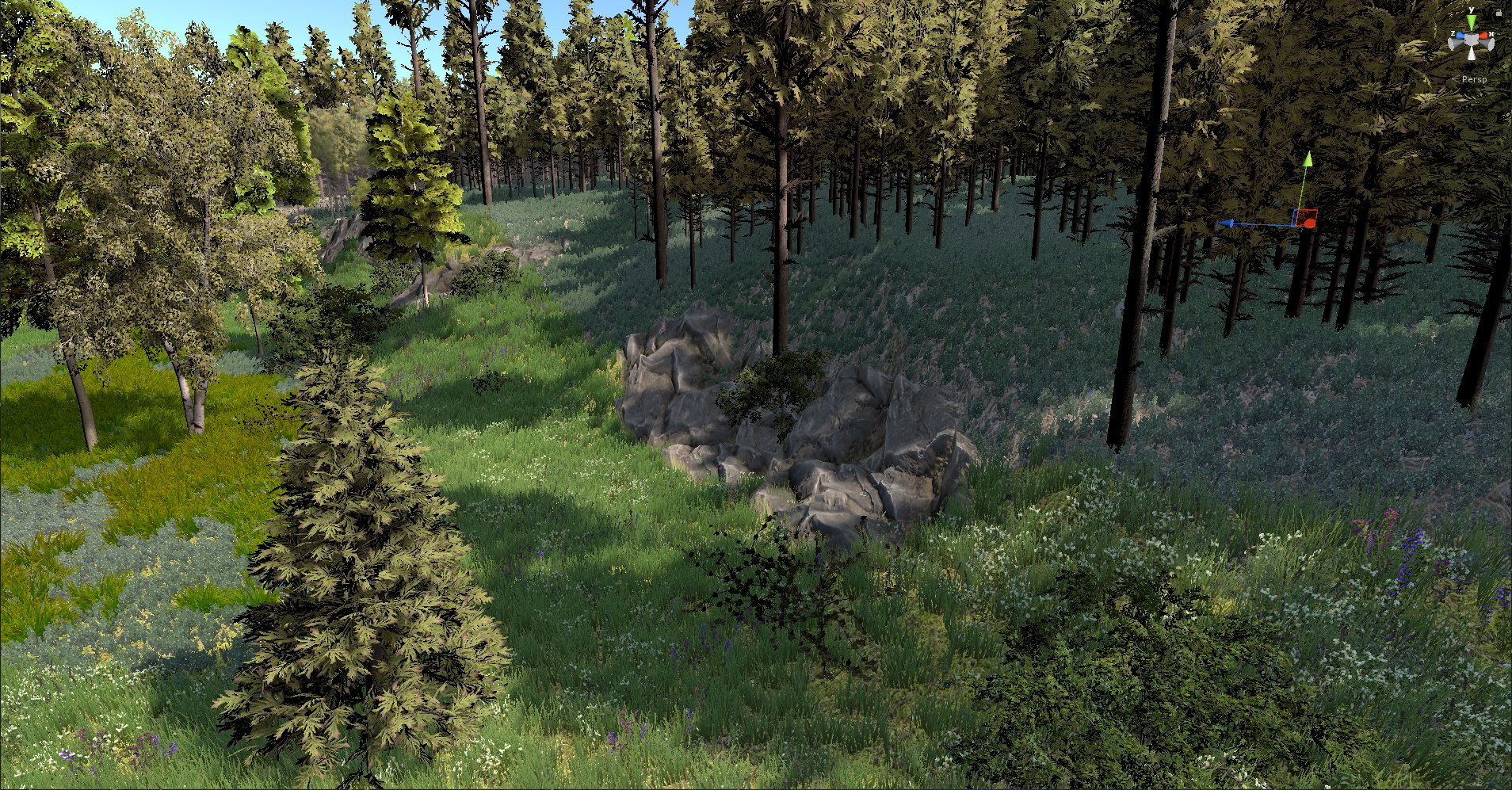
Just finishing a new cliff converter. It's fully automatic and hopefully much better than before. And I will update existing scandinavian maps with new cliffs. Today I will release beta build with new cliffs on Landvetter Landehof map. You can compare old cliffs with new on scree
Just finishing a new cliff converter. It's fully automatic and hopefully much better than before. And I will update existing scandinavian maps with new cliffs.
Today I will release beta build with new cliffs on Landvetter Landehof map.
You can compare old cliffs with new on screenshots
Before
After
Before
After
Building of map/competitions catalog at start of the game was taking longer than it would be nice in last few months. And waiting while course replays wasn't too nice too with increased amount of player replays. So it was just right time for massive optimization. Everything is no
Building of map/competitions catalog at start of the game was taking longer than it would be nice in last few months.
And waiting while course replays wasn't too nice too with increased amount of player replays.
So it was just right time for massive optimization. Everything is now parallelized.
Time needed for map catalog building or for downloading replays were improved by whole magnitude. Map catalog will be most often be built till you will enter course list.
Other changes:
Removed colliders for streamed rocks in Landvetter maps. As it was annoying to avoid them.
Please let me know if you will experience some issues. Like loading of replays will get stuck forever or too long etc.
Merry Christmas! Get Virtual-O with great 50% discount and new Landvetter Landehof map! What could be better gift for all our players than new map! Enjoy it's really nice huge scandinavian map.
Merry Christmas!
Get Virtual-O with great 50% discount and new Landvetter Landehof map!
What could be better gift for all our players than new map!
Enjoy it's really nice huge scandinavian map.
Long awaited feature is now available in Virtual-O: STRAFING At the same time you could see short video from latest Gironella map
Long awaited feature is now available in Virtual-O:
STRAFING
At the same time you could see short video from latest Gironella map
https://youtu.be/OCjoUFBdg-0
Long awaited feature is now available in Virtual-O: STRAFING At the same time you could see short video from latest Gironella map
Long awaited feature is now available in Virtual-O:
STRAFING
At the same time you could see short video from latest Gironella map
https://youtu.be/OCjoUFBdg-0
Merry Christmas! Get Virtual-O with 30% discount and new Gironella map! Change log: Added Gironella map Added water quality slider Upgraded WorldPoliticalMapGlobe Check if control is punchable to evade problem of punching control through another side of fence on micro maps Disabl
Merry Christmas! Get Virtual-O with 30% discount and new Gironella map!
Change log:
Added Gironella map
Added water quality slider
Upgraded WorldPoliticalMapGlobe
Check if control is punchable to evade problem of punching control through another side of fence on micro maps
Disabled tutorial disabling...
Fixed bug with checking of unused controls when uploading course
Fixed bug with null reference exception while validating course
Added scaling of race log with game mode. Now it's logging route in these intervals (Beginner = 10ms, Normal = 5ms, Elite = 2ms). Before it was fixed to every 5ms. So Elite mode was less precise
Added movement tail smoothing
Finished corridor training support. Added support for corridor training into all maps (added map overlay layer)
Merry Christmas! Get Virtual-O with 30% discount and new Gironella map! Change log: Added Gironella map Added water quality slider Upgraded WorldPoliticalMapGlobe Check if control is punchable to evade problem of punching control through another side of fence on micro maps Disabl
Merry Christmas! Get Virtual-O with 30% discount and new Gironella map!
Change log:
Added Gironella map
Added water quality slider
Upgraded WorldPoliticalMapGlobe
Check if control is punchable to evade problem of punching control through another side of fence on micro maps
Disabled tutorial disabling...
Fixed bug with checking of unused controls when uploading course
Fixed bug with null reference exception while validating course
Added scaling of race log with game mode. Now it's logging route in these intervals (Beginner = 10ms, Normal = 5ms, Elite = 2ms). Before it was fixed to every 5ms. So Elite mode was less precise
Added movement tail smoothing
Finished corridor training support. Added support for corridor training into all maps (added map overlay layer)
Very special post written by Nick Lightfoot. Thanks for sharing your experience about using Virtual-O in coaching: I’ve always found that the perceptual and decision making skills involved in orienteering are better learnt than taught a view that is backed up by recent trends in
Very special post written by Nick Lightfoot. Thanks for sharing your experience about using Virtual-O in coaching:
I’ve always found that the perceptual and decision making skills involved in orienteering are better learnt than taught a view that is backed up by recent trends in cognitive science. To become a world class orienteer you have to practice the relevant skills for thousands of hours. Traditional training with a map is time consuming and expensive so I’ve been an advocate of regular ‘armchair training’. Things like leg planning, simplification, map perception etc. can all be practiced with a mixture of fast decision making exercises under pressure and slower analytical exercises with coaches feedback, and I’ve found a strong correlation between speed and confidence in armchair training and performance in orienteering races.
Photo by Laura Harrison
The idea of using an orienteering simulator takes armchair training a step closer to the real thing, offering a more complete training experience at a fraction of the cost in time and money. It’s also a lot easier for coaches to observe and offer feedback, particularly for larger groups. The challenge is to make the simulator realistic enough so that the skills required are as close to real orienteering as possible. From a coaching perspective realistic ‘game play’ is critical - rewarding good technique so that right skill-sets are reinforced, whilst a realistic visual experience makes the overall game more engaging and enables training of map perception skills in different types of terrain, but the most important thing is it needs to be fun. If Virtual-O can make training fun for novices and elite athletes alike.
I’ve been experimenting with using Virtual-O for coaching sessions with club, regional and national squad level athletes with the sessions varying to suit the size and needs of the particular group.
At a recent South Yorkshire Orienteers club night we had a couple of class room sessions - Group 1 was for younger children (under 11s) mostly novices and Group 2 for older children and adults with a mixture of abilities, about 30 in each group. For both we used one computer and a large screen and distributed printed sheets with screen grabs of the courses to allow people to follow where we were going on their own map. For the younger group the courses were all on paths, for the older group we used a some easy courses on contour only maps plus a more difficult course as an introduction to Swedish terrain.
For each leg one of the group proposed a plan which we discussed and which the I then executed. For some legs I stopped and asked the group where we were -either at our planned checkpoints or deliberately (or accidentally) off course at which point we discussed relocation strategies. I used ‘Beginners’ Game Mode (x1 speed) for most of the exercises, which I think offers a more realistic experience particularly when it comes to distance judgement, and also made it easier to follow and point out key features en-route. So we were able to discuss and practice leg planning, relocation and contours in one session. It seemed to work well and we had good feedback.
Photo by Laura Harrison
I think it would be better to have one person driving virtual-O and another interacting with the audience. It would have been useful to pause the game and enable a pointer on the map or even overlay drawing tools to highlight map features, but a laser pen would do the job. As with any large group it’s difficult to pitch the standard at the right level to keep everyone engaged all the time – if anything I’d aim higher to keep the more experienced interested and give the novices a chance to stretch themselves in a safe environment. One or two of the younger children just wanted me to run through the marshes and jump off crags and a few struggled to follow the action, but most were answering and asking questions.
At the last YHOA regional squad session we managed to get 3 computers running virtual-O so we did a hands on session. We had 3 teams racing each other on the same course with 3 in each team taking it in turns at the controls so 9 children involved in each race. It worked well! All three team members seemed engaged throughout discussing plans and helping to relocate when necessary and the competitive element adds to the fun and training benefit. As a coach I was able to see much more of the action than a typical forest race and got a pretty good idea of individual styles and abilities. Most seemed to pick up the controls very quickly but I think I pitched the technical level a little too high for the less experienced.
We used ‘Normal’ game mode (x2 speed) to get through the races quicker, but it added to the challenge particularly with distance judgement with lots of overshooting which makes relocation doubly hard in Virtual-O as you see less of the map than normal. A lot of the athletes use baseplate compasses so one of the challenges was learning thumb compass style map orientation – it would be good to see a proper baseplate compass option in Virtual-O in the future.
One of the elite athletes I coach is a sprint specialist who’s looking to improve compass use, contour interpretation and confidence in non-urban terrains. We used the club night courses but as a hands-on exercise with myself observing and occasionally offering feedback. We’re hoping that her laptop will be powerful enough to allow her to use Virtual-O for regular session, but if not then we’ll certainly continue to use it as part of our joint armchair training.
There are lots of features already in Virtual-O which I can imagine adding variety with different map levels, weather conditions, night orienteering and prototype of tools for corridor and window exercises. I can see Virtual-O being an excellent tool for increasing the number of hours of technical training for serious athletes, but it also has the potential for offering a fun alternative to normal orienteering particularly for older juniors who play video games. With that in mind that in mind it would be great to extend the online gaming features to allow private competitions, leagues, rankings within a club or other orienteering community.
Nick Lightfoot
Very special post written by Nick Lightfoot. Thanks for sharing your experience about using Virtual-O in coaching: I’ve always found that the perceptual and decision making skills involved in orienteering are better learnt than taught a view that is backed up by recent trends in
Very special post written by Nick Lightfoot. Thanks for sharing your experience about using Virtual-O in coaching:
I’ve always found that the perceptual and decision making skills involved in orienteering are better learnt than taught a view that is backed up by recent trends in cognitive science. To become a world class orienteer you have to practice the relevant skills for thousands of hours. Traditional training with a map is time consuming and expensive so I’ve been an advocate of regular ‘armchair training’. Things like leg planning, simplification, map perception etc. can all be practiced with a mixture of fast decision making exercises under pressure and slower analytical exercises with coaches feedback, and I’ve found a strong correlation between speed and confidence in armchair training and performance in orienteering races.
Photo by Laura Harrison
The idea of using an orienteering simulator takes armchair training a step closer to the real thing, offering a more complete training experience at a fraction of the cost in time and money. It’s also a lot easier for coaches to observe and offer feedback, particularly for larger groups. The challenge is to make the simulator realistic enough so that the skills required are as close to real orienteering as possible. From a coaching perspective realistic ‘game play’ is critical - rewarding good technique so that right skill-sets are reinforced, whilst a realistic visual experience makes the overall game more engaging and enables training of map perception skills in different types of terrain, but the most important thing is it needs to be fun. If Virtual-O can make training fun for novices and elite athletes alike.
I’ve been experimenting with using Virtual-O for coaching sessions with club, regional and national squad level athletes with the sessions varying to suit the size and needs of the particular group.
At a recent South Yorkshire Orienteers club night we had a couple of class room sessions - Group 1 was for younger children (under 11s) mostly novices and Group 2 for older children and adults with a mixture of abilities, about 30 in each group. For both we used one computer and a large screen and distributed printed sheets with screen grabs of the courses to allow people to follow where we were going on their own map. For the younger group the courses were all on paths, for the older group we used a some easy courses on contour only maps plus a more difficult course as an introduction to Swedish terrain.
For each leg one of the group proposed a plan which we discussed and which the I then executed. For some legs I stopped and asked the group where we were -either at our planned checkpoints or deliberately (or accidentally) off course at which point we discussed relocation strategies. I used ‘Beginners’ Game Mode (x1 speed) for most of the exercises, which I think offers a more realistic experience particularly when it comes to distance judgement, and also made it easier to follow and point out key features en-route. So we were able to discuss and practice leg planning, relocation and contours in one session. It seemed to work well and we had good feedback.
Photo by Laura Harrison
I think it would be better to have one person driving virtual-O and another interacting with the audience. It would have been useful to pause the game and enable a pointer on the map or even overlay drawing tools to highlight map features, but a laser pen would do the job. As with any large group it’s difficult to pitch the standard at the right level to keep everyone engaged all the time – if anything I’d aim higher to keep the more experienced interested and give the novices a chance to stretch themselves in a safe environment. One or two of the younger children just wanted me to run through the marshes and jump off crags and a few struggled to follow the action, but most were answering and asking questions.
At the last YHOA regional squad session we managed to get 3 computers running virtual-O so we did a hands on session. We had 3 teams racing each other on the same course with 3 in each team taking it in turns at the controls so 9 children involved in each race. It worked well! All three team members seemed engaged throughout discussing plans and helping to relocate when necessary and the competitive element adds to the fun and training benefit. As a coach I was able to see much more of the action than a typical forest race and got a pretty good idea of individual styles and abilities. Most seemed to pick up the controls very quickly but I think I pitched the technical level a little too high for the less experienced.
We used ‘Normal’ game mode (x2 speed) to get through the races quicker, but it added to the challenge particularly with distance judgement with lots of overshooting which makes relocation doubly hard in Virtual-O as you see less of the map than normal. A lot of the athletes use baseplate compasses so one of the challenges was learning thumb compass style map orientation – it would be good to see a proper baseplate compass option in Virtual-O in the future.
One of the elite athletes I coach is a sprint specialist who’s looking to improve compass use, contour interpretation and confidence in non-urban terrains. We used the club night courses but as a hands-on exercise with myself observing and occasionally offering feedback. We’re hoping that her laptop will be powerful enough to allow her to use Virtual-O for regular session, but if not then we’ll certainly continue to use it as part of our joint armchair training.
There are lots of features already in Virtual-O which I can imagine adding variety with different map levels, weather conditions, night orienteering and prototype of tools for corridor and window exercises. I can see Virtual-O being an excellent tool for increasing the number of hours of technical training for serious athletes, but it also has the potential for offering a fun alternative to normal orienteering particularly for older juniors who play video games. With that in mind that in mind it would be great to extend the online gaming features to allow private competitions, leagues, rankings within a club or other orienteering community.
Nick Lightfoot
Enjoy this great guide how to enable CrossFire support for Virtual-O made by Angus Haines. Thanks! I have just provided recipe how to run Virtual-O in exclusive mode and Angus have researched it further and tested. I'm pretty sure hat you can perform similar steps to enable SLI f
Enjoy this great guide how to enable CrossFire support for Virtual-O made by Angus Haines. Thanks!
I have just provided recipe how to run Virtual-O in exclusive mode and Angus have researched it further and tested. I'm pretty sure hat you can perform similar steps to enable SLI for NVIIDA cards.
CrossFire setup guide
To enable Virtual-O to utilize AMD CrossFire you first must force the game to run fullscreen (not windowed borderless, the default setting).
To do this you need to go to your Steam library, right click on Virtual-O, Properties and under General click ‘Set Launch Options…’ and enter the command line:
-window-mode exclusive
Then open AMD Radeon Settings, Gaming then Virtual-O (if it’s not there, then click add in the top right corner and either scan or add it manually).
In AMD CrossFire Mode I found that using ‘Optimize 1x1’ resulted in the best performance.
Once you have launched Virtual-O make sure to have Antialiasing set to FXAA or lower, as TSAA results in some serious issues with outlines, and to have V-Sync enabled to reduce screen tearing.
P.S.:
I have posted this guide in FAQ too:
http://steamcommunity.com/app/529020/discussions/3/1489992080503003183/
Enjoy this great guide how to enable CrossFire support for Virtual-O made by Angus Haines. Thanks! I have just provided recipe how to run Virtual-O in exclusive mode and Angus have researched it further and tested. I'm pretty sure hat you can perform similar steps to enable SLI f
Enjoy this great guide how to enable CrossFire support for Virtual-O made by Angus Haines. Thanks!
I have just provided recipe how to run Virtual-O in exclusive mode and Angus have researched it further and tested. I'm pretty sure hat you can perform similar steps to enable SLI for NVIIDA cards.
CrossFire setup guide
To enable Virtual-O to utilize AMD CrossFire you first must force the game to run fullscreen (not windowed borderless, the default setting).
To do this you need to go to your Steam library, right click on Virtual-O, Properties and under General click ‘Set Launch Options…’ and enter the command line:
-window-mode exclusive
Then open AMD Radeon Settings, Gaming then Virtual-O (if it’s not there, then click add in the top right corner and either scan or add it manually).
In AMD CrossFire Mode I found that using ‘Optimize 1x1’ resulted in the best performance.
Once you have launched Virtual-O make sure to have Antialiasing set to FXAA or lower, as TSAA results in some serious issues with outlines, and to have V-Sync enabled to reduce screen tearing.
P.S.:
I have posted this guide in FAQ too:
http://steamcommunity.com/app/529020/discussions/3/1489992080503003183/
New scandinavian map is now available in stable branch of Virtual-O! Basically 10 months of development which was living separate in beta branch is now available for everyone as default. What do you need to do? Well basically nothing. Stable branch is now automatically replaced w
New scandinavian map is now available in stable branch of Virtual-O! Basically 10 months of development which was living separate in beta branch is now available for everyone as default.
What do you need to do? Well basically nothing. Stable branch is now automatically replaced with newest version of Virtual-O. And players which were using beta branch can still stay on it.
It will be same version as stable till new beta branch update will arrive.
Landvetter-Tahult
This area is dominated by large wetlands and sparse low-growing pine trees with good visibility
Size of terrain is 2x2km
Here is nice gameplay video from this map made by Grehninator
Speed of some symbols were improved in the meantime, but you can get nice idea how new map looks.
https://youtu.be/skFI1BskoAI
In rare case when update wouldn't work for you, you could still switch back to legacy branch
Here is guide for that:
1. First report your problem to email specified in main menu. And it would be fixed ASAP
2. Right click on Virtual-O in Steam library. Choose Properties -> Betas
3. Pick legacy branch in beta dropdown
4. New build will start to download
Change log:
Apart from adding new map of course
Added validation for bounds when creating elements for symbol map. Simply only used part of the OCAD map is converted.
Replaced SMAA with TAA
Added Screen Space Shadows
Major update of game engine version (in paradox game could be slower in some cases)
Made control 25% bigger
Optimized 4.9KB garbage allocation per frame
Improved world globe performance
Added Objects Streamer
Optimized image effects into one uber effect
Added optimization for multiterrain rendering (specially for Landvetter and Kingdom of Webs)
Added terrain culling distance slider. It specifies distance on which whole terrain will be culled.
Added runtime spawning of tree colliders (used for Landvetter)
Fixed "floating" pines in Lada
Removed annoying tooltips which where showing on picking of value.
Fixed Wrong reaction distance in course builder when selecting controls on Landvetter
Replaced vignette and brightness/contrast by Unity post processing stack. Adjusted eye adaptation too.
(You may need to tune gamma again as it was reset)
Upgraded Unity to 5.6.2 which solved graphical glitch when screen collapsed to triangles
Added new gameplay tips in loading screen
Optimized runtime evaluation of symbol map (speed, direction disturbance etc)
Updated Steam API to newest version
Fixed mouse not reacting problem on computers with touch input
Fixed particles
Fixed bug of missing trees after exiting course builder. (terrain culling refresh was missing)
Optimized runtime footsteps generation
Removed weird stripg on grass color in Landvetter. Adjusted blueberries tint to remove too green effect.
Implemented basic corridor training prototype. (now disabled in UI for first beta branch test
Support for localization. Added Steam based language switching. (if that language is supported
CourseBuilder and CourseReplay are now prefabs shared between all map base scenes. Added localization to course builder, replay
Added Tahult brown map image
Fixed bug of loosing changes to course conditions while course list is updated
Fixed sorting for competition type, status, difficulty in course list, added support for translations
Added vsync in main menus to do not bake your GPUs when not needed
Added power lines to Landvetter
Added possibility to invert mouse based map movement and rotation (separately)
Now assigning tail colors based on finish time in course replay
For now I'm disabling TOD rays even if it's enabled as with actual version it's basically not working
Updated Unity to 5.6.3p3
Improved performance for ultra high settings
Added validation for missing control descriptions before uploading competition/course
Added validation for course name uniqueness before uploading competition/course
Added wrap to course and competition descriptions in course builder
Fixed Str8 compass rotation when using it in right hand
Fixed mixed values order for course builder mode slider
Fixed missing base plate compass 3D model
Added shadows distance and LOD slider
Added translations preview
Fixed bug with wrong color of local vs online replay of actual player
Known issues in Landvetter:
Small jittering of hand and compass while looking to map
Disabling objects streamer is available just for debugging purposes. It will be removed in future to secure fair conditions for all.
New scandinavian map is now available in stable branch of Virtual-O! Basically 10 months of development which was living separate in beta branch is now available for everyone as default. What do you need to do? Well basically nothing. Stable branch is now automatically replaced w
New scandinavian map is now available in stable branch of Virtual-O! Basically 10 months of development which was living separate in beta branch is now available for everyone as default.
What do you need to do? Well basically nothing. Stable branch is now automatically replaced with newest version of Virtual-O. And players which were using beta branch can still stay on it.
It will be same version as stable till new beta branch update will arrive.
Landvetter-Tahult
This area is dominated by large wetlands and sparse low-growing pine trees with good visibility
Size of terrain is 2x2km
Here is nice gameplay video from this map made by Grehninator
Speed of some symbols were improved in the meantime, but you can get nice idea how new map looks.
https://youtu.be/skFI1BskoAI
In rare case when update wouldn't work for you, you could still switch back to legacy branch
Here is guide for that:
1. First report your problem to email specified in main menu. And it would be fixed ASAP
2. Right click on Virtual-O in Steam library. Choose Properties -> Betas
3. Pick legacy branch in beta dropdown
4. New build will start to download
Change log:
Apart from adding new map of course
Added validation for bounds when creating elements for symbol map. Simply only used part of the OCAD map is converted.
Replaced SMAA with TAA
Added Screen Space Shadows
Major update of game engine version (in paradox game could be slower in some cases)
Made control 25% bigger
Optimized 4.9KB garbage allocation per frame
Improved world globe performance
Added Objects Streamer
Optimized image effects into one uber effect
Added optimization for multiterrain rendering (specially for Landvetter and Kingdom of Webs)
Added terrain culling distance slider. It specifies distance on which whole terrain will be culled.
Added runtime spawning of tree colliders (used for Landvetter)
Fixed "floating" pines in Lada
Removed annoying tooltips which where showing on picking of value.
Fixed Wrong reaction distance in course builder when selecting controls on Landvetter
Replaced vignette and brightness/contrast by Unity post processing stack. Adjusted eye adaptation too.
(You may need to tune gamma again as it was reset)
Upgraded Unity to 5.6.2 which solved graphical glitch when screen collapsed to triangles
Added new gameplay tips in loading screen
Optimized runtime evaluation of symbol map (speed, direction disturbance etc)
Updated Steam API to newest version
Fixed mouse not reacting problem on computers with touch input
Fixed particles
Fixed bug of missing trees after exiting course builder. (terrain culling refresh was missing)
Optimized runtime footsteps generation
Removed weird stripg on grass color in Landvetter. Adjusted blueberries tint to remove too green effect.
Implemented basic corridor training prototype. (now disabled in UI for first beta branch test
Support for localization. Added Steam based language switching. (if that language is supported
CourseBuilder and CourseReplay are now prefabs shared between all map base scenes. Added localization to course builder, replay
Added Tahult brown map image
Fixed bug of loosing changes to course conditions while course list is updated
Fixed sorting for competition type, status, difficulty in course list, added support for translations
Added vsync in main menus to do not bake your GPUs when not needed
Added power lines to Landvetter
Added possibility to invert mouse based map movement and rotation (separately)
Now assigning tail colors based on finish time in course replay
For now I'm disabling TOD rays even if it's enabled as with actual version it's basically not working
Updated Unity to 5.6.3p3
Improved performance for ultra high settings
Added validation for missing control descriptions before uploading competition/course
Added validation for course name uniqueness before uploading competition/course
Added wrap to course and competition descriptions in course builder
Fixed Str8 compass rotation when using it in right hand
Fixed mixed values order for course builder mode slider
Fixed missing base plate compass 3D model
Added shadows distance and LOD slider
Added translations preview
Fixed bug with wrong color of local vs online replay of actual player
Known issues in Landvetter:
Small jittering of hand and compass while looking to map
Disabling objects streamer is available just for debugging purposes. It will be removed in future to secure fair conditions for all.
Change log: Added validation for missing control descriptions before uploading competition/course Added validation for course name uniqueness before uploading competition/course Added wrap to course and competition descriptions in course builder Fixed Str8 compass rotation when u
Change log:
Added validation for missing control descriptions before uploading competition/course
Added validation for course name uniqueness before uploading competition/course
Added wrap to course and competition descriptions in course builder
Fixed Str8 compass rotation when using it in right hand
Fixed mixed values order for course builder mode slider.
Change log: Added validation for missing control descriptions before uploading competition/course Added validation for course name uniqueness before uploading competition/course Added wrap to course and competition descriptions in course builder Fixed Str8 compass rotation when u
Change log:
Added validation for missing control descriptions before uploading competition/course
Added validation for course name uniqueness before uploading competition/course
Added wrap to course and competition descriptions in course builder
Fixed Str8 compass rotation when using it in right hand
Fixed mixed values order for course builder mode slider.
Change log: Implemented basic corridor training prototype. (now disabled in UI for first beta branch test Support for localization. Added Steam based language switching. (if that language is supported CourseBuilder and CourseReplay are now prefabs shared between all map base scen
Change log:
Implemented basic corridor training prototype. (now disabled in UI for first beta branch test
Support for localization. Added Steam based language switching. (if that language is supported
CourseBuilder and CourseReplay are now prefabs shared between all map base scenes. Added localization to course builder, replay
Added Tahult brown map image
Fixed bug of loosing changes to course conditions while course list is updated
Fixed sorting for competition type, status, difficulty in course list, added support for translations
Added vsync in main menus to do not bake your GPUs when not needed
Added power lines to Landvetter
Added possibility to invert mouse based map movement and rotation (separately)
Now assigning tail colors based on finish time in course replay
For now I'm disabling TOD rays even if it's enabled as with actual version it's basically not working
Change log: Implemented basic corridor training prototype. (now disabled in UI for first beta branch test Support for localization. Added Steam based language switching. (if that language is supported CourseBuilder and CourseReplay are now prefabs shared between all map base scen
Change log:
Implemented basic corridor training prototype. (now disabled in UI for first beta branch test
Support for localization. Added Steam based language switching. (if that language is supported
CourseBuilder and CourseReplay are now prefabs shared between all map base scenes. Added localization to course builder, replay
Added Tahult brown map image
Fixed bug of loosing changes to course conditions while course list is updated
Fixed sorting for competition type, status, difficulty in course list, added support for translations
Added vsync in main menus to do not bake your GPUs when not needed
Added power lines to Landvetter
Added possibility to invert mouse based map movement and rotation (separately)
Now assigning tail colors based on finish time in course replay
For now I'm disabling TOD rays even if it's enabled as with actual version it's basically not working

 After
After
 Before
 After
After