Changes - space drag movement expectations with regards to re-centers The new movement expectation is on re-center you should lose your verticality, your play area will be oriented towards current HMD direction, and new "center" set at new location. This should be consistent acro
Changes
-space drag movement expectations with regards to re-centers The new movement expectation is on re-center you should lose your verticality, your play area will be oriented towards current HMD direction, and new "center" set at new location. This should be consistent across all hmd's
- Added default bindings for new controllers
- Added additional logging
Fixes
- space fix will now no longer be greyed out and work in most environments
- space drag Movement is partially restored in OpenXR based titles. Specifically Vertical Movement
- rotation adjust will work again across everything
- Adjusted initialization behavior or autosaved chaperone, should fix various cases of temporary rotation and chaperone movement.
Known Issues
- space drag performance is very poor in openXR games, further adjustment may be needed.
- OpenXR drag rotation offset sometimes you may have an initial rotation in OpenXR titles from using drag.
With the soon to be released Frame, There have been a lot of things changing in SteamVR, and as such certain features are effected.
I know it can be frustrating when things break suddenly, unfortunately more often than not these changes can make it out into SteamVR beta/public, without me having really any idea it's effected until I notice it or reports come in. If you have an issue that pops up please post something, It can help immensely in finding things out. The best way to report issues is in the discord.
Additionally for the next little bit, you may expect to see more frequent changes to beta/experimental/live branches as I try to address changes that happen, These won't be major updates (that's what version 6.0.0 is for). They will be targeted mainly around bug fixes.
Just a Quick Update: With the soon to be released Frame, There have been a lot of things changing in SteamVR, and as such certain features are effected. Beta is updated to reflect some of these changes, and fix issues. Based on feedback or future changes Valve may make on their e
Just a Quick Update:
With the soon to be released Frame, There have been a lot of things changing in SteamVR, and as such certain features are effected.
Beta is updated to reflect some of these changes, and fix issues. Based on feedback or future changes Valve may make on their end some of these changes may get rolled back or altered further.
I know it can be frustrating when things break suddenly, unfortunately more often than not these changes can make it out into SteamVR beta/public, without me having really any idea it's effected until I notice it or reports come in. If you have an issue that pops up please post something, It can help immensely in finding things out. The best way to report issues is in the discord.
So what's changed in Beta:
Space Fix tab will now work regardless of environment
Space Drag Movement is partially restored in OpenXR titles, specifically vertical movement only, The performance of such is not Super great, and will probably require additional tweaks in the future to improve the user experience.
Space Drag Movement Defaults Changed Essentially this is changing the behavior or "recenter" events slightly, the expected behavior is now to kill any vertical height to default/real height, set the forward direction to current HMD direction, and make current location the new "center"
rotation slider Functionality should be restored across all games
Adjusted logging to provide some more information
Added Default bindings for new controllers
Adjusted initialization behavior to improve cases where you get randomly rotated/moved at startup.
This is considered a release candidate build, and barring no major issues will hit live in 1-2 weeks.
Additionally for the next little bit, you may expect to see more frequent changes to beta/experimental/live branches as I try to address changes that happen, These won't be major updates (that's what version 6.0.0 is for). They will be targeted mainly around bug fixes.
Fixes - Fixed an issue where space drag would not properly initialize if a user's base stations were asleep - Fixed an issue preventing third party apps to adjust chaperone properly note: this is the default behavior, but changes will only properly apply when there are no current
Fixes
- Fixed an issue where space drag would not properly initialize if a user's base stations were asleep
- Fixed an issue preventing third party apps to adjust chaperone properly note: this is the default behavior, but changes will only properly apply when there are no current offsets with space drag.
- Changed the space fix tab features to be based off of space drag logic
Known Issues With Mixed Set-ups
- IF you use OVR space calibrator, then we have an incompatibility with the Paste chaperone bounds automatically when geometry resets setting.
I Bring a bit of bitter-sweet news but the short version is below. on or about 4/15/24 (april 15th 2024) OVR Advanced Settings will no longer be free it will cost $7.99 (and adjusted regionally). - If you already use/own OVRAS on Steam, you will not need to purchase it. - You hav
I Bring a bit of bitter-sweet news but the short version is below.
on or about 4/15/24 (april 15th 2024) OVR Advanced Settings will no longer be free it will cost $7.99 (and adjusted regionally).
- If you already use/own OVRAS on Steam, you will not need to purchase it.
- You have until 4/14/24 to add/download it for free, at which point it will be paid.
- It will cost $7.99
Why?
It has been my pleasure over the last several years to continue to support and develop for OVRAS for over 750,000 users, I want to continue to do so, and in fact continually want to create a better User experience for all users and VR as a whole.
Simply put development is not currently on a sustainable path, and hopefully with this change more time and effort can be put into making up for several shortfalls.
What's Going to Change?
Ultimately this change is designed to help alleviate several issues, including better support through more documentation/tutorials, possibly translations for some other languages, and more time just spent fixing issues that crop up.
Thank You
For the community as a whole and those that have assisted the project through time, contribution, or financially, thank you. Your support is invaluable, and developing OVRAS into what the community wants is an on-going goal.
Again sorry for the Back and forth updating between 5.7.4 and some of the 5.8.* branches. Hopefully this has fixed most of the lingering issues and Patch notes can be found below: 5.8.9 Fixes - Fixed Brightness Slider, minimum now 3% by text set and 20% by scroll bar - Fixed vari
Again sorry for the Back and forth updating between 5.7.4 and some of the 5.8.* branches.
Hopefully this has fixed most of the lingering issues and Patch notes can be found below:
5.8.9
Fixes
- Fixed Brightness Slider, minimum now 3% by text set and 20% by scroll bar
- Fixed various Re-center / space drag issues
- Fixed psuedo room-setup launch on auto-apply chaperone
- Increased logging around Space Drag
- Changed wording in offsets tab from "seated recenter" to "recenter"
Previous (5.8.*)
Features
- Battery Tracker overlay control - ability in utility tab to now disable the overlay for batteries on trackers if you don't want it.
- Desktop Mode Improvements
- Steam launch option on steam there should be an option to launch into desktop mode (this is just the [code single]--desktop-mode parameter)
- Always launch as Desktop Mode in settings tab you will now have a checkbox to always launch as desktop mode, if the screen is blank I would recommend this as an option as it is fully functional now, just will not be in the SteamVR dashboard.
- Bindings Tab on Desktop this will now open your default browser to the SteamVR binding interface, it varies slightly from overlay version as you will have to navigate to OVRAS instead of being dropped directly on the screen.
- Added F13-F19 as Keyboard Options via [code single]G3-G9
- No HMD Toggle in SteamVR tab added toggle to change steamvr setting to not require an HMD
- Power Button launches SteamVR in SteamVR tab added toggle to change steamvr setting on whether or not controller button will turn on steamVR
Fixes
- Space Drag Changes - Removed some checks to fix an issue where users could not drag out of the box. This fix should mainly effect non Lighthouse users.
- initialization Changes - Will now retry SteamVR initialization if it does not work - this may not work 100% as intended and is something to watch, this may fix some of the automatic crashing users were having.
Misc
- Removed old-style motion This was mostly a legacy feature, and with testing I don't think this feature is required any longer
- Removed adjust chaperone This Feature is no longer required due to recent-ish changes to chaperone behavior from Valve
- Made Some Minor Changes to Space Drag code to optimize it slightly
- Removed Simple Recenter Was not exposed to users, and was just dead code.
- Removed Allow External Chaperone Edits - Mostly deprecated should not effect other programs
This patch should fix most issues with space drag and your chaperone/guardian system if you still are having issues please say something in the discussion threads or preferably on the discord. 5.8.6 Feedback - Please if you have particular issues with this build comment in steam
This patch should fix most issues with space drag and your chaperone/guardian system if you still are having issues please say something in the discussion threads or preferably on the discord.
5.8.6
Feedback
- Please if you have particular issues with this build comment in steam Discussion forums or on our discord so I can investigate if needed.
Bug Fixes
- Space Drag Changes - Removed some checks to fix an issue where users could not drag out of the box. This fix should mainly effect non Lighthouse users.
- Recenter Fixed - Recenter should be working again
- Fixed camera settings - fixed an issue with camera settings for steamvr page
Misc:
- Removed allow external chaperone edits setting
Known Issues:
- Some reports of issues with Space drag on pico 3 link
- Play area will be centered around origin point if you use space fix features/tab
- Settings don't save in Desktop Mode if you close the window (please either just close SteamVR or shut it down with button in settings for now)
- There may still be some lingering issues with space drag and it jumping when you start to pull in certain configurations
5.8.3 Features - Battery Tracker overlay control - ability in utility tab to now disable the overlay for batteries on trackers if you don't want it. - Desktop Mode Improvements - Steam launch option on steam there should be an option to launch into desktop mode (this is just the
5.8.3
Features
- Battery Tracker overlay control - ability in utility tab to now disable the overlay for batteries on trackers if you don't want it.
- Desktop Mode Improvements
- Steam launch option on steam there should be an option to launch into desktop mode (this is just the launch parameter) [code single]--desktop-mode
- Always launch as Desktop Mode in settings tab you will now have a checkbox to always launch as desktop mode, if the screen is blank I would recommend this as an option as it is fully functional now, just will not be in the SteamVR dashboard.
- Bindings Tab on Desktop this will now open your default browser to the SteamVR binding interface, it varies slightly from overlay version as you will have to navigate to OVRAS instead of being dropped directly on the screen.
- Added F13-F19 as Keyboard Options via "G3-G9"
- No HMD Toggle in SteamVR tab added toggle to change steamvr setting to not require an HMD
- Power Button launches SteamVR in SteamVR tab added toggle to change steamvr setting on whether or not controller button will turn on steamVR
Bug Fixes
- Space Drag Changes - Removed some checks to fix an issue where users could not drag out of the box. This fix should mainly effect non Lighthouse users.
- initialization Changes - Will now retry SteamVR initialization if it does not work - this may not work 100% as intended and is something to watch, this may fix some of the automatic crashing users were having.
Misc
- Removed old-style motion This was mostly a legacy feature, and with testing I don't think this feature is required any longer
- Removed adjust chaperone This Feature is no longer required due to recent-ish changes to chaperone behavior from Valve
- Made Some Minor Changes to Space Drag code to optimize it slightly
- Removed Simple Recenter Was not exposed to users, and was just dead code.
Known Issues
- Chaperone Profiles will have to be re-made
- In some set-ups when you start to "drag" you may "jump" a little bit - this should be same as current behavior, and I'm investigating, creating and applying a chaperone profile fixes this issue if it bothers you
- Closing The Desktop Window WILL NOT save settings, either exit VR or exit ovras through settings->shutdown option
- Auto apply chaperone profile causes room setup to pseudo-launch, it will disappear in ~30 seconds, you can close it, or launch games over it.
WMR support
- Should now be considered deprecated, Everything will continue to work as is, It's more a matter of support if specific features break for WMR only they will not be receiving updates.
Just a Quick Announcement Covering that we have launched our Official Youtube Channel as well as a few Guides that may interest people Space Drag Guide Feature Overview Guide Binding/Action Guide
Just a Quick Announcement Covering that we have launched our Official Youtube Channel as well as a few Guides that may interest people
I am aware of issues with the 5.7.4 branch for a small subset of users. 5.7.3 is temporarily available as a beta branch for users who need to roll back. Furthermore their is a beta branch delaytest that is specifically for trying some fixes for the issue. If you have the issue I
I am aware of issues with the 5.7.4 branch for a small subset of users.
5.7.3 is temporarily available as a beta branch for users who need to roll back.
Furthermore their is a beta branch delaytest that is specifically for trying some fixes for the issue.
If you have the issue I need testing on delaytest branch, and can share that in steam's forums as a topic or on the discord.
Updated SteamVR Libraries to 1.26.7 Updated The Camera Options in steamvr tab Changed Behavior of Space Drag to ignore invalid play area error, as some setups the play area is not properly reported to steamvr Fixed some issues with Space drag moving your position to the wrong are
Updated SteamVR Libraries to 1.26.7
Updated The Camera Options in steamvr tab
Changed Behavior of Space Drag to ignore invalid play area error, as some setups the play area is not properly reported to steamvr
Fixed some issues with Space drag moving your position to the wrong area in seated games
With the SteamVR Beta Update You may experience you Chaperone Not Moving with space Drag Movement. In order to Fix this: Option A: Use version 5.7.1 ( live build) and the live build of SteamVR. Option B: Use version 5.7.2 ( beta build) and the BETA build of SteamVR. Please Be Saf
With the SteamVR Beta Update You may experience you Chaperone Not Moving with space Drag Movement.
In order to Fix this:
Option A:
Use version 5.7.1 (live build) and the live build of SteamVR.
Option B:
Use version 5.7.2 (beta build) and the BETA build of SteamVR.
Please Be Safe and use the appropriate version, This should no longer be necessary when the current build of SteamVR becomes the live version.
5.7.0 Patch Notes Features - Chaperone Auto Fade Out Height based - When head ducks below configurable height for >5 seconds chaperone will fade out, allows dynamically disabling chaperone if you say sit down in your play area - note This currently doesn't really respect space
5.7.0 Patch Notes
Features
- Chaperone Auto Fade Out Height based
- When head ducks below configurable height for >5 seconds chaperone will fade out, allows dynamically disabling chaperone if you say sit down in your play area
- note This currently doesn't really respect space drag, so will only properly work while you are not drug away from origin
- note This will disable chaperone and fade distance chaperone features while this is enabled (and are as such disabledin the UI [The fade distance is 0.4m while standing with this feature])
- Volume Slider in setting tab
- note currently does not affect alarm volume
Bug Fixes
- HMD not found error (and other steamvr init errors)
- if we detect a steamvr error on bootup now we will log and otherwise ignore the errors. It appears as though steamvr may throw the errors incorrectly during startup or there is a race condition internal to steamvr in some setups.
5.6.2 Is Out! Features Face Lift Honestly This has probably been too long since we updated, but updated color pallette to hopefully better blend in and not be as.... blue. Feel free to leave feedback on new looks positive/negative or changes. Per App Bindings Now Have your Bindin
5.6.2 Is Out!
Features
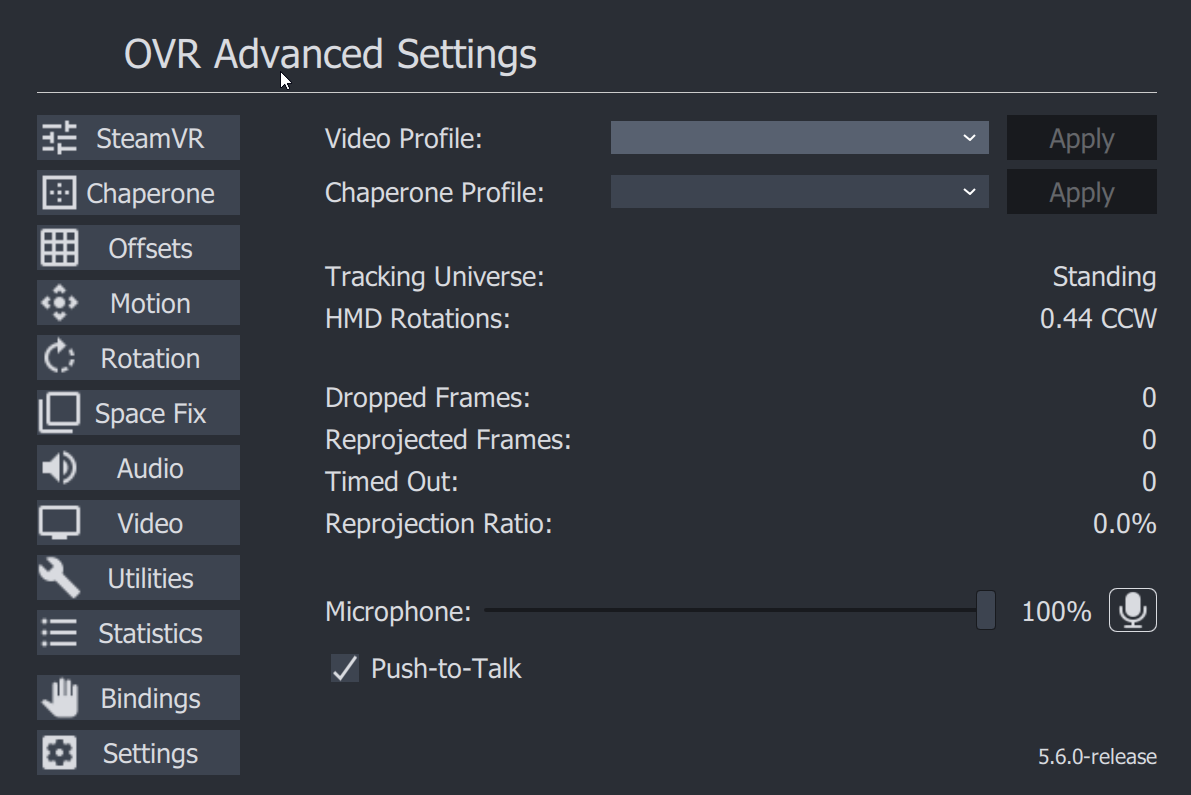
Face Lift
Honestly This has probably been too long since we updated, but updated color pallette to hopefully better blend in and not be as.... blue. Feel free to leave feedback on new looks positive/negative or changes.
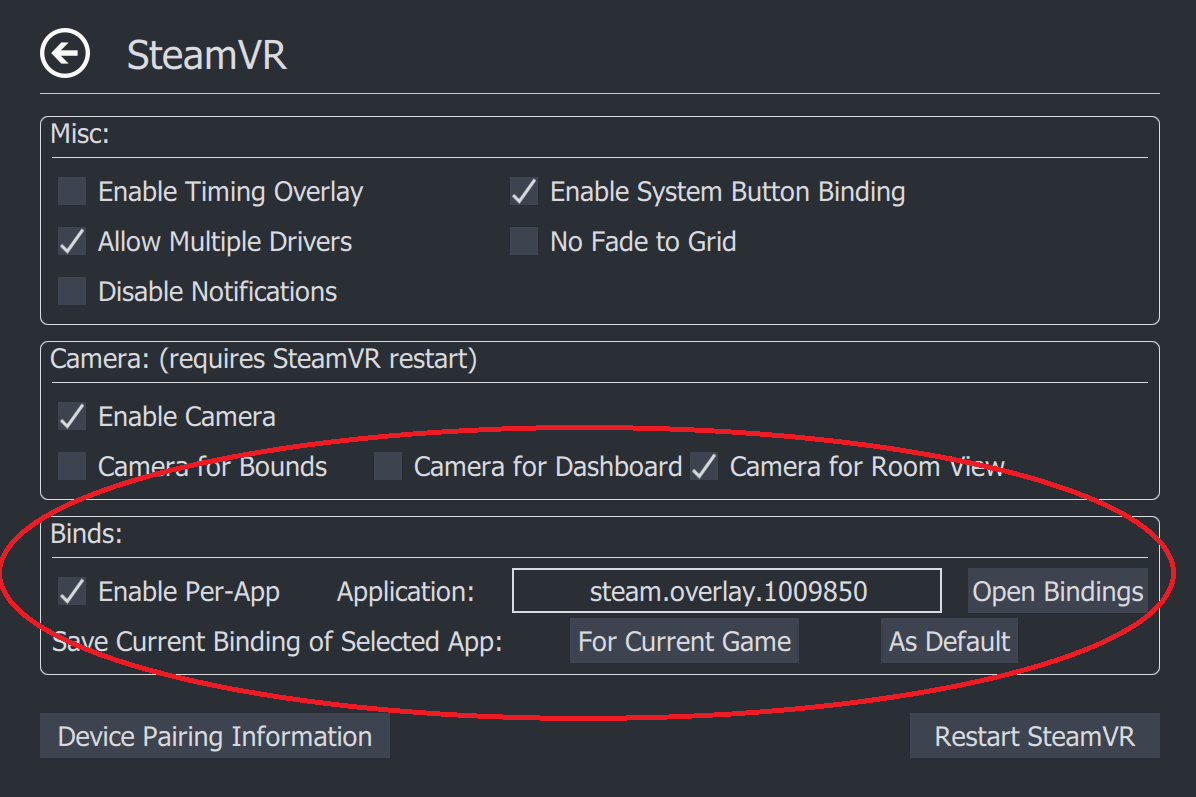
Per App Bindings
Now Have your Bindings Change Based On what game you are playing.
Usage:
Enable Per-App Bindings via Checkbox
Select Application you want to select Bindings for:
Some Common Overlays and their App ID's (not affiliated, just for reference)
Save Binding for Current Game, or as a Default (applies if no game found)
Your Bindings Will Automatically be saved beside existing settings
(%appdata%\AdvancedSettings-Team\ on Windows)
Possible Fix for Space Drag not working Issues
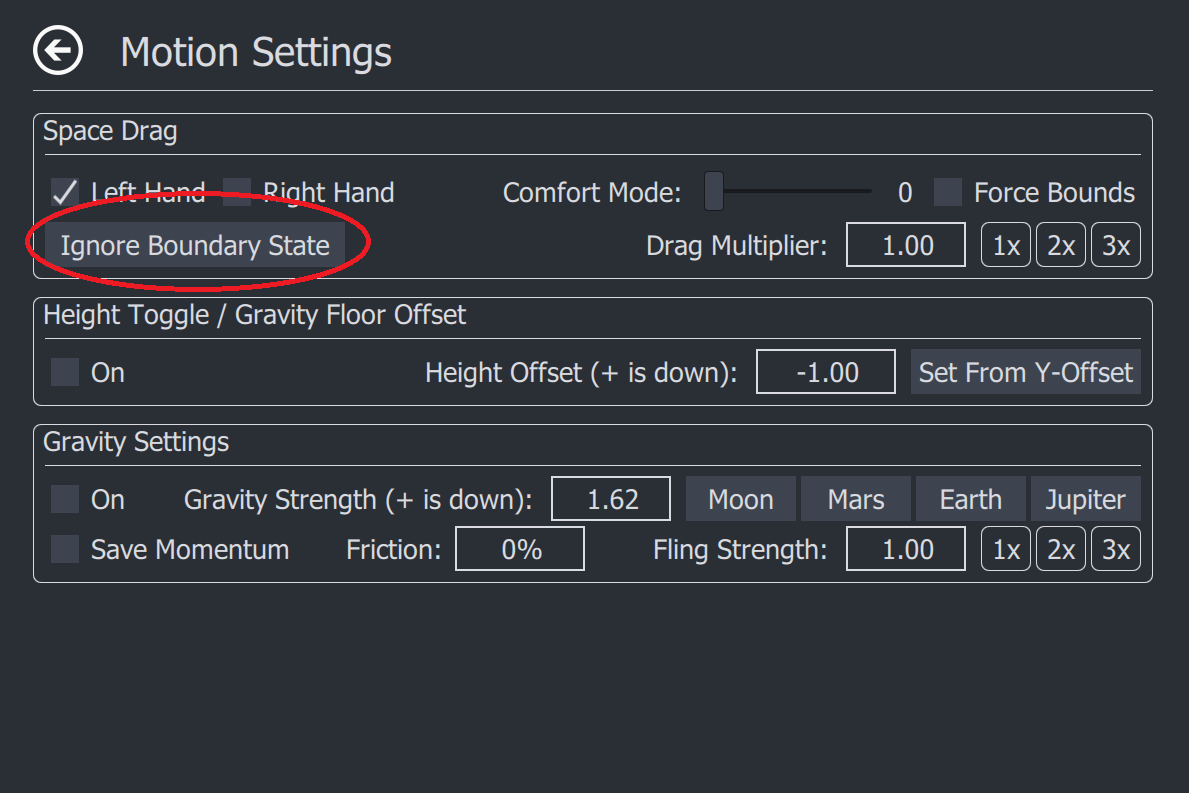
Simply Click the Button and see if you can space drag after that, If not please leave comment, and hopefully can find out the issue.
Patch Notes:
# 5.6.2
## Features
### Per App Bindings
- In the SteamVR tab You are now able to set bindings for overlay applications based on what game you are playing.
- These Binding Files are saved in the Same directory as your settings/logs
### A new Look
- a new Color Scheme to better match OpenVR/SteamVR's theme
### Ignore Boundary State
- This is another attempt at trying to get better support for space drag on third party headsets.
- Simply click this button per session, and it should help you
- If it works well, it will be better integrated if not it may eventually be removed
## Fixes
- Fixed a Collision in Settings, and rotation page for entries
5.6.0 Beta is here and we need you! (seriously please come test) This is a beta you need to opt in to beta branch Features Face Lift Honestly This has probably been too long since we updated, but updated color pallette to hopefully better blend in and not be as.... blue. Feel fre
5.6.0 Beta is here and we need you! (seriously please come test)
This is a beta you need to opt in to beta branch
Features
Face Lift
Honestly This has probably been too long since we updated, but updated color pallette to hopefully better blend in and not be as.... blue. Feel free to leave feedback on new looks positive/negative or changes.
Per App Bindings
Now Have your Bindings Change Based On what game you are playing.
Usage:
Enable Per-App Bindings via Checkbox
Select Application you want to select Bindings for:
Some Common Overlays and their App ID's (not affiliated, just for reference)
Save Binding for Current Game, or as a Default (applies if no game found)
Your Bindings Will Automatically be saved beside existing settings
(%appdata%\AdvancedSettings-Team\ on Windows)
Linux Users - please test this feature to make sure paths resolve properly.
Possible Fix for Space Drag not working Issues
Simply Click the Button and see if you can space drag after that, If not please leave comment, and hopefully can find out the issue.
New Features Device Pairing You Are Now Able To Pair SteamVR Devices With OVRAS. SteamVR Tab -> Device Pairing Information In General, with an empty dongle, make your device enter pairing mode (blue-flashing light), and hit pair in app. The Dongle Must not have another device
New Features
Device Pairing
You Are Now Able To Pair SteamVR Devices With OVRAS.
SteamVR Tab -> Device Pairing Information
In General, with an empty dongle, make your device enter pairing mode (blue-flashing light), and hit pair in app. The Dongle Must not have another device currently attached to it and powered.
Why? Unlike Steam's Native interface ours allows you to bind to specific dongles. Additionally for users that use additional devices besides the controllers it is a very common for your controllers to get bound to dongles that are not the Headsets, in this configuration you can have tracking issues, and strongly suggest you bind your controllers to the HMD.
Space Drag Multiplier
Multiplier in Space Drag to allow you to multiply your real world movement i.e. drag 1m translates to 2m in game with a 2x multiplier
Auto-Apply Chaperone
Option in Settings you can now have a chaperone profile auto-apply on launch (great for WMR native chaperone users) At this time you will still have to close out of room-setup so not quite 100% yet.
Settings Removal
The Following Settings Have Been Removed to better support Space Drag Features (i.e. these are all defaulted on now)
Enable Seated Motion
Enable Un-Cal Motion
OpenXR Fix
The Following Setting has been removed because a change to OpenVR/SteamVR Deprecated it
Adjust Chaperone
Fixes
Fixed battery indicator for Tundra Trackers
Fixed an Issue causing some long identifiers to make device pairing information text overlap
Added another digit of precision to fling multiplier to be more in line with the rest of the page
New Things Device Pairing Information In SteamVR tab There is now a "Device Information" tab this tab Displays the Amount of SteamVR dongles you have and in-use, as well as to what dongle the Controller/Tracker Is Bound to. We Currently Recognize 2 unique types of dongles headset
New Things
Device Pairing Information
In SteamVR tab There is now a "Device Information" tab
this tab Displays the Amount of SteamVR dongles you have and in-use, as well as to what dongle the Controller/Tracker Is Bound to.
We Currently Recognize 2 unique types of dongles headset and Tundra, all other dongles are seen as standard dongle These are tested to include HTC's and converted steam controller dongles.
If you have other Types of Dongles, and would like to run some tests to see if we can uniquely identify those as well please reach out.
Apply Offset Keybind
New Keybind to apply Offsets
OpenXR patch
Added option in Settings to Enable better Support for OpenXR
Note: This is a work-around forcing the tracking universe to be "standing" on our end, it will change in the Future
Uncalibrated Motion
Added option in Settings to Allow motion while in uncalibrated playspace
Note: This is for the hybrid tracking/non-steamVR Users that have issues using Space Drag, Enabling should allow these users to use it without issue.
Changes
Force changed Default state of Chaperone Auto-Recovery to Off, and Inverted display in Settings Menu.
Fixed Render bug with nothing showing up if clicking on icon, If you still have issues with this please reach out to us Increased Compatibility with Other Overlay Applications for Brightness/Color Overlays, (they should now Render on Top of all other overlays
Fixed Render bug with nothing showing up if clicking on icon, If you still have issues with this please reach out to us
Increased Compatibility with Other Overlay Applications for Brightness/Color Overlays, (they should now Render on Top of all other overlays

 Usage:
 Simply Click the Button and see if you can space drag after that, If not please leave comment, and hopefully can find out the issue.
Patch Notes:
# 5.6.2
## Features
### Per App Bindings
- In the SteamVR tab You are now able to set bindings for overlay applications based on what game you are playing.
- These Binding Files are saved in the Same directory as your settings/logs
### A new Look
- a new Color Scheme to better match OpenVR/SteamVR's theme
### Ignore Boundary State
- This is another attempt at trying to get better support for space drag on third party headsets.
- Simply click this button per session, and it should help you
- If it works well, it will be better integrated if not it may eventually be removed
## Fixes
- Fixed a Collision in Settings, and rotation page for entries
Simply Click the Button and see if you can space drag after that, If not please leave comment, and hopefully can find out the issue.
Patch Notes:
# 5.6.2
## Features
### Per App Bindings
- In the SteamVR tab You are now able to set bindings for overlay applications based on what game you are playing.
- These Binding Files are saved in the Same directory as your settings/logs
### A new Look
- a new Color Scheme to better match OpenVR/SteamVR's theme
### Ignore Boundary State
- This is another attempt at trying to get better support for space drag on third party headsets.
- Simply click this button per session, and it should help you
- If it works well, it will be better integrated if not it may eventually be removed
## Fixes
- Fixed a Collision in Settings, and rotation page for entries